Atlas presents itself as the tool to "build, test and grow Shopify stores with AI". You paste a product link, and a store comes out. That link can come from AliExpress, Amazon, Alibaba or Shopify. We tested it with a real product, from generation to editing, all the way to the price.
How Atlas works
Atlas installs in your Shopify store and creates the pages there. The flow has three steps. The AI starts from a template you pick, not from a blank page.
- The product. You paste an AliExpress, Amazon, Alibaba or Shopify link. Atlas imports the photos, title, variants and price.
- The template. You pick a "predefined store template" out of 13. Atlas describes it as "a home page and product page template designed by experts".
- The customer research. It's optional. You upload a file about your customers, or you skip the step.
- The generation. It takes about 50 seconds. Out come a product page and a home page. The product is also created in your Shopify admin with its description.
No step is about your brand, your name, your audience or your language. On the App Store, Atlas says "AI creates your design, product content, and pro photos automatically". At generation, though, the design is the template's. And the photos are the seller's. The app has 381 reviews at 4.5 out of 5 as of October 29, 2026. It has existed since April 2024.
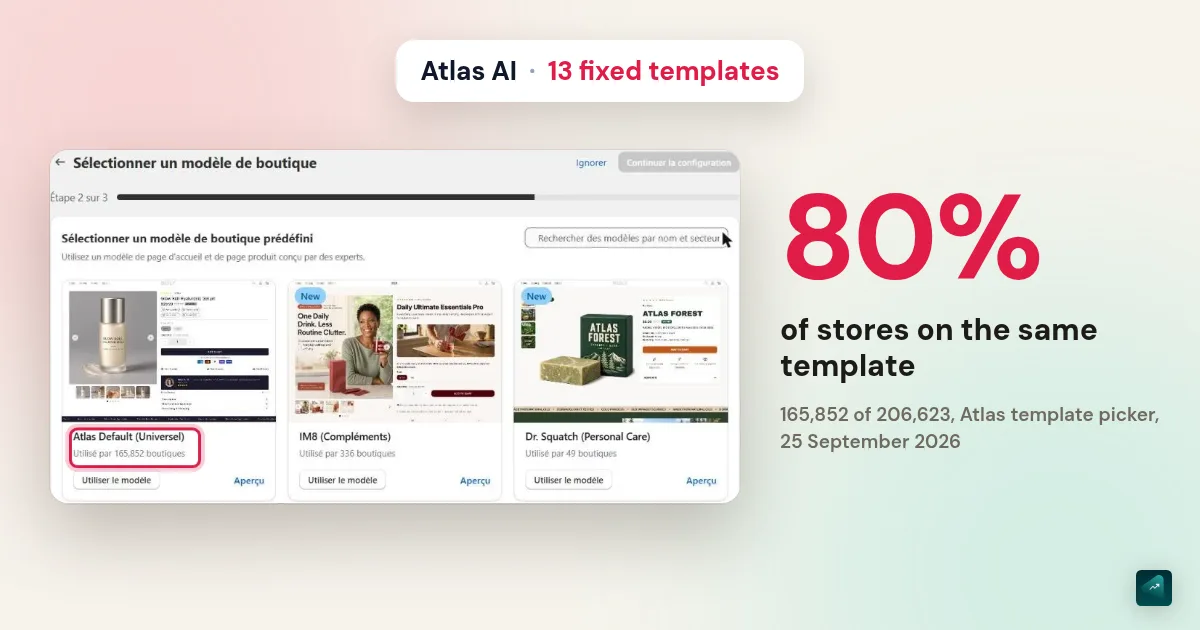
Fixed templates: 80% of stores on the same one
Atlas says itself that you start from a "predefined" template. Generation fills in its copy, images and colors, but it does not create a layout. And the default template is used by 165,852 stores. The 13 templates count 206,623 in total, which puts 80% on a single one.
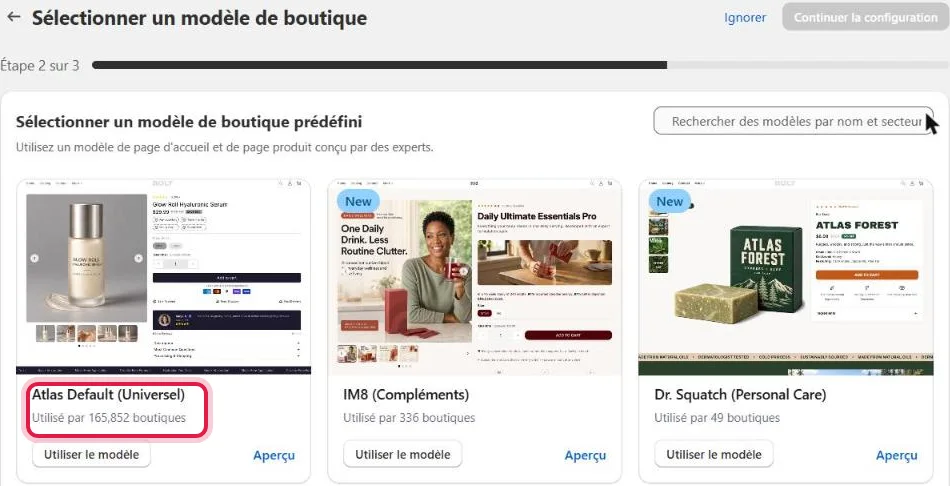
- One template for almost everyone. Atlas Default (Universal) is used by 165,852 stores. Next come Lumin (beauty) with 16,499, Adam Griffin (pets) with 6,854 and LucidLab (supplements) with 5,577. The other 9 have fewer than 4,000 stores each.
- Templates named after existing brands. You'll find Skims, Dr. Squatch, Our Place, Solawave, IM8 or Gruns. Others are named after a person.
- The copy comes with the template. The template preview shows "Join over 10,000+ Happy Customers". The same sentence appears word for word on the generated store.
- What Atlas says. Its FAQ states that every generated store is "completely unique". Its pricing page presents the templates with "Same theme. Different brands."
On the same template, stores share the same structure. That is the very idea of a predefined template. Your product changes, but the page stays the one of more than 165,000 other stores.
The result on our test product
We used the same AliExpress mini blender as for DropMagic, rated 4.0 from 4 reviews. Atlas asks for three things: the product link, one template out of 13 and an optional customer research file. It asks no question about your brand, your name, your audience or your language. The store comes out in about 50 seconds.
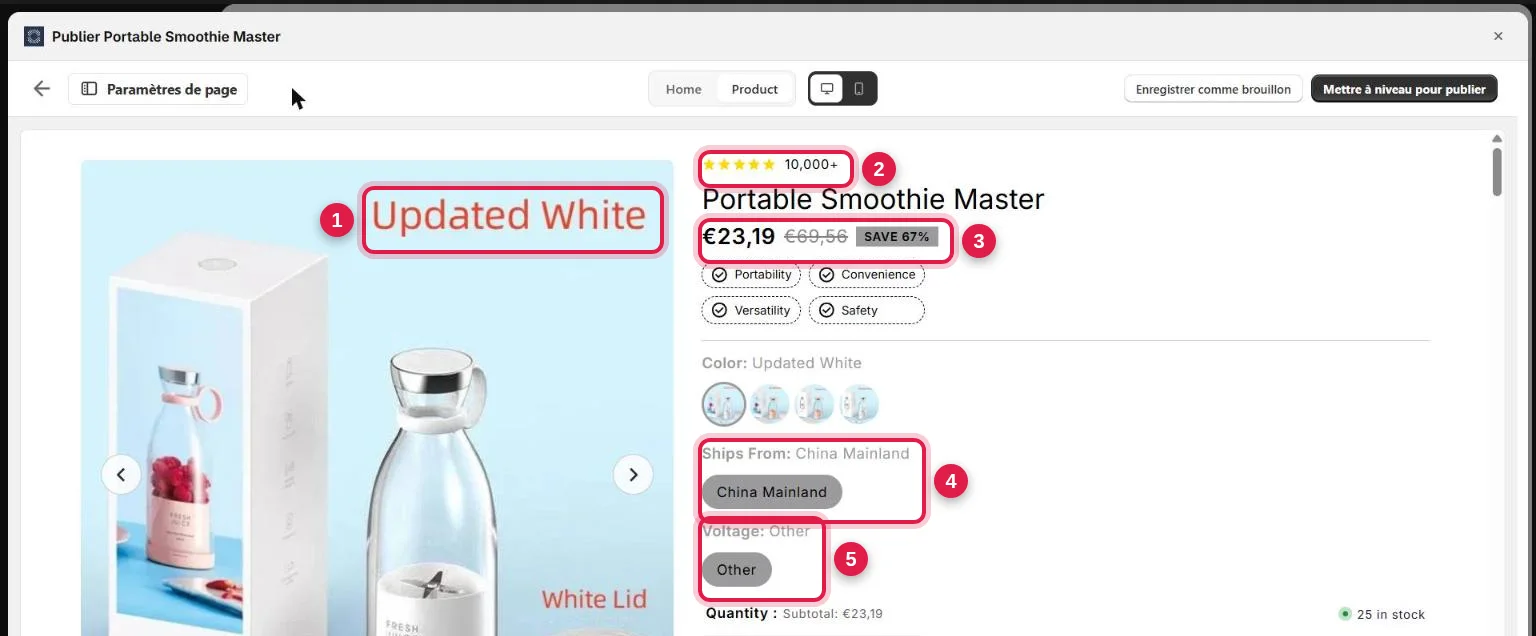
- The seller's photos, as is. Atlas created no image. The store's 8 photos are the ones from the AliExpress listing, 640 to 1,000 pixels. The seller's text stays baked in, like "Updated White", "White Lid" and even "Easy Charing" with its typo.
- A rating with no customers behind it. The page shows "10,000+" under the title and "Sarah and 438 people purchased". Yet the store was created a minute earlier.
- The cost price as the selling price. The 23.19 price is the one picked up on AliExpress at import ($23.19). Atlas copied it as is in euros, with no margin and without the supplier's shipping. The €69.56 strikethrough price and the "SAVE 67%" were never charged.
- Supplier options shown to the customer. The "Ships From: China Mainland" option appears as a button to click. So your customer sees where the parcel leaves from.
- An option that says nothing. The "Voltage: Other" option offers a single choice.
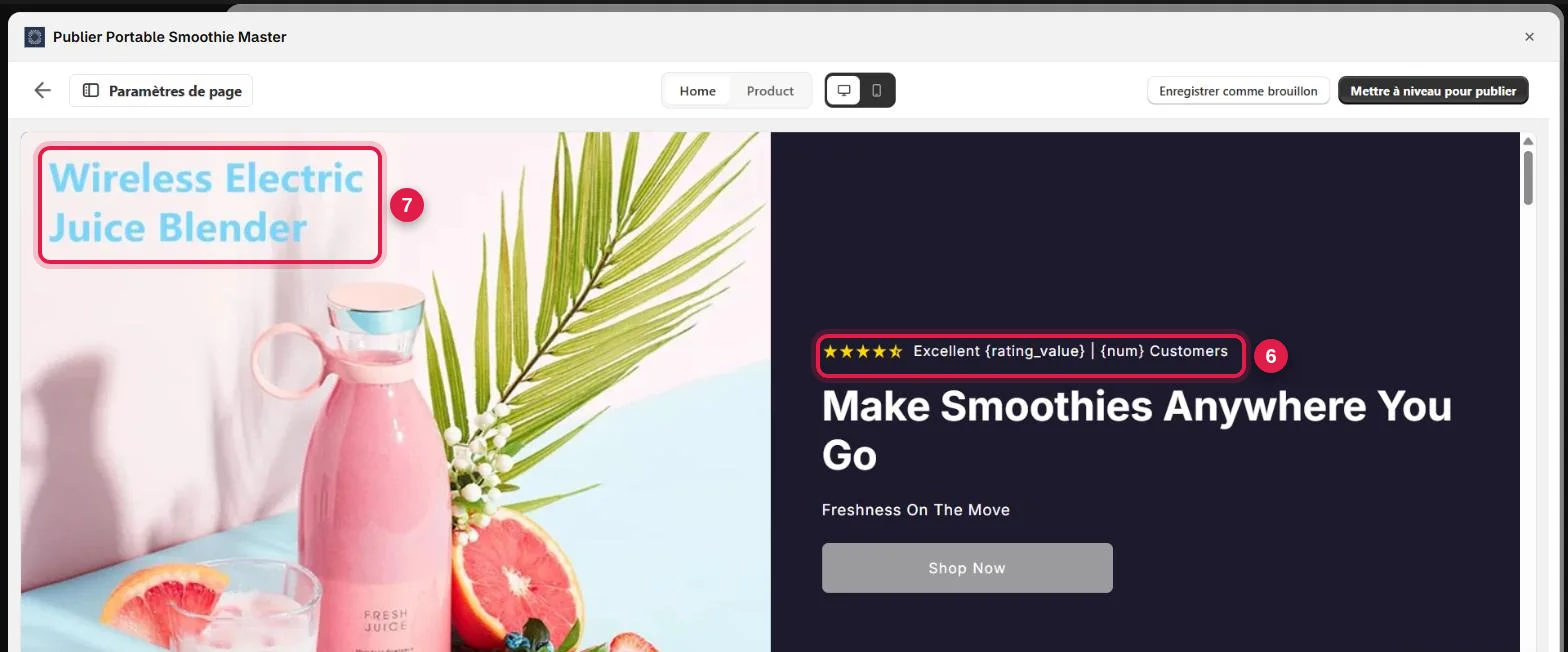
- Variables never filled in. At the top of the home page, you read "Excellent {rating_value} | {num} Customers". The template's placeholders stay empty on desktop and on mobile. They show up empty again under "Join over 10,000+ Happy Customers".
- The seller's photo as the main image, with its "Wireless Electric Juice Blender" text.
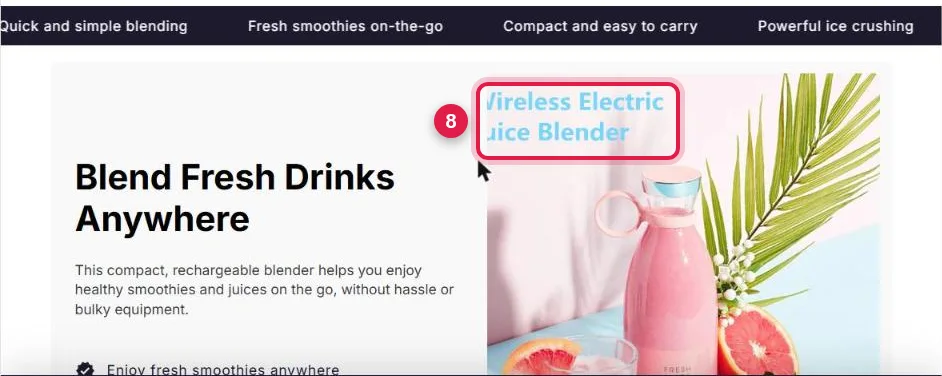
- The same photo, cropped again. Cropped for the section, it cuts the seller's text into "ireless Electric" and "uice Blender". The crop changes with the screen width.
Further down both pages:
- 4 reviews signed "Sarah K., Los Angeles", under a "4 New Reviews" counter. Their text itself says "This is a sample review, please input your genuine customer reviews here";
- a testimonial carousel left with the template text, with "Review header of 2-4 words" and "A text review talking about the experience with the product". On the home page, you read "Customer's Review Title" and "Insert review text here";
- "As seen on" followed by "ATLAS ATLAS ATLAS" logos. No media outlet appears, just the tool's name;
- an "Our vs Others" table where your brand is called "new-theme-v1". That is the store's technical Shopify address;
- "92% Saw Noticeable Results", for a product the store has never sold;
- worldwide shipping, 24/7 support and easy returns promised by default. Yet Atlas asked nothing about shipping or returns;
- the same photos from one section to the next, down to the "Easy Charing" photo next to the contact form.
Editing the store: by hand, with no AI
Atlas says on its website that you can then "fully customize every aspect" with its editor. That's true, and it's exactly the point, because editing is done by hand. The editor has no button to ask the AI for a change.
- Right after generation, the editor only changes the theme colors.
- In the full editor, each section is a list of fields. You get text (bold, italic, lists), images and buttons. Empty variables, sample reviews, seller photos and the price all get fixed field by field.
- One AI feature after generation: "Page variant". Atlas describes it as a text variant "with a new angle" for an existing page. It works by "keeping its layout and its offer". It requires the subscription.
- Store settings are left to you. Shipping, markets and policies are set in the Shopify admin. Yet the page already promises worldwide shipping and easy returns.
An App Store review from August 11, 2026 sums it up: "it doesn't customize as it says it does". So what you pay for each month is a filled-in template that you finish yourself.
The price: $39 a month, then tiers
Atlas has one plan at $39 a month, with every feature. It covers 10 published pages, $1,000 of revenue added by bundle offers and 250 orders through the cart drawer. Beyond that, each category moves to a tier billed on top. The bill can climb to $454 a month in total. (Atlas help center, checked on September 25, 2026. The pricing page on the website shows 5 included pages and 5 AI photos.)
| Category | Included in the $39 | Tiers beyond |
|---|---|---|
| Published pages | 10 | +$10 (15 pages) to +$70 a month (unlimited) |
| Revenue added by bundle offers | $1,000 | +$10 ($2,500) to +$195 a month (above $50,000) |
| Cart drawer orders | 250 | +$10 (500) to +$150 a month (above 5,000) |
Take a store running with 20 published pages and 1,000 cart orders in the month. Its bundles add $10,000 of revenue. Its bill then goes from $39 to $114. The free trial lasts 7 days. The app is also free on Shopify development stores.
- If you cancel, nothing is deleted. Your published Atlas pages, however, are covered by a subscription notice that your customers see instead of the product. Bundle offers and the Atlas cart drawer disappear from the store.
- Billing goes through Shopify. Atlas reviews refund requests case by case. On the App Store, two reviews from June and July 2026 describe charges that continued after uninstalling.
What Atlas does well
- Speed. It takes three steps and about 50 seconds of generation.
- Offers in the same app. You get bundle offers, quantity breaks and cart upsells without installing another app.
- Ad pages. Atlas builds landing pages, advertorials and listicles. So you can test several sales angles on one product.
- One plan. Every feature is included from $39 a month, with no higher plan to unlock.
Atlas or Scale Ova, situation by situation
Scale Ova also starts from a product link, but it can start from an idea or from your existing Shopify store too. Here is what each tool does for you depending on your situation. The data was checked on September 25, 2026.
| Your situation | With Atlas | With Scale Ova |
|---|---|---|
| You are new to Shopify | You finish the store by hand, and set shipping, markets and policies yourself in the Shopify admin | You ask the AI: it also sets products, menus, shipping, markets, languages and policies in your store |
| You want a store that looks like your brand | A predefined template: the default one is used by 165,852 stores | The theme, pages and copy are generated for your project |
| Your store is not in English | Atlas does not ask for the language | The store is generated in the language of your market |
| You want to change something afterwards | A field editor, with no AI | You ask in a conversation, or click the element to change |
| You want bundle offers and a cart upsell | Included | Included too: packs, quantity breaks, cart upsell |
| You want a store fast | 50 seconds, after 3 clicks | A few minutes, after a conversation about your brand and your audience |
Atlas generates faster, with a lead of a few minutes. It is the only row where it comes out ahead.
Scale Ova starts with the strategy. It looks at your market, your promise, your offers and what makes your buyers hesitate. It then generates the whole Shopify store from that, with the theme, the pages and the product pages. It also generates the collections, the copy and the images. The AI stays connected to the store itself, not only to the pages. It handles products, collections and menus. It also works on discounts and page templates. And it sets shipping, markets, languages and translations. For a beginner, that is what saves looking for each setting in the Shopify admin. See generated stores, no sign-up.
Other Atlas alternatives
- DropMagic starts from a product link, or suggests a product. It delivers a product page and a home page on request. Each one is editable section by section with an AI rewrite. Where it falls short: publishing requires Pro at $79 a month. And in our test, the generated reviews were labeled as verified purchases. Our DropMagic review.
- Copyfy is first a product and ad research tool, with an AI store on top. Where it falls short: it has no free plan. You get a 5-day trial, then €49 to €129 a month. Our Copyfy review.
- BuildYourStore and Storebuild.ai start from one niche out of five and provide 10 products, a theme and pages. Where it falls short: you choose neither your products nor your design. Their terms also rule out any refund. Our reviews of BuildYourStore and Storebuild.ai.
- Shopify AI Store Builder generates store designs for free from a few words. Where it falls short: these are designs, not a store with products, copy and a strategy.
Going further
Want to see what it gives with your product? Paste your link or describe your product to Scale Ova and look at the generated store. The overview of AI store builders compares the tools of the same kind. And to work on the product page itself, read the Shopify product page that converts.
FAQ
What do reviews say about Atlas AI?
How much does Atlas AI cost?
Is Atlas free?
Can you get a refund from Atlas?
Does Atlas build a unique store?
Does Atlas create the product photos?
Can you edit the store with AI after generation?
Does Atlas work without Shopify?
What is an alternative to Atlas?
Atlas or Scale Ova?
Sources
- Real test on September 25, 2026: Atlas app installed on a Shopify store, AliExpress product 1005004260636292, dated captures
- Atlas (helloatlas.io), pricing page and FAQ, base plan, templates, "every single Atlas store [...] is completely unique", checked September 25, 2026
- Atlas help center: understanding your subscription, checked September 25, 2026
- Atlas help center: usage rates and tiers, checked September 25, 2026
- Atlas help center: what happens after you cancel, checked September 25, 2026
- Atlas help center: refunds, disputes and unexpected charges, checked September 25, 2026
- Atlas on the Shopify App Store, rating and pricing checked October 29, 2026, quoted reviews checked September 25, 2026