You saw Copyfy with an e-commerce creator or in an ad. Before paying, you want to know what its AI store is worth. So we created a fresh trial account and pasted a product link, then followed the flow to the end. After that, we went to look at live stores made with the same theme. Here's what we saw, from the flow to the price.
How Copyfy works, step by step
The flow starts from a product link. It begins with no account and no card. No step asks for your brand name or your selling price.
- The product. You paste the URL of a product page, which can come from Shopify, AliExpress, Alibaba or Amazon. You can also pick one of the suggested "winning products". We pasted the AliExpress link of a 350 ml portable mini blender.
- The language. Six choices: English, French, Spanish, German, Italian, Portuguese. We ran the test in French, so the screenshots below are in French.
- "Who are you selling to?" Copyfy suggests four personas written for the product: a commuter making lunch-break smoothies, a gift for a sporty traveler, a premium on-the-go buyer, someone let down by other mini blenders. A fifth box labeled "Let the AI decide" is ticked by default.
- "How do you want to sell it?" Copyfy then suggests four angles, all about making a smoothie anywhere without a kitchen. The "Let the AI decide" box is there again.
- "Your free AI images". Five generated images are already ticked, next to the seller's photos.
- Generation. While it runs, the screen asks you to create your account.
- The editor. Three steps: generate images, customize the store, publish.
- "Connect your Shopify". That is the button on the last step. The store then goes to your Shopify account.
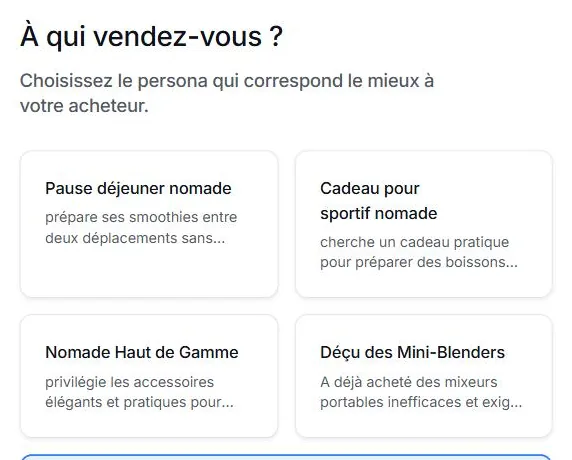
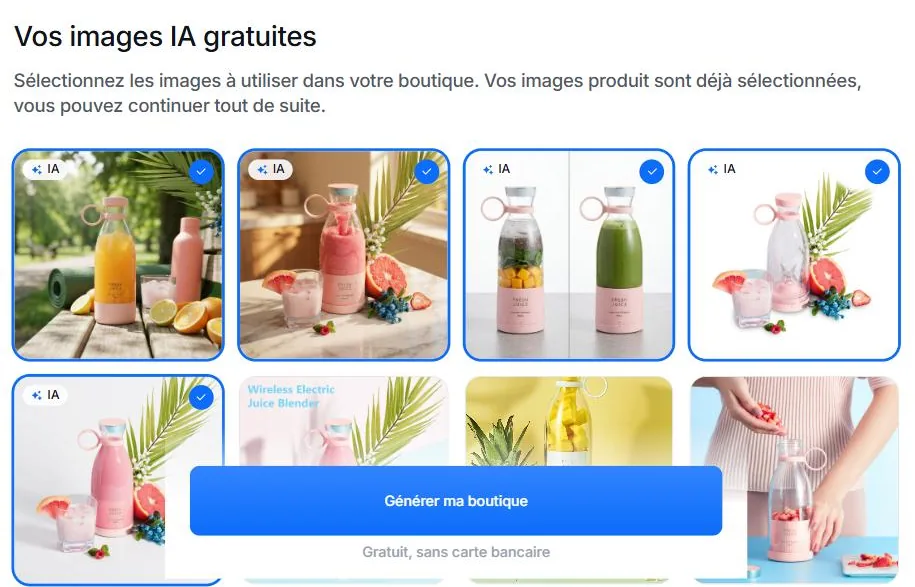
That's what sets it apart from the free niche stores, since here the tool starts from your product. The personas, the angles and the images really are about a portable blender. The rest of this review shows that all of it lands in one single template.
The generated store: what the preview shows
The store comes out in a few minutes under the name "YOUR BRAND". It is a sales page for a single product, in thirteen blocks. The copy is written for that product, but the social proof is added by default.
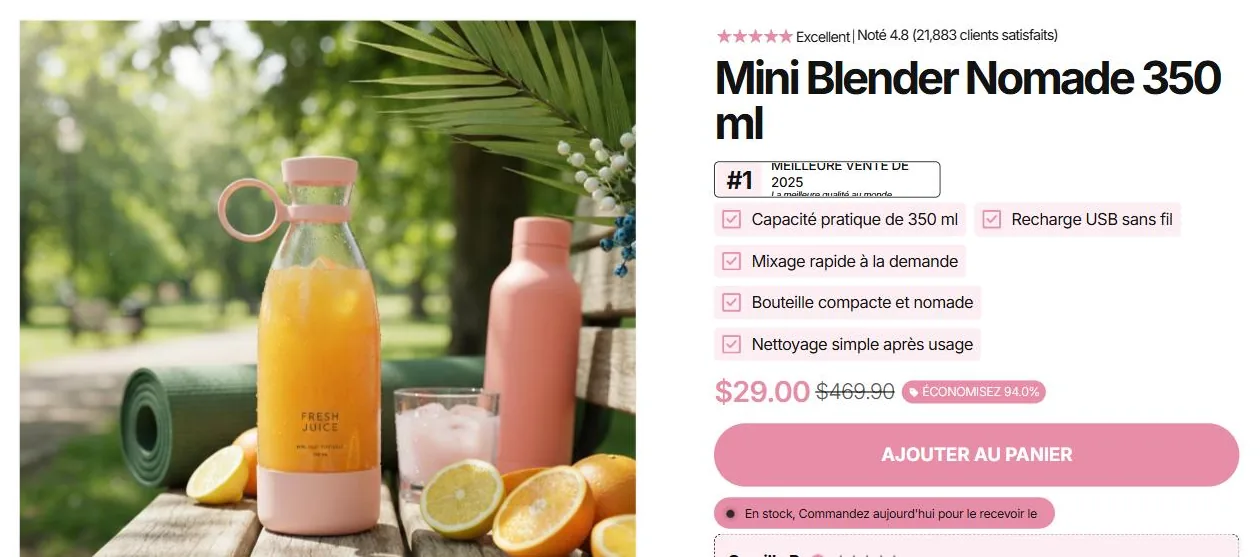
- What is done well. The headline about rethinking your break holds up. The five selling points are accurate, like the 350 ml, USB charging and easy cleaning. The page also has a five-step how-to and a five-question FAQ about the product. It's all in correct French.
- "Rated 4.8 (21,883 satisfied customers)". The line shows three times on the page. Yet the product was just imported and the store has no customers.
- "#1 best seller of 2025, the best quality in the world". This badge sits under the product title.
- Four signed reviews. They carry the names Camille R., Sophie M., Nicolas D. and Élodie P. The text is written by the AI during generation.
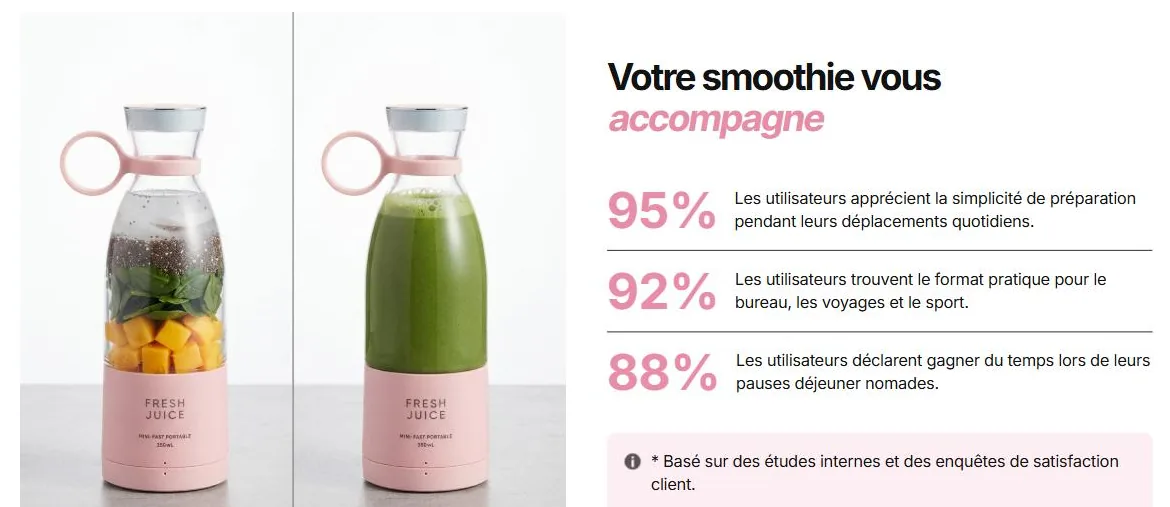
- "95%, 92%, 88%". These three satisfaction figures carry the note "Based on internal studies and customer satisfaction surveys".
- The price: $189.90, crossed out $469.90. The price is in dollars, while the top bar announces free shipping from €50. The flow never asked for your selling price.
- Template leftovers. A review in English signed "Melissa Nohr" scrolls among the blender's reviews. It talks about a breathable material for long walks. The footer shows "Contact: 0123 456 789" and "info@gmail.com".
- Promises you did not make. The page announces a 30-night money-back guarantee, free shipping and easy returns.
- Five images for thirteen blocks. The page loads 26 images. They are the five AI images from the previous step coming back again, plus one seller photo. The same shot of the blender in a park opens the product block and shows up again as a banner further down. No image is created for a specific block.
- A "Video grid" with no video. The block is titled "See it in action". It actually shows four of those five images, as stills.
Pricing: a 5-day trial, then €49 to €129 a month
The trial lasts 5 days, with no card. After 5 days, access is automatically disabled unless you move to a paid plan. (Copyfy pricing page, checked October 2, 2026.)
| Plan | Listed price | AI credits | Research | Store analyses | Product exports |
|---|---|---|---|---|---|
| Starter | €49 a month | 50 a month | 30 a month | 2 | 20 |
| Growth | €89 a month, billed quarterly | 80 a month | 80 a month | 25 | 50 |
| Pro | €129 a month | 150 a month | Unlimited | 100 | Unlimited |
- Credits. Our trial account showed "10 credits left". The screen states that creating an AI store uses 5 AI credits. On Starter, that is at most 10 stores a month if you generate nothing else.
- Discounts. 15% off quarterly, 40% off yearly.
- The license. The theme installed on your store depends on a Copyfy license. We saw on live stores what happens when it is not active. That's in the next section.
- Shopify on top. The store lives on Shopify, with its own plan.
Over a year on monthly Starter, that comes to €588 before Shopify. That price covers the whole research suite, and not just the store.
What this theme looks like live: 27 stores
We searched Google for the template sentence "Based on internal studies and customer satisfaction surveys" in French and in English. Then we opened 39 addresses on October 2, 2026, like any visitor. 27 run on the Copyfy theme.
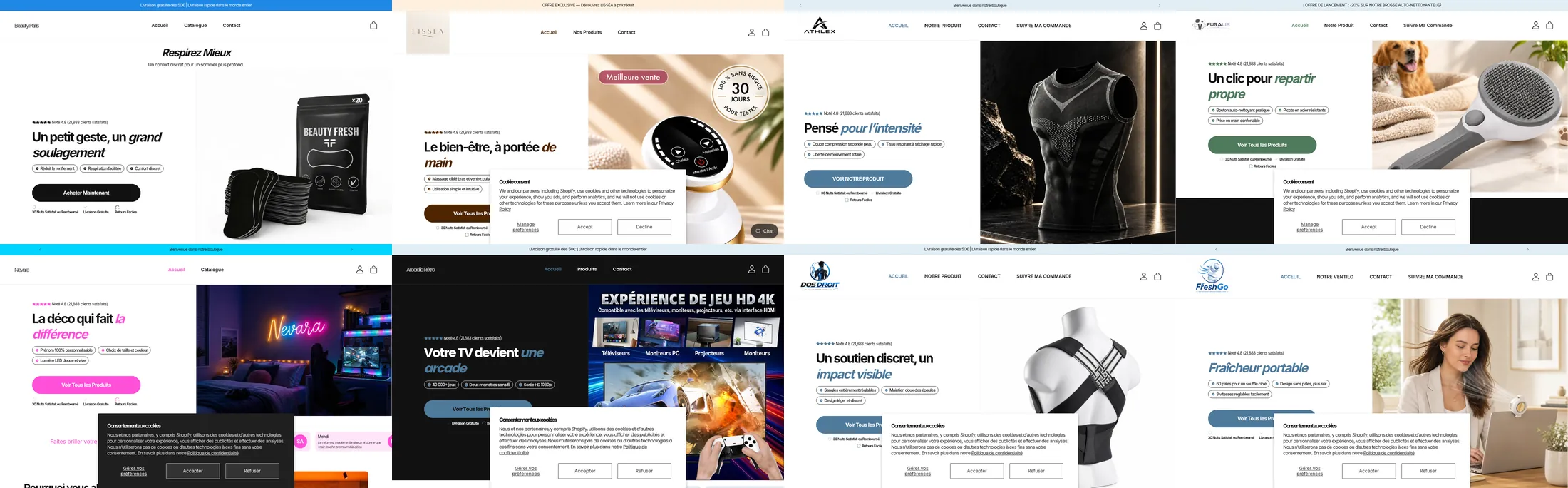
- A signed theme. On 21 stores, the theme is still named "Copyfy", followed by the store name and a date.
- "21,883 satisfied customers", word for word. 12 stores out of 27 show it. You find it on a posture brace, a dog brush, a game console, leggings and a coffee table. The number never changes.
- "Rated 4.5 (0 satisfied customers)". 3 stores show that line as is.
- 95%, 92%, 88%. 20 stores show these three satisfaction figures. We found them through the neighboring sentence, so our method inflates this count. The "21,883 customers" were not part of the search.
- "#1 best seller of 2025". 11 stores carry that badge, with "the best quality in the world".
- The same blocks, in the same order. We recorded the block order on 15 of those stores. 9 have the exact same sequence of twelve blocks: hero, scrolling reviews, steps, product, benefits, video grid, image with FAQ, comparison, statistics, marquee, banner, FAQ. The other 6 differ by one or two blocks.
- The video grid, still with no video. 13 of those 15 stores have the block. We found no video in any of them.
- The name never set. 3 stores are called "Ma boutique" (My store). On 8, the theme is still named "Ma boutique", "My Store" or "YOUR BRAND".
- Two stores replaced by a Copyfy screen. A visitor who lands on their own domain no longer sees the store. They see this:
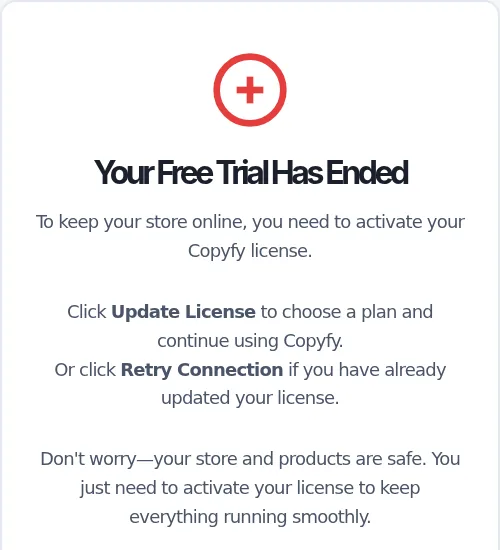
Copyfy confirms it on Trustpilot. In a reply dated June 18, 2026, it explains the error message seen on a merchant's website. According to Copyfy, that merchant had not activated their license. So your store stays online as long as the Copyfy subscription runs.
Where is the AI? It fills in the boxes. The copy and the five images really are about the product. Everything else comes from the template, with the same blocks in the same order. The rating, the percentages and the badge are the same too, for a posture brace and for a coffee table. The AI doesn't decide the structure of the page. It doesn't set the price or choose what proves the product sells.
Store quality: a filled-in template, and numbers nobody measured
A store sells when its reviews are real, its price leaves a margin and its page speaks to someone. Copyfy handles the third point. The first two are still to do.
- The rating and reviews need replacing. A buyer quickly notices "21,883 satisfied customers" on a store opened yesterday. Yet 12 merchants out of 27 did not remove it.
- The price needs setting. The mini blender comes out at $189.90 crossed out $469.90, and nobody worked out that price. On the stores we checked, we found an item at €189.90 and a coffee table at €749.99.
- The promises need checking. The page promises a 30-night refund, free shipping and easy returns on your behalf.
- The images loop. Five visuals serve the whole page. So a visitor sees the same photo three or four times while scrolling.
- One page, one product. The home page is a sales page. There's no brand story, no collection and no written About page. Yet the menu shows Shop, About and Contact. In the footer, you find a sample phone number.
- What is there. The page has a complete product block and a comparison of "Our blender" against "Other solutions". It also has an FAQ and clean images. The mobile version is carefully done.
It is a decent page for testing a product with ads for a few days. But it is not a store. It is the sales page 27 other merchants already have, with your product in it. To sell a single product for the long run, see what a real one-product store contains.
Editing the store afterward: fields, and a chat that does half the job
Copyfy's editor has four tabs: Home page, Product page, Styles, Chat. You mostly edit fields, section by section.
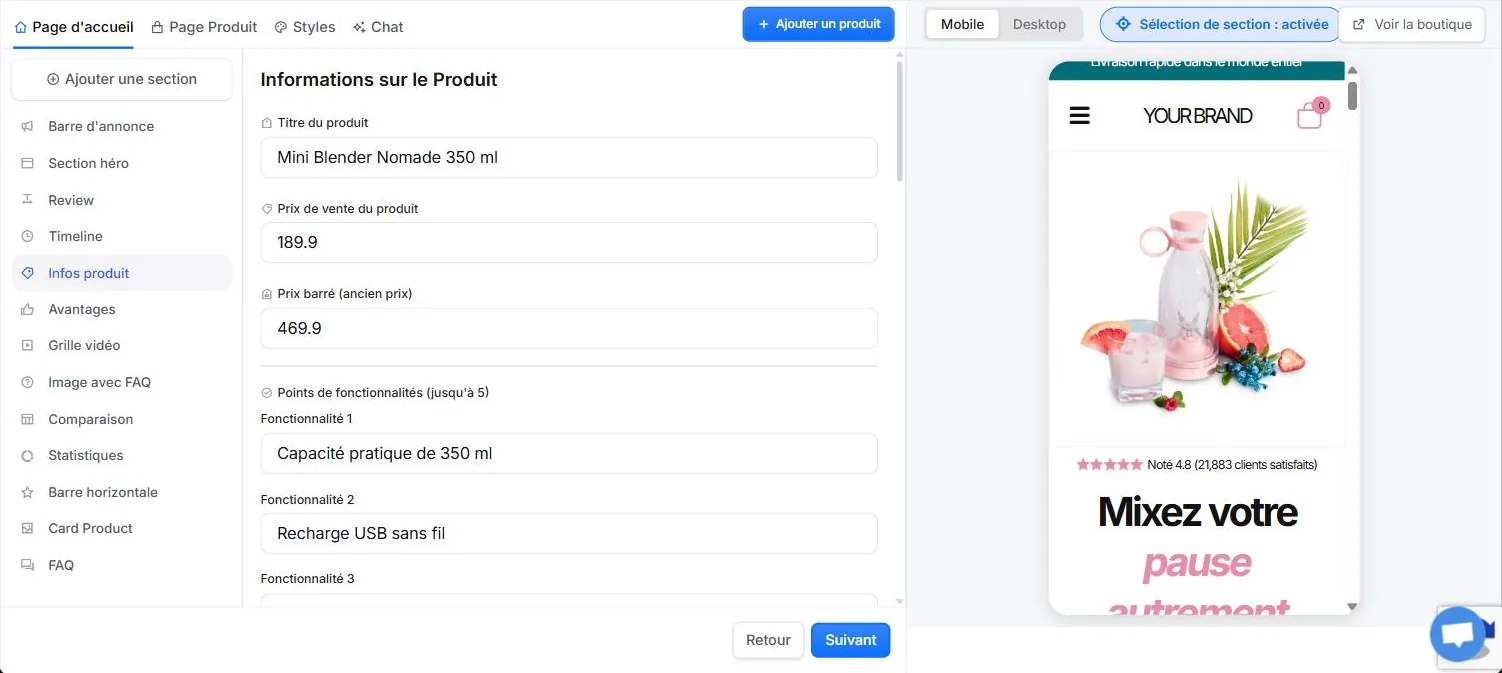
- Sections. The home page has thirteen sections. Each has its fields: title, price, compare-at price, five selling points, rating, number of reviews, guarantees. You can add more from a list.
- Styles. You pick a font and a palette, either suggested by the AI or ready-made. There's also an option to import the colors of a competitor's site.
- Images. An "Edit with AI" button on each image.
- Chat. It introduces itself as Copyfy AI, your Store AI copilot.
We tested the chat with a simple request, in French. We asked it to remove the English review signed Melissa Nohr from the testimonials and to set the product price to €29.90 instead of $189.90.
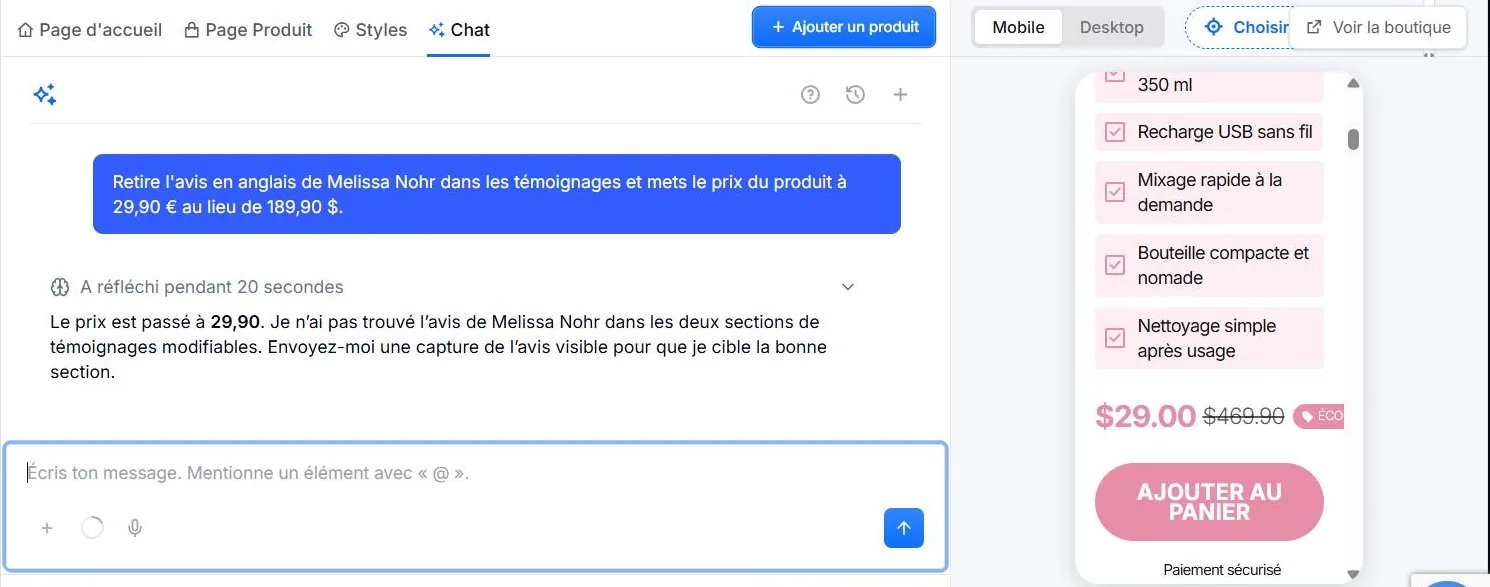
- The price. The chat replies that the price is now 29.90. But the store shows $29.00, still in dollars. The crossed-out price stayed at $469.90 and the badge now reads "Save 94.0%".
- The English review. The chat says it could not find the review in the two editable testimonial sections. It asks for a screenshot to target the right section. The review is still on the page.
- The time. The chat thought for twenty seconds, with no credit deducted.
The chat exists and it does act on the store. But it works on the template's fields and doesn't see what sits outside them. It even reports a result it did not get.
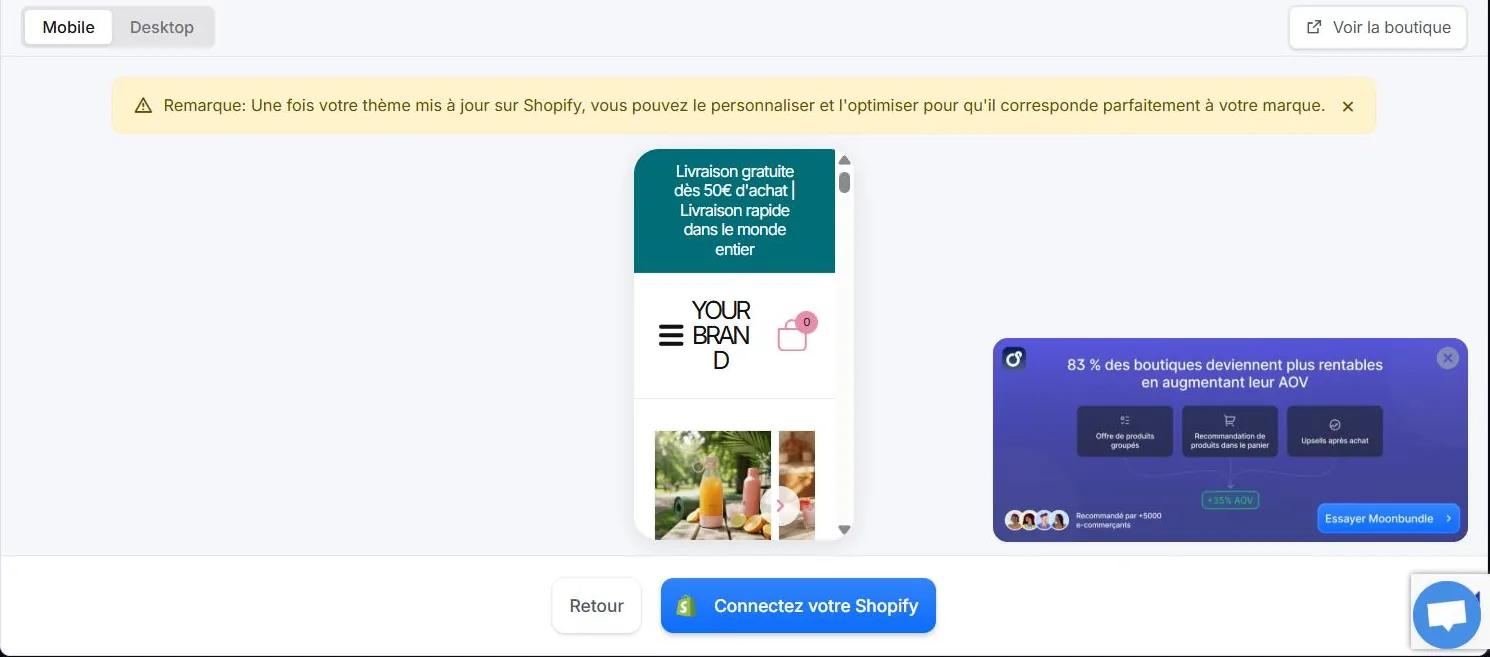
On that screen, Copyfy notes that the store is then customized in Shopify. So products, shipping, payments, policies and languages are set in the admin, by hand.
What the reviews say
Trustpilot shows 144 reviews and a 3.9 out of 5 rating as of October 29, 2026. The profile has been claimed since November 2022.
- Positive reviews are about research. They praise the competitor analysis, the tutorial videos and the live coaching, along with support that answers fast. The AI store is rarely mentioned.
- Copyfy replies to negative reviews. In its June 18, 2026 reply, it describes itself as "strictly a software tool that allows merchants to build the visual design of their stores". It notes that it does not handle orders, payments or shipping.
- The numbers on its own site. The home page shows "4.8/5" and "trusted by 200,000+ e-merchants". The pricing page says "29,870+ have already joined". Those figures come from Copyfy.
What Copyfy does well
- Research in the same place as creation. You find winning products, top stores and an ad library. Then you build the store and the visuals in the same place. That is its real job, and Scale Ova does not do product research.
- It reads the product. Personas, selling angles and copy are written for what you sell.
- Images. It produces five clean visuals right at generation, even if they then serve the whole page.
- Speed. You go from a link to a sales page in a few minutes, with no card.
- French. The flow, the editor, the coaching and the support are in French. The store can also be generated in five other languages.
Copyfy or Scale Ova, situation by situation
Here is what each tool does for you depending on your situation, checked October 2, 2026.
| Your situation | With Copyfy | With Scale Ova |
|---|---|---|
| You are still looking for your product | Winning products, top stores, an ad library | Scale Ova does not do product research |
| You have a product link | A sales page for that product, on the Copyfy theme | A complete store generated from that link |
| You have an idea, no product yet | You need a link or a suggested product | You describe your project in one sentence |
| You want a store that looks like you | One theme, the same blocks in the same order, five repeated images | The theme, pages and copy are generated for your project |
| You want real reviews and real numbers | Rating, reviews, percentages and badge added by default, for you to remove | Nothing is shown as a customer review until you have some |
| You want to change something later | Fields per section, a chat limited to the template's fields | You ask in chat, or click the element you want to change |
| You are new to Shopify | You set up the admin yourself | You ask the AI: products, menus, shipping, markets, languages, policies |
| You already have a store | Copyfy generates a new one | Ova Recraft starts from your store and reworks it |
| You stop the subscription | Two stores we checked show a license screen instead of the site | The published store stays on your Shopify |
Copyfy comes out ahead on the first row, and that row matters. If you do not have your product yet, that is where to start.
Scale Ova starts with your project and sets your market, your promise and your offers first. It then generates the whole Shopify store from that: theme, pages, product pages, collections, copy and images. The AI stays connected to the store after generation. You can ask it to handle products, collections, menus, discounts, shipping, markets and languages. Generating and editing are free, and publishing to Shopify requires a subscription. See generated stores, no signup.
The two also combine: find the product with Copyfy, build the store with Scale Ova.
Other Copyfy alternatives
- DropMagic also starts from a product link and delivers a product page and a home page. Publishing requires Pro at $79 a month. Our DropMagic review.
- Atlas AI starts from a product link and fills one of 13 templates. Editing is then done by hand, with no AI. Our Atlas AI review.
- BuildYourStore.ai gives away a store per niche, with no product link. Before you get it, you need a Shopify plan and a supplier's app. Our BuildYourStore test.
- Storebuild.ai works on the same principle, with Zendrop. Our Storebuild test.
Going further
Already have your product? Paste your link or describe your project to Scale Ova and look at the result. The overview of AI store builders compares tools of the same kind.
FAQ
How does Copyfy's AI store work?
Is Copyfy legit?
Is Copyfy free?
How much does Copyfy cost?
How many AI stores can you create with Copyfy?
Which languages does Copyfy generate the store in?
Are the reviews on a Copyfy store real?
Can you edit a Copyfy store with AI?
What happens if I cancel my Copyfy subscription?
Does Copyfy use a template?
Does Copyfy create images for the store?
Does Copyfy work without Shopify?
Copyfy or Scale Ova?
Sources
- Real test on October 2, 2026: fresh trial account on app.copyfy.io, AliExpress link of a mini blender, dated screenshots
- Survey on October 2, 2026: 39 addresses opened without an account, 27 stores on the Copyfy theme, dated screenshots
- Copyfy, pricing page, plans, credits and FAQ, checked October 2, 2026
- Copyfy on Trustpilot, reviews and replies checked October 2, 2026, rating and review count rechecked October 29, 2026