You're opening your Shopify store and you've hit the cookie question. You're wondering whether you need a paid app, or whether Shopify already handles it. The good news is that a small store can often get by with Shopify's own banner. You still need to know what it covers, and to check that it actually works on your store.
This guide covers the practical side of consent, for anyone selling to customers in the EU or the UK. For the full list of legal pages and what goes in your privacy policy, the guide to Shopify legal pages covers it. This isn't legal advice. For a complex case, check with your data protection authority.
Does a Shopify store need a cookie banner?
Yes, if you sell to visitors in Europe. The rule is simple. A cookie that the site doesn't strictly need can only be set after the visitor agrees.
Some cookies are exempt. That includes the one that keeps the cart contents, and the one that stores the visitor's cookie choice. Advertising cookies and most analytics tools need consent.
Shopify sets cookies of that second kind on your store. Its cookie policy updated on October 28, 2026 lists one under analytics and another under marketing. Once you add a Meta or TikTok pixel, the list grows. So in practice, a store selling in Europe needs a banner.
If you only sell in the US, Shopify doesn't turn the banner on by default. It describes the US as a region that doesn't require opt-in consent for cookies.
How to turn on Shopify's cookie banner
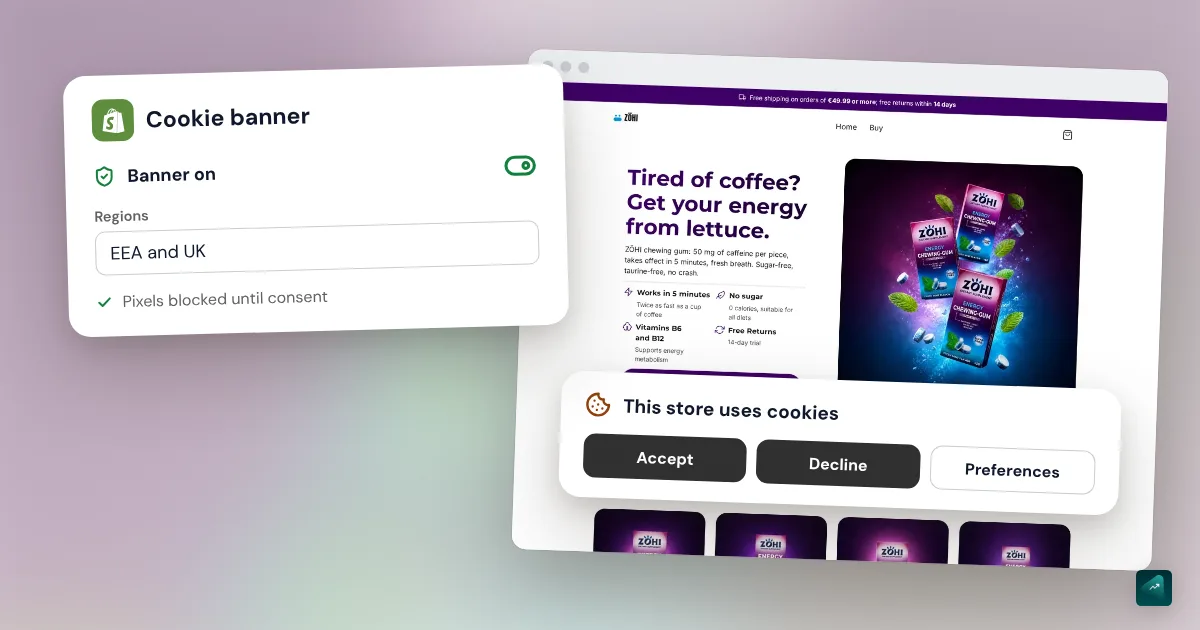
On a recently created store, automated privacy settings are on by default. The banner is then already set up for Europe and the UK. Check each setting anyway, since Shopify asks you to make sure they fit your store.
One condition comes first. You can only use the banner once you've published a privacy policy. If you don't have one yet, start with Settings > Customer privacy > Privacy Policy.
Then, to set up the banner:
- In your Shopify admin, go to Settings > Customer privacy.
- Click Cookie banner.
- In Regions and content, keep Use automated settings on if you want to follow Shopify's recommendations.
- To pick the countries yourself, click Edit in the Regions section. Select the regions, then click Done and Save.
- To change the wording, click Edit in the Content section, then Done and Save.
- Adjust the colors to match your store, then click Save.
- In Position, choose where the banner shows. Click View to see it on your store.
The banner can show on the storefront, cart, checkout and customer account pages. It costs nothing on top of your Shopify plan. If you sell in several languages, Shopify provides translations of the banner for its own themes. You can fine-tune them in the Translate & Adapt app.
What the banner blocks, and what slips past it
In regions where the banner is active, Shopify only collects non-essential data after consent. That applies to its own cookies. It also applies to pixels installed by an app, like the Meta or TikTok app. Those pixels run through Shopify's customer events system, which applies the visitor's choice.
Shopify's Help Center states the limit plainly. Its banner only governs Shopify's own tools. If you pasted a script into your theme code, the banner doesn't hold it back. That's often the case for an old pixel, a session recording tool or a chat widget. You'll then need a third-party banner or some extra setup.
One side effect often surprises merchants. Some visitors decline, and Shopify doesn't count their sessions in your analytics. Your session count drops, and your displayed conversion rate moves with it. Your sales stay the same.
What EU consent rules expect from your banner
France's CNIL set out its rules in guidelines adopted on September 17, 2020. It added a recommendation and a Q&A page, updated on April 29, 2026. Other EU regulators apply the same GDPR and ePrivacy framework, with their own guidance. Here's what the CNIL expects from a banner.
- Nothing before the choice. Until the visitor answers, cookies that need consent stay off.
- Refusing as easy as accepting. The CNIL considers a "Reject all" button at the same level as "Accept all" a clear way to get there. Hiding refusal behind a settings button skews the choice.
- Browsing on isn't consent. A visitor who ignores the banner has declined.
- Withdrawing at any time. It must be as easy as giving consent, through a link available on every page.
- Remembering the choice for a while. Visitors shouldn't have to answer on every page. The CNIL says keeping the choice for 6 months is generally good practice.
- Being able to prove consent. Anyone relying on consent must be able to show they collected it.
Shopify's banner shows a decline button next to the accept button. Don't hide it with custom code, even if a forum suggests it. A refusal less visible than acceptance is exactly what the CNIL checks for.
The visitor's choice is stored in a cookie Shopify calls _shopify_cmp. According to its cookie policy, it lasts one year. That's longer than the 6 months the CNIL mentions. The CNIL calls this good practice to adapt to each site, not a fixed limit. Shopify's Help Center doesn't describe any setting for this duration. If it matters for your store, the CNIL's own page is the place to settle it.
Regulators do check online stores. On September 1, 2025, the CNIL fined SHEIN's Irish subsidiary €150 million. Advertising cookies were set before any click on the banner. After a "Reject all", new cookies were still being set. Your store isn't SHEIN's size, but those are exactly the points regulators check.
Test your banner in five minutes
You can check all of this yourself, without a paid tool.
- Open your store in a private browsing window. The banner should appear right away.
- Before clicking, open your browser's developer tools. The cookie list should show no Meta, TikTok or Google cookies.
- Click the decline button, then browse three or four pages. No advertising cookie should appear.
- Look for the Cookie preferences link in the footer. It should reopen your choices.
- With the Shopify Pixel Helper extension, a waiting pixel shows "Pixel is awaiting consent" until you accept.
If an advertising cookie shows up before your click, it almost always comes from a script added by hand. Look for it in your theme code or in your list of apps.
When a third-party cookie app is worth it
Shopify's banner is enough if all your tools run through Shopify. That's the case for a store using the official Meta, TikTok and Google apps. A third-party app makes sense in other situations.
The first is a script added outside Shopify that you can't remove. A consent app can block that kind of script until the visitor chooses. The second is when you need a detailed list of your cookies by category, or a consent log to show in an audit. Check the app's listing to make sure it offers what you need.
Pandectes, Consentmo and Cookiebot are among the names that come up. You'll find them in the cookie consent category of the Shopify App Store, along with many others. Their plans and prices change often, so compare them on the day you install.
Once you've picked an app, Shopify asks you to connect it properly:
- Install the app, turn on its banner and choose the regions where it shows.
- In your Shopify admin, go to Settings > Customer privacy.
- In the Privacy settings section, click Cookie banner.
- If Remove cookie banner is available, click it, then click Remove.
- Click Set custom banner regions if that option is available. Otherwise, click Edit in the Regions section.
- Select every region where your app shows its banner, then click Save.
The regions must match in Shopify and in the app. Otherwise, Shopify warns that non-essential data can be processed before consent. The app should also connect to Shopify's Customer Privacy API, so the visitor's choice reaches your pixels. Ask the app developer if the listing doesn't say.
Meta and TikTok pixels, and Google Consent Mode
Pixels installed by the official apps follow the choice made in the banner. To see what a pixel can do, go to Settings > Customer events. Click the pixel, then View customer privacy. The tutorial on adding the Meta and TikTok pixel to Shopify covers setup and purchase tracking checks.
Google adds one more layer, Google Consent Mode v2. According to Shopify's Help Center, Google doesn't use data from EEA visitors for personalized ads without this mode and valid consent. Shopify asks you to set up your customer privacy settings correctly, so consent reaches Google. A third-party banner must be integrated with those settings. A Google Tag Manager custom pixel needs a code snippet added by hand.
Look closely at Google Analytics. The CNIL exempts audience measurement that serves only you and produces anonymous statistics. It adds that several tools on the market fall outside that exemption, because the provider reuses the data for itself. When in doubt, keep those tools behind the banner.
Privacy policy, records and customer rights
The banner is only one part of the GDPR. Three other points apply to every store, even a small one.
The privacy policy
The banner links to your privacy policy. Shopify generates an automated one that updates when you change certain settings. It doesn't always know about the apps and pixels you've added. Review it after each new app. What it must contain is covered in the guide to Shopify legal pages.
The record of processing activities
The CNIL asks every business that handles personal data to keep a record of its processing. Businesses with fewer than 250 employees get an exemption. It doesn't cover customer management, which is a regular activity. An online store therefore needs its record. The CNIL offers a free simplified template on its website.
Answering a customer who wants their data
A customer can ask for a copy of their data, or for it to be erased. Under the GDPR, you generally have one month to respond. Shopify gives you the tools in the admin.
To export a customer's data:
- In your Shopify admin, click Customers.
- Open the customer's profile.
- Click More actions > Request customer data.
- Refresh the page to access the data. If you're the store owner, you also get it by email.
To erase their personal data, follow the same path and click More actions > Erase personal data. You then have 10 days to cancel. The name and address are removed, but the record of the sale stays in your admin. If you shared that data with another service, like an email tool, it's up to you to let them know.
Having Ova write your privacy policy
Ova doesn't set up the cookie banner, which stays a setting in your Shopify admin. It can read and rewrite your privacy policy, like your other policies. You might write "update my privacy policy: I sell in France and use the Meta, TikTok and Klaviyo apps." It shows you the text before saving it to Shopify. It also handles the rest of the store, from the theme to the pages. Always review the text, since Ova doesn't replace a lawyer. Generation and edits are free, and the subscription is what lets you publish to Shopify. Describe your store to Scale Ova to get started, then move on to the other settings with the complete guide to building a Shopify store.
FAQ
Does Shopify have a free cookie banner?
Why isn't my Shopify cookie banner showing?
Can I remove the decline button from the banner?
Is Shopify GDPR compliant?
Do I need a cookie banner if I only sell in the US?
How long should a visitor's choice be kept?
Does the cookie banner lower my sales?
Sources
- Shopify Help Center, configuring customer privacy settings: banner steps, default regions, limit to Shopify's tools, third-party apps and matching regions, effect on analytics, read October 29, 2026
- Shopify Help Center, understanding customer privacy settings: Google Consent Mode v2, third-party privacy apps, read October 29, 2026
- Shopify Help Center, app pixels: Customer events, pixel privacy settings, Shopify Pixel Helper, read October 29, 2026
- Shopify Help Center, processing customer data requests: exporting and erasing a customer's data, 10-day cancellation, read October 29, 2026
- Shopify Cookie Policy: cookies set on merchant storefronts, one-year
_shopify_cmp, updated October 28, 2026 - CNIL, cookies and trackers: what the law says (in French): prior consent, exempt trackers, refusing and withdrawing as easy as accepting, proof of consent, September 17, 2020 guidelines, read October 29, 2026
- CNIL, Q&A on the cookie guidelines and recommendation (in French): "Reject all" button, continued browsing, 6-month retention of the choice, updated April 29, 2026, read October 29, 2026
- CNIL, audience measurement tools (in French): exemption conditions, tools that fall outside it, page dated July 4, 2025, read October 29, 2026
- CNIL, SHEIN fined €150 million: decision of September 1, 2025, published September 3, 2025
- CNIL, record of processing activities (in French): obligation, under-250-employee exemption, simplified template, read October 29, 2026
- CNIL, answering a right of access request (in French): one-month deadline, possible extension, read October 29, 2026