Your store has its domain name. Now you want an address like hello@yourstore.com for your contact page and your order emails. When you search, you run into two words that sound alike. Forwarding and an inbox don't do the same thing at all, and that's where most beginners get it wrong.
If you don't have a domain yet, start with the Shopify domain name guide. It covers buying one, prices and connecting it to your store. This guide assumes your domain is already set up.
Forwarding or a real inbox: what changes
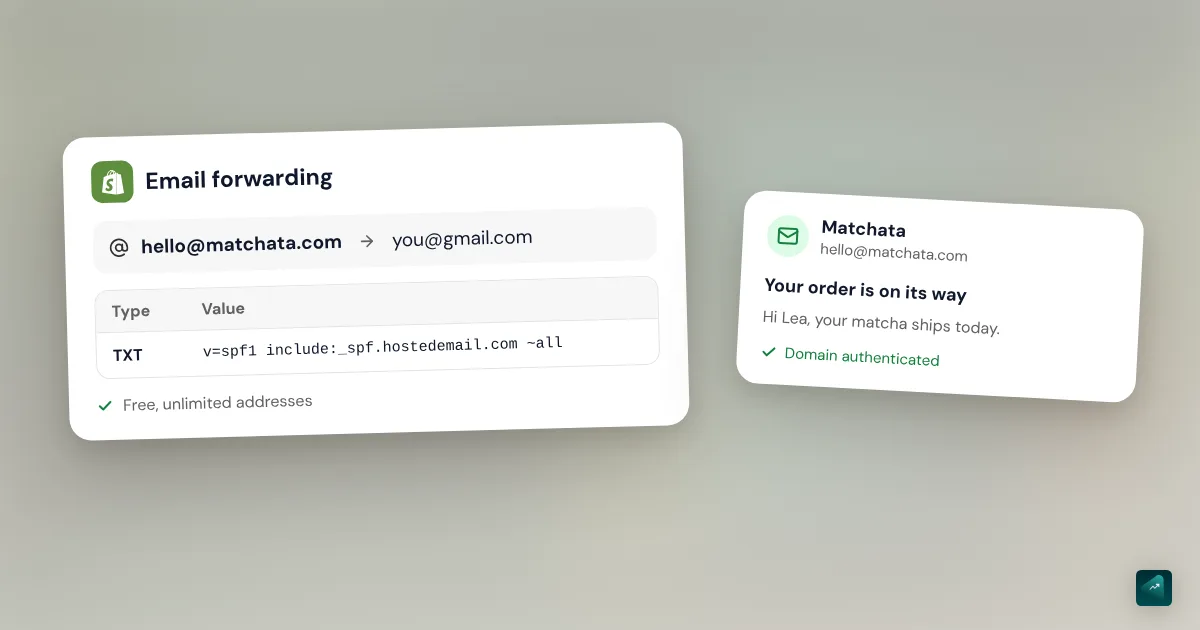
Forwarding receives mail for you and sends it on to your usual inbox. A hosted inbox also lets you send and reply with your business address.
| Shopify forwarding | Hosted inbox | |
|---|---|---|
| Price | Free | From $0 to a few dollars per user per month |
| Receive on hello@ | Yes, in your Gmail or Outlook | Yes, in the host's inbox |
| Reply from hello@ | No, the reply comes from your personal inbox | Yes |
| Which domains | Only a Shopify-managed domain | Any domain |
| Number of addresses | Unlimited | Depends on the host's plan |
A Shopify-managed domain is one you bought through Shopify or transferred to it. A domain bought from another registrar and only connected to your store doesn't count.
Forwarding is enough to get started. Your customer writes to hello@ and you read the message in your Gmail. Things go wrong when you reply. Your customer then sees your personal address, and the professional look is gone. Once you really talk with customers, a hosted inbox makes more sense.
Set up free email forwarding in Shopify
Shopify lets you create as many forwarding addresses as you want. Each one forwards to a single receiving address. You could send hello@ to your Gmail and orders@ to your business partner's.
- In your Shopify admin, go to Settings > Domains.
- Click your domain.
- In the Email forwarding section, click Add forwarding email.
- In Forwarding email address, type only the first part of the address, like "hello." You don't need the @ or anything after it.
- In Receiving email address, type your full address, like yourname@gmail.com.
- Click Save.
If the Add forwarding email button doesn't show, your domain probably isn't managed by Shopify. That's the case for a domain bought elsewhere and then connected. Shopify gives two options here. Your domain provider may offer forwarding itself. Otherwise, you can transfer your domain to Shopify.
Add the SPF record
Shopify asks you to add an SPF record so messages forward properly. It's a DNS line that says which servers may handle mail for your domain.
- In Settings > Domains, click your domain.
- In the DNS settings section, click Manage.
- Click Add custom record, and then click TXT Record.
- In Name, type @.
- In TXT value, paste
v=spf1 include:_spf.hostedemail.com ~all. - Click Confirm.
Test your forwarding
Send a message to your new address from an inbox other than the receiving one. Then check that it arrives. Give DNS changes up to 48 hours before you decide it doesn't work.
If your receiving inbox is at Yahoo or AOL, forwarded messages can get lost. These providers enforce DKIM strictly, and Shopify advises against using them as a destination.
Pick a real inbox on your domain
To reply with your business address, you need an email host. Shopify doesn't offer one, but it connects two directly, Google Workspace and Zoho Mail. Others plug in with a few DNS records.
| Service | Entry plan | Listed price | Good to know |
|---|---|---|---|
| Zoho Mail | Mail Free | $0 | Up to 5 users on one domain, 5 GB each, no IMAP or POP |
| Zoho Mail | Mail Lite | $1 per user per month, billed yearly | 5 GB per user |
| Microsoft 365 | Business Basic | $6.00 per user per month, paid yearly | Outlook and Exchange |
| Google Workspace | Business Starter | $7 per user per month | Gmail on your domain, 30 GB, 14-day free trial |
Prices checked on October 29, 2026 on each service's public pricing page. At Google, the final price depends on your commitment and shows before you sign up.
Registrars sell mailboxes too, often for less. In France, for example, OVHcloud's entry mailbox shows at €0.30 a month before VAT.
If you work alone and want to spend nothing, Zoho Mail Free does the job. Its free plan doesn't include IMAP or POP. So you can't read it in an app like Apple Mail or Outlook.
If you already live in Gmail, Google Workspace is the easiest. You get the same interface with your business address. And if your registrar sells mailboxes, you manage your domain and your inbox in one place.
Connect the inbox to your domain
Incoming mail follows your domain's MX records. These are the DNS lines that tell the internet where to deliver your email. Connecting an inbox mostly means setting the right MX records, plus one verification record.
Shopify-managed domain, with Google Workspace or Zoho Mail
- Create your account with the host, then your address, like hello@yourstore.com.
- Start the domain verification there. Google gives you a TXT code or a meta tag. Zoho gives you a unique code like zb12345678, under Domains in the General tab.
- In your Shopify admin, go to Settings > Domains and click your domain.
- In the Email forwarding section, click Switch to email hosting.
- Select your provider and paste the code, then click Save.
- Go back to the host and finish its setup.
With Zoho, paste the unique code and not a TXT record. It's the first mistake the Shopify Help Center lists.
Shopify-managed domain, with another host
For Microsoft 365 or a registrar's mailbox, you add the records the host gives you yourself. Go to Settings > Domains, click your domain, then click Manage in the DNS settings section. The Add custom record button lets you pick the type of each record. They're usually MX and TXT records, sometimes CNAME.
Domain bought elsewhere and connected to Shopify
Nothing happens in Shopify here. Your domain is still managed by your provider, so the MX records go in its DNS settings. Follow your email host's guide. MX records don't touch the ones that link your domain to your store, the A record and the www CNAME.
For Google Workspace, for example, Google asks for one MX record pointing to smtp.google.com with priority 1. It also asks you to delete old MX records. Google allows up to 72 hours for the new records to take effect.
Send and reply from your business address
Once the inbox is connected, you write from the host's own tool. That's Gmail for Google Workspace and Outlook for Microsoft 365. At Zoho, you use its webmail. If your plan includes IMAP, you can also read your mail in the app of your choice.
With forwarding alone, you can't. The Shopify Help Center says so plainly. When you reply to a forwarded message, your receiving address shows as the sender. Only an email host lets you reply as hello@.
The address that sends your order emails
Shopify uses two different addresses, and people often mix them up. The Store email is in Settings > General. Shopify uses it to contact you. The Sender email is in Settings > Notifications, and it's the one your customers see.
The sender email is the From address on your order confirmations and marketing emails. It also receives messages from your contact form, covered in the Shopify contact page guide. Enter your business address in the Sender email section, then click Save.
A forwarding address works here too. If a customer replies to an order confirmation, their message lands in your personal inbox. Just avoid addresses with "noreply" or "no-reply." Some email hosts reject them outright.
Authenticate your domain to stay out of spam
If your domain isn't authenticated, Shopify rewrites your address to something like store+123@shopifyemail.com. Your customers then see an unknown sender. Authentication relies on SPF and DKIM, which prove that Shopify may send on your behalf.
- Domain bought through Shopify. There's nothing to do, Shopify sets up DKIM, SPF and DMARC for you.
- Domain at Cloudflare, GoDaddy or IONOS. Go to Settings > Notifications. In the Sender email section, click Email domain authentication. Then click Authenticate automatically.
- Any other provider. The same section shows CNAME records to copy to your provider. Add all of them, because the number varies.
These CNAME records are enough for SPF and DKIM, with no IP address to add. Shopify also recommends a DMARC record, which Gmail and Yahoo require. It's a TXT record named _dmarc, with the value v=DMARC1; p=none;. Allow up to 48 hours for the check to pass. It's also the first setting to fix before you send newsletters, as email marketing for a small store explains.
The traps that break your email
MX records that override your forwarding
Shopify warns that your domain's forwarding is affected as soon as you add MX records. Mail then goes to your new host, and your forwarding addresses may stop working. Before you switch, write down all your forwarding addresses. Then recreate them at the host, as aliases or real inboxes.
The opposite trap exists too. One forgotten old MX record can send part of your mail to the old service. That's why Google asks you to delete old MX records before adding its own.
Two SPF records on the same domain
A domain must have only one SPF record. The SPF standard (RFC 7208) returns an error when it finds two. If you move from Shopify forwarding to Google Workspace, don't paste Google's record next to the old one. Replace it, or merge both into a single record. When Google is your only mail service, it gives the value v=spf1 include:_spf.google.com ~all.
TXT records deleted when you connect your domain
Some registrar guides for Shopify tell you to delete the domain's TXT records. OVHcloud's guide does. If your inbox already runs on that domain, one of them may be your SPF. Check before deleting, as the domain name guide explains.
An address that depends on your domain
If your domain expires or is canceled, you can't use its forwarding address as your sender email anymore. So leave auto-renewal on. If you're building your store from scratch, the complete guide to building a Shopify store puts this step in order.
What Ova does around your business email
Ova doesn't create an inbox and doesn't touch your domain. You handle those settings in Shopify and with your email host, using this guide. Ova handles the rest of the store in the Shopify admin, like pages and theme text. Once your address is ready, you can tell it "Put hello@yourstore.com in the footer and on the Contact page." Generating and editing are free, and a Scale Ova subscription is only needed to publish to Shopify.
FAQ
Does Shopify give you a business email address?
How much does business email cost for a Shopify store?
Can I set up Shopify email forwarding with a domain from another registrar?
Why is my Shopify email forwarding not working?
v=spf1 include:_spf.hostedemail.com ~all. Then give DNS changes 48 hours. Test from an address other than the receiving one. If your receiving inbox is at Yahoo or AOL, pick another destination. And if you added MX records, Shopify forwarding is affected.Can I reply to customers from my forwarding address?
Which address should send my Shopify emails?
Is Shopify Messaging an inbox?
Sources
- Shopify Help Center, email hosting and forwarding, free and unlimited forwarding on a Shopify-managed domain, accessed October 29, 2026
- Shopify Help Center, setting up email forwarding for a Shopify-managed custom domain, steps, SPF value, replies and troubleshooting, accessed October 29, 2026
- Shopify Help Center, setting up email hosting, Zoho Mail and Google Workspace, effect of MX records on forwarding, accessed October 29, 2026
- Shopify Help Center, setting up your email, sender email, authentication and DMARC, accessed October 29, 2026
- Google Workspace Help, set up MX records, smtp.google.com and the 72-hour delay, accessed October 29, 2026
- Google Workspace Help, set up SPF, Google's SPF value, accessed October 29, 2026
- RFC 7208, Sender Policy Framework, one SPF record per domain
- OVHcloud, connecting an OVHcloud domain name to Shopify (in French)
- Public pricing pages of Zoho Mail, Microsoft 365, Google Workspace and OVHcloud, checked on October 29, 2026