You're about to run your first ads, and someone told you to install the pixel first. That's good advice. Without a pixel, Meta and TikTok can't see who buys after seeing your ad. They end up optimizing for clicks. On your end, you can't tell which ad to keep and which to cut.
On Shopify, you can set it up in one sitting if you follow the order below. What really costs you is finding out after three weeks of ad spend that every purchase was counted twice.
What you need before you start
The pixel itself costs nothing. Both apps are free and you only pay for your ads. Here's what you need before you start.
- For Meta. You need your Facebook account, a Facebook page for your brand and an ad account. The app offers to create whatever is missing.
- For TikTok. Start with a TikTok for Business account. You then need a Business Center, the space that groups your accounts, your pixel and your catalog. The last piece is a TikTok Ads Manager account, where you build campaigns.
- For testing. Shopify Payments test mode lets you place an order without a real payment. The shipping and payments guide shows where to turn it on.
If your store isn't set up yet, the complete guide to building a Shopify store walks through every step in order.
Step 0: check no pixel is already lying around
If the same Meta pixel is placed twice on your store, every purchase counts double. Your campaign looks twice as profitable as it is, and you raise the budget on false numbers.
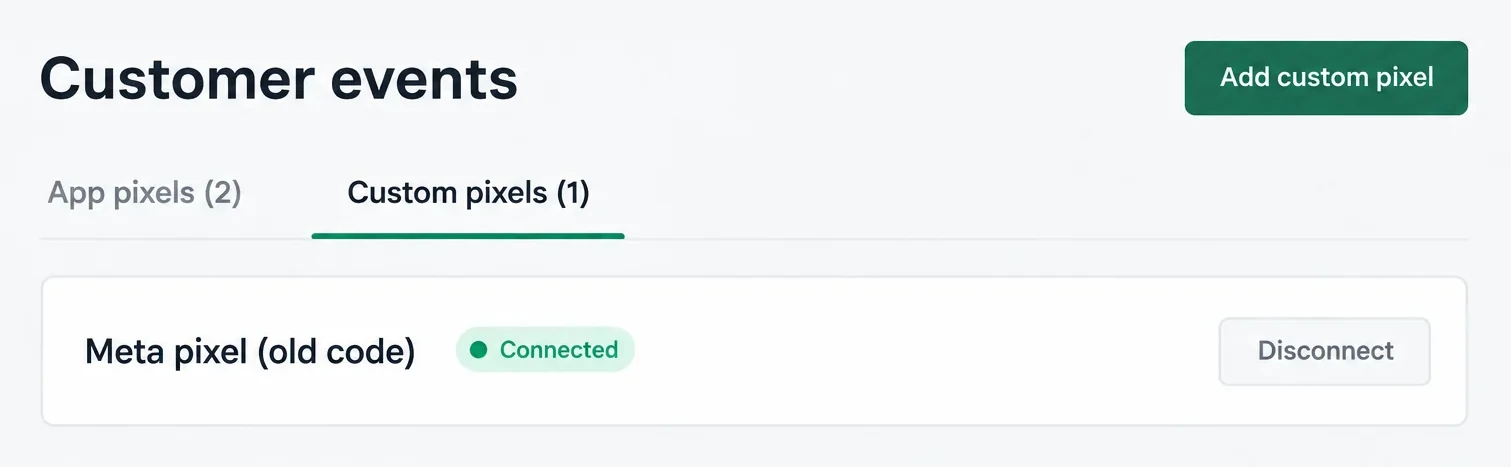
If your store is brand new, skip ahead. If it has a past, check the four places in the table. A freelancer before you, a bought theme or apps you tried and forgot may have left a pixel there.
| Where to look | How to check | What you do |
|---|---|---|
| Installed apps | Settings > Apps and sales channels: spot any pixel or tracking app (multi-pixel, "Facebook Pixel", "TikTok Pixel"), plus page builders and upsell apps with a "Pixel ID" field in their settings | Keep only each platform's official app, and clear the "Pixel ID" fields of the others |
| Pixels registered with Shopify | Settings > Customer events: the page lists app pixels and custom pixels | Delete the custom pixel that duplicates an app |
| Theme code | Online Store > Themes > Edit code, theme.liquid file: search for fbq( (Meta) or ttq. (TikTok) |
Duplicate the theme to keep a copy, then remove the block |
| Google Tag Manager | If a GTM container is installed, open it and look for a Meta or TikTok tag | Pause the tag, the official app takes over |
If ads are already running on an old pixel, don't cut anything ahead of time. First note what you find. Then install the app and connect that same pixel, so you keep its history and your audiences. Remove the old code right after. That way you get no hours without a counted purchase and no stretch where everything counts double.
Install the Facebook (Meta) pixel
Everything happens in the Facebook & Instagram app, published by Meta. It places the pixel across the whole store, checkout included. It's also the method Shopify documents.
- In the Shopify App Store, install Facebook & Instagram, developed by Meta. It's added to your sales channels.
- Connect your Facebook account. Then pick or create your business portfolio, your page and your ad account.
- In the app, go to Settings > Data sharing settings. Turn on Customer data sharing. Then pick a level under Choose level, using the table below.
- Select your pixel or create one. In Meta Events Manager it's also called a "dataset".
- Confirm. The pixel now runs on your store without a line of code from you.
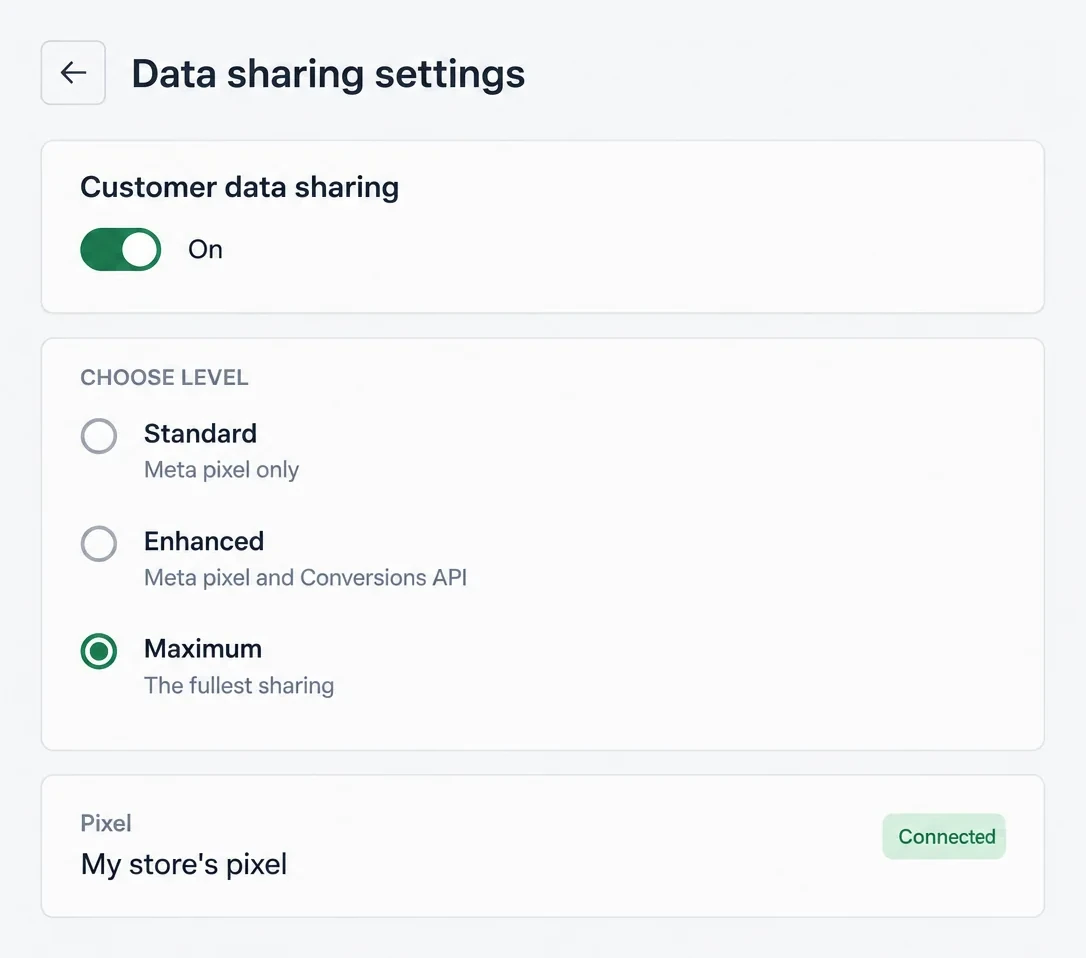
The data sharing level is the choice that really matters. Here are the three levels as the Shopify Help Center describes them.
| Level | What goes to Meta | What can get lost |
|---|---|---|
| Standard | The browser pixel, which shares your visitors' browsing behavior | Anything an ad blocker or the browser blocks, purchases included |
| Enhanced | The pixel, plus the purchase sent straight from Shopify's server to Meta's (the Conversions API), with the customer's name, location, email and phone | Views and carts can still be blocked. The purchase gets through even when the browser blocks the pixel |
| Maximum | The same customer data as Enhanced, and your store gets Meta's latest advertising technology as it's released | Same as Enhanced |
Pick Maximum. The purchase is the signal your campaigns need most. From Enhanced up, it also leaves from the server without depending on your customer's browser. According to Shopify, Maximum sends the same customer information as Enhanced. It adds Meta's new advertising features as they come out. The trade-off is real, because you share your customers' personal data with Meta. Shopify asks you to say so in your privacy policy, so do it while you're at it.
Install the TikTok pixel
The TikTok app works the same way. It creates the pixel, installs it and syncs your catalog.
- Install the TikTok app from the Shopify App Store. It's added to your sales channels.
- Connect your TikTok for Business account. Then link your Business Center and your TikTok Ads Manager account. The app offers to create them if they don't exist.
- Turn on data sharing and pick a level.
- Click Create Pixel or select an existing pixel. Fill in your business details and confirm.
- The catalog syncs on its own for the primary market set in your store. It's used for ads that show your products, not to measure sales. So a rejected product doesn't block the pixel. You can track product approval in the app's catalog section.
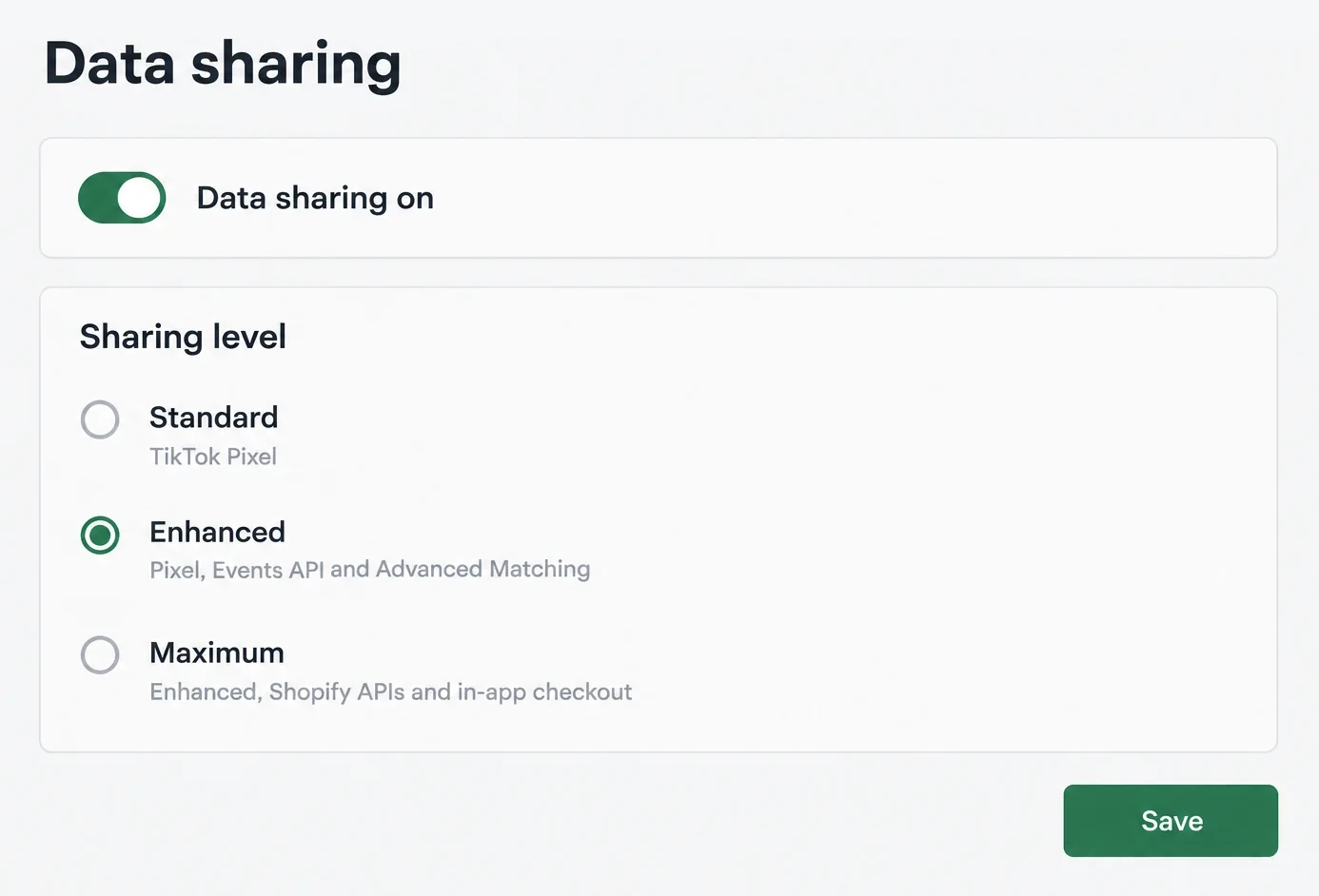
TikTok has three levels too. Here's how its help describes them.
| Level | What TikTok uses |
|---|---|
| Standard | The TikTok pixel alone, sharing your visitors' browsing behavior |
| Enhanced | The pixel, the Events API (server-side sending) and Advanced Matching (hashed email and phone, to recognize the buyer) |
| Maximum | All of the above, plus Shopify APIs and a Shopify checkout shown inside TikTok's in-app browser (in beta) |
Pick at least Enhanced, because that's the level where the purchase is also sent from the server. Maximum adds Shopify APIs and a Shopify checkout shown right inside TikTok's browser. According to TikTok's February 2025 help, that checkout is still in beta. It isn't TikTok Shop.
Place an end-to-end test order
An installed app doesn't prove the purchase reaches Meta or TikTok. To find out, place an order like a customer and watch what each platform receives.
Before you start:
- Turn on Shopify Payments test mode. If you don't use Shopify Payments, use Shopify's test payment gateway instead. Testing a payment requires a paid plan. The test cards and the test gateway are covered in the Shopify test order guide.
- Turn off your ad blocker for the test.
- When the cookie banner shows, click Accept. In the European Economic Area and the UK, Shopify only runs pixels once the visitor has agreed. If you decline or ignore the banner, the test tool won't see anything from the browser.
Then:
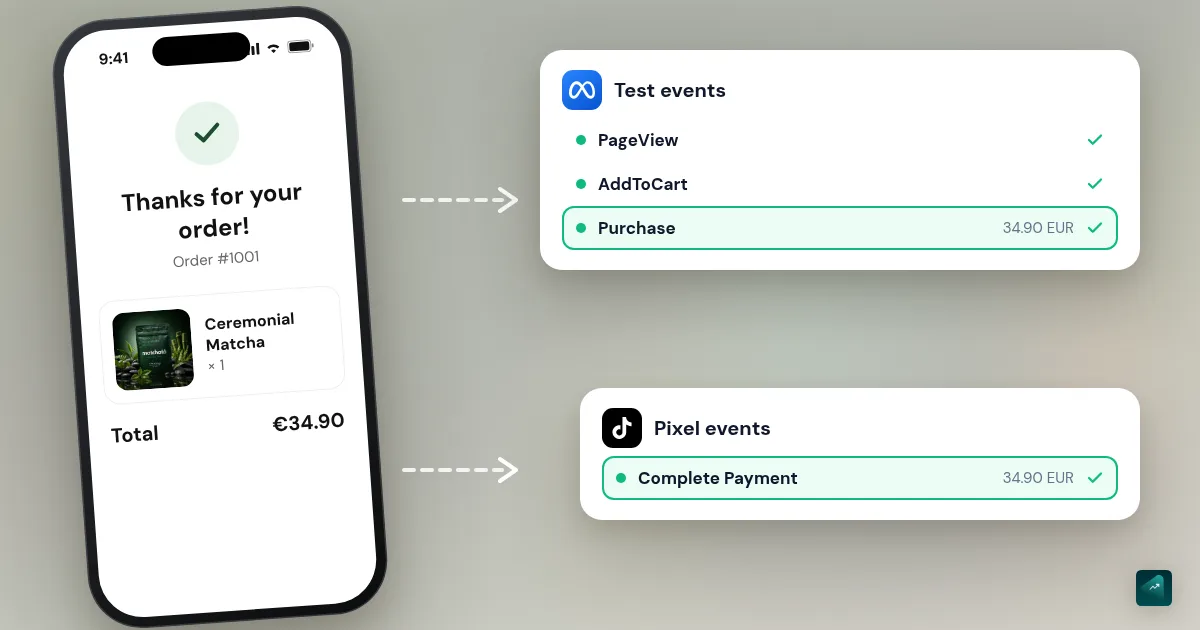
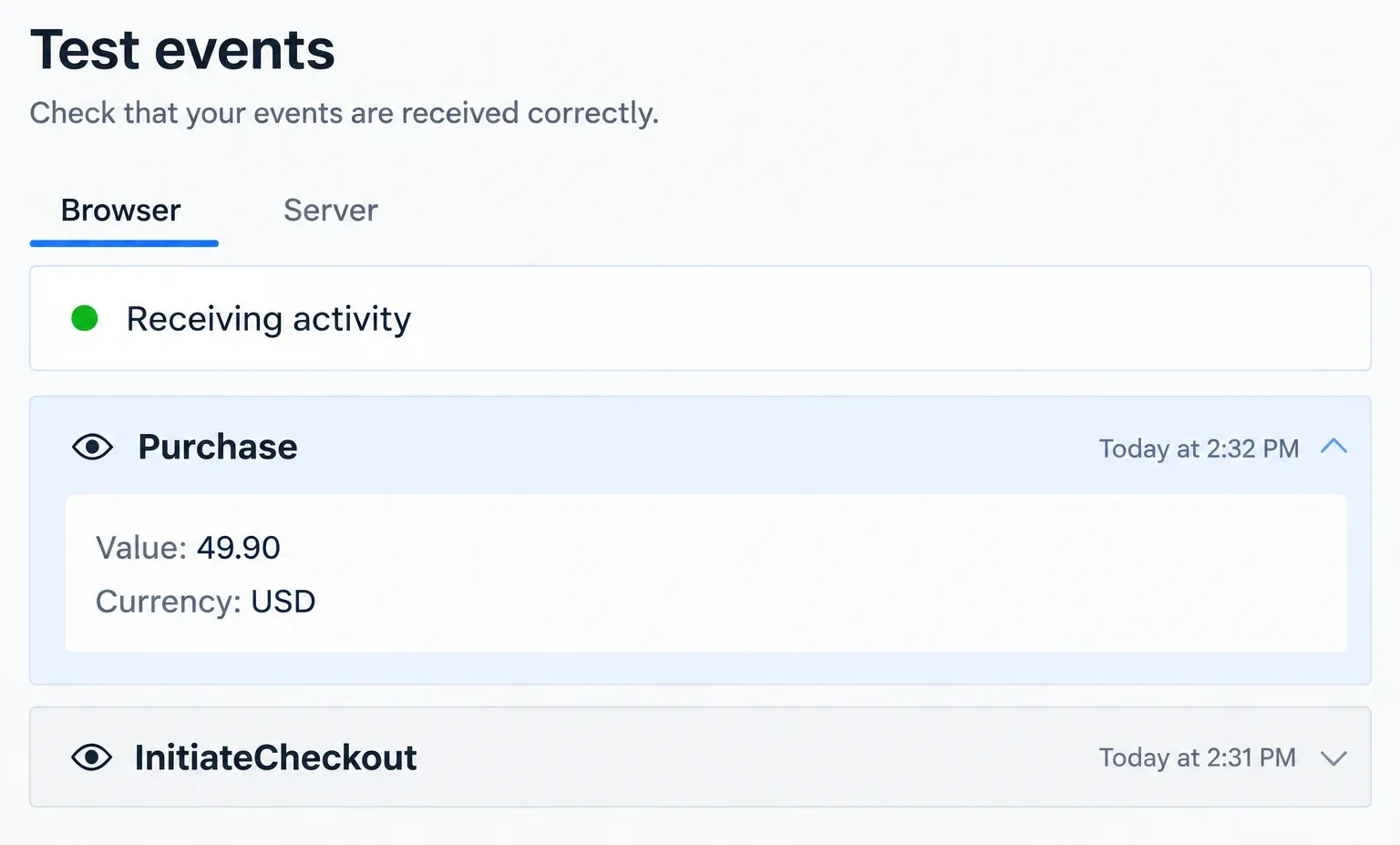
- In Meta, open Events Manager and select your pixel. Go to the Test events tab. Enter your store address and open it from that screen.
- In TikTok, go to Tools > Events from TikTok Ads Manager. Open your pixel, then its test events tool.
- Browse the store like a customer. Open a product page and add the product to your cart, then go all the way through checkout and purchase.
On each platform, you should see these events come in:
- ViewContent when you open the product page;
- AddToCart;
- InitiateCheckout;
- Purchase only once, with the order amount and the right currency. On TikTok, the Shopify help still calls the purchase Complete Payment. If that's the name you see, it's your purchase.
Once you're done, turn test mode off. While it's on, real customers can't pay by card.
The Server tab of the test tool only shows server events that carry its test code. To check server-side sending, wait until the next day. Then look in the Events Manager overview to see whether the Purchase event arrives from both the browser and the server.
The Meta Pixel Helper and TikTok Pixel Helper Chrome extensions give a page-by-page preview. On Shopify, app pixels run in an isolated space of the page. So the extension doesn't always see everything. If the platform's test tool receives the events, trust the test tool.
In the ad dashboards, numbers show up more slowly. Shopify notes you need real customer activity before data appears. The live test shows up right away.
Two indicators to check after a few days
The test proves events are leaving. These two indicators tell you whether Meta and TikTok can actually use them.
Event Match Quality. Meta defines it as a score out of 10. It shows how well the customer information sent from your server matches an event to a Meta account. The higher it is, the better Meta ties your sales to your ads. It also gets better at finding people who look like your buyers. You'll find it in Events Manager, in the details of the Purchase event. On Shopify, your only real lever is the sharing level. At Standard, no customer information is sent from the server. If the score looks low on Maximum, don't make checkout fields mandatory to push it up. A customer who abandons their cart costs more than a point of score.
Deduplication. With the pixel and the Conversions API, the same purchase is sent twice, from the browser and from the server. That's on purpose. Meta recognizes the two with a shared event ID. If they arrive within 48 hours, it generally keeps the first one received and discards the other. The official app sets that ID for you. The check is simple. Over a week, compare the purchase count in Events Manager with your online store's order count in Shopify. It should match or sit slightly below, never above. Cookie refusals take a few away.
On TikTok, Events Manager shows the same markers in your pixel's overview. You'll see the Event Match Quality score and deduplication information in the event details. A Diagnostics column also flags events to fix.
When the numbers don't add up
Here are the most common gaps between what Meta or TikTok show and what Shopify says. The table gives the likely cause of each and what to do about it.
| What you see | Likely cause | What you do |
|---|---|---|
| Twice as many purchases in Meta as orders in Shopify | The same pixel placed twice, often by the official app and by old code in the theme | Go back to step 0, keep only the official app |
| Nothing reaches the test tool, not even views | Cookie banner declined or ignored, or an ad blocker is on | Accept cookies, turn off the blocker, try again |
| Views and carts come through, never the purchase | Test order not completed, or data sharing turned off in the app | Place a full test order again, check data sharing is on |
| The purchase shows a value of 0 | Test order placed with a 100% discount | Test with a real price, still in test mode |
| Fewer purchases on the ad side than orders | Visitors declining cookies, ad blockers | Partly normal. Server-side sending recovers purchases lost to ad blockers. A visitor who declines cookies has made a choice you don't work around |
| Meta claims more sales than your ads made | Meta counts a sale when the person clicked or only saw your ad within a set period, and Meta, TikTok and Google can all claim the same order | Keep Shopify as your reference and track your UTMs (below) |
Old tutorial steps you can skip
Many tutorials predate several changes at Shopify and Meta, especially the videos. You can skip these three steps.
- Pasting the pixel code into
theme.liquid. The official app already places the pixel everywhere. Hand-added code duplicates it as soon as the app is installed. Shopify also notes that a pixel installed that way may need a third-party cookie banner or custom logic to respect consent. - Adding a conversion script to the thank you page (the old "Additional scripts" field in checkout settings). Shopify stopped running these scripts on August 26, 2026 for non-Plus stores, and on August 28, 2025 for Shopify Plus. If your old purchase tracking went through there, it has counted nothing since. The official app takes over, through Customer events.
- Ranking your 8 events and verifying your domain to track conversions. Meta removed that screen, and there are no events left to rank in Events Manager. Meta still recommends domain verification, but your pixel measures purchases without it.
Cookies and consent
If you sell in the EU or the UK, visitors must be able to refuse advertising cookies. France's CNIL, for example, requires refusing to be as easy as accepting.
Shopify runs its own cookie banner under Settings > Customer privacy. Pixels placed by apps go through Shopify's pixel system, which applies the visitor's choice. That's one more reason not to paste code by hand.
On a new store, this banner is on by default for visitors from the European Economic Area and the UK. It needs an active market in those regions. You may use another banner, such as Axeptio, Didomi or Cookiebot. If so, check that it's connected to Shopify's Customer Privacy API, as its help asks. That API is what passes the visitor's choice to app pixels. When a visitor declines, pixels don't run in their browser. Your ad numbers will sit a little below your real orders, and that's not a bug.
The full banner setup and EU consent rules are in the Shopify cookie banner guide.
UTMs: know where your sales come from
Each platform counts sales by its own rules. UTMs give you your own version, which Shopify reads in its reports.
| Parameter | What it says | Example |
|---|---|---|
| utm_source | The platform | facebook, tiktok |
| utm_medium | The traffic type | paid_social |
| utm_campaign | The campaign | bottle_launch |
| utm_content | The creative or its version | problem_video_v2 |
Write everything in lowercase and always reuse the same names. Never put a customer's email or name in a URL. In Meta and TikTok, these parameters go at ad level, in the URL parameters field. On Meta, you can let the platform fill in the name. The utm_campaign={{campaign.name}} parameter picks up your campaign name, as long as you name it with the same rule. In Shopify, you'll find these sales in the marketing reports, grouped by UTM source and campaign. To read them without getting fooled by attribution, learn to read your campaign numbers in the right order.
What's next
Your next step is your first Meta Ads campaign or your first TikTok Ads campaign. Still torn between the two? Choose your channel first.
No store yet? Scale Ova generates a complete Shopify store from your product. You can generate it, look around and edit it for free. Only publishing it to Shopify takes a subscription. Once published, it's a Shopify store like any other. The Facebook & Instagram and TikTok apps install on it exactly as shown here.
FAQ
How do I add the Facebook pixel to Shopify?
How do I add the TikTok pixel to Shopify?
Do I need to verify my domain for the Meta pixel?
Pixel or Conversions API: which one?
Should I keep my old pixel or create a new one?
Why can't Meta Pixel Helper find my pixel?
Sources
- Facebook data sharing, Shopify Help Center, accessed September 23, 2026
- Meta pixel, Shopify Help Center, accessed September 23, 2026
- Pixels overview, Shopify Help Center, accessed September 23, 2026
- Configuring customer privacy settings, Shopify Help Center, accessed September 23, 2026
- Placing a test order and Activating a payment gateway in test mode, Shopify Help Center, accessed September 23, 2026
- Marketing reports, Shopify Help Center, accessed September 23, 2026
- Script tags blocked on the Order status page, Shopify developer docs, accessed September 23, 2026
- Deduplicate Pixel and Server Events, Meta for Developers, accessed September 23, 2026
- Dataset Quality API (Event Match Quality), Meta for Developers, accessed September 23, 2026
- Using the API (Test Events tool), Meta for Developers, accessed September 23, 2026
- Evolution of Meta's Aggregated Event Measurement, Adviso, May 15, 2023, accessed September 23, 2026
- Shopify Set-Up Guide, TikTok For Business help, updated February 2025, accessed September 23, 2026
- Data Sharing on TikTok App on Shopify, TikTok For Business help, updated February 2025, accessed September 23, 2026
- Supported Events By Shopify, TikTok For Business help, updated February 2025, accessed September 23, 2026
- About diagnostic and monitoring tools in TikTok Events Manager, TikTok For Business help, updated November 2025, accessed September 23, 2026
- Cookies and other trackers: guidelines and recommendation, CNIL (in French), accessed September 23, 2026
- Facebook & Instagram by Meta and TikTok, Shopify App Store, accessed September 23, 2026