You're setting up your store, and many of your customers will want to pay with PayPal. So you open the payment settings, and nothing looks like the tutorials you found. The reason is simple. Shopify changed the way PayPal connects in France, and most guides online still describe the old method. This guide starts from what the Shopify Help Center says today.
If you're looking for the full picture of payments and shipping, it's in setting up shipping and payments on Shopify. This one is only about PayPal.
How PayPal works on Shopify in France
Shopify offers two PayPal integrations for a store like yours. Your country decides which one you get.
| Your store | PayPal integration | Where you manage it |
|---|---|---|
| In France or the United States, with Shopify Payments | PayPal Wallet, built into Shopify Payments | In the Shopify admin, with Shopify Payments |
| In another country (Belgium, Switzerland, Canada…) | PayPal Express Checkout | Settings > Payments, Additional payment methods section |
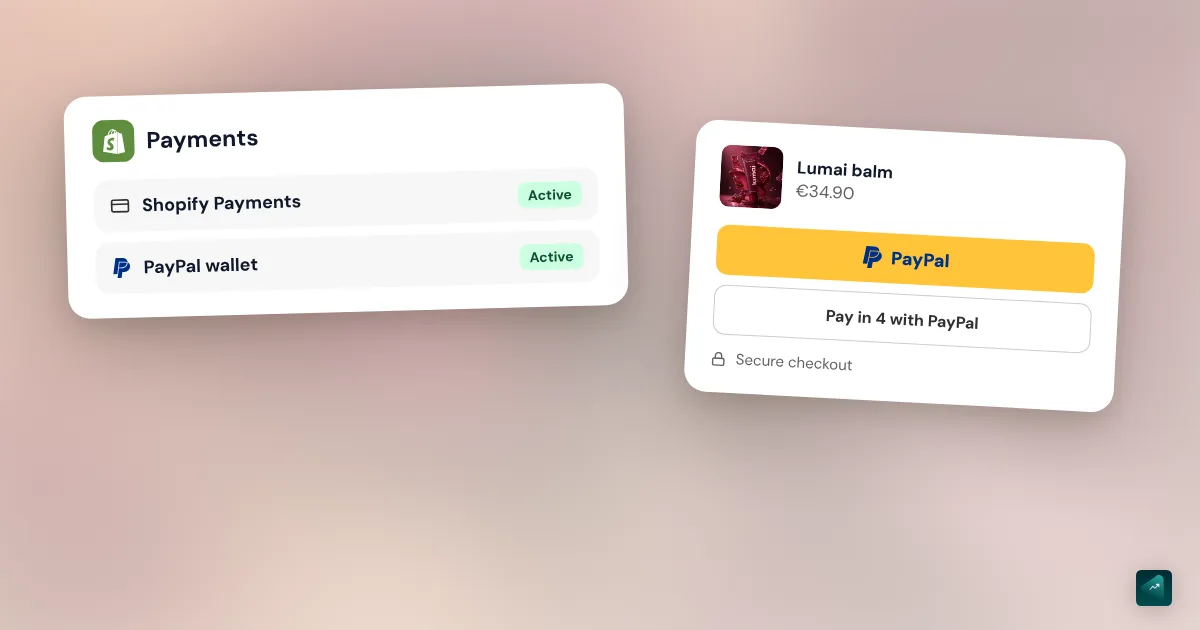
PayPal Wallet works as a payment method inside Shopify Payments. You get the account automatically when you set up Shopify Payments for France. Your PayPal refunds and disputes are then handled in the Shopify admin. Your PayPal money arrives with your Shopify payouts, in the bank account you picked. Card payments and PayPal payments even go out in a single payout.
The Help Center is very clear on one point. A store based in France with Shopify Payments won't find PayPal under Additional payment methods. PayPal only connects through the wallet there. You also need the latest version of Shopify Checkout.
What if your store doesn't have Shopify Payments?
That's the case for a business Shopify Payments turned down, or a store based in the French overseas territories. On this point, two Help Center pages don't say quite the same thing. The overview page says PayPal Express Checkout isn't available to merchants in France. The setup page only mentions merchants in France who use Shopify Payments. Open Settings > Payments and check whether PayPal shows up under Additional payment methods. If it doesn't, Shopify Support is the only one who can settle it for your store.
How to turn on PayPal on Shopify
With Shopify Payments, in France
There's nothing to connect. First activate Shopify Payments in Settings > Payments, with your business documents. PayPal Wallet comes with it. Then check that PayPal shows up on your checkout page, from your online store. The Help Center doesn't describe any other activation screen for France.
Activating Shopify Payments itself is covered step by step in the shipping and payments guide.
With PayPal Express Checkout, outside France
When you create your store, Shopify generates a PayPal Express Checkout account with the email address you sign in with. That account already receives PayPal payments. But it stays incomplete until you finish its setup. Without that, you can't refund an order or capture a payment manually.
- In your Shopify admin, go to Settings > Payments.
- In the Additional payment methods section, click Setup incomplete next to PayPal.
- Click Complete setup.
- Enter the email address of your PayPal account, then click Next.
- Enter the password for that account, then click Next.
- On the Tell us about your business page, enter your business details.
- Check the policy and permissions statements, then click Agree and Create Account.
- On the Describe your business page, pick your business type from the menu, fill in the details, and click Next.
- On the Tell us more about you page, enter your details, then click Submit.
- On the confirmation page, click Go back to Shopify.
Only the store owner can edit this PayPal information. A staff member with full access can't do it for you.
Connecting a PayPal account you already have
PayPal Express Checkout looks for a business account with the same email address as your store. If that account already exists, you receive payments right away. If not, you have two options. You can add your store's email address to your existing PayPal account. You can also sign up for a PayPal business account with that address.
Watch the email that's prefilled on the PayPal screen. If you used another PayPal account recently, its address may be the one showing. To find the right one, go to Settings > General and look for your Store email in the Store contact details section.
A personal PayPal account isn't enough. The Help Center requires a business account. You can upgrade your personal account to a business account from PayPal.
The PayPal accelerated checkout button
PayPal Express Checkout is an accelerated checkout. Your customer logs in to PayPal and pays without typing their address again. On the product page, Shopify can show a button with the PayPal logo next to Add to cart. The buttons offered depend on the payment methods you've turned on.
In France, Shopify's page on payment methods lists PayPal separately from accelerated checkouts. Those are Apple Pay and Shop Pay. Open a product page in your online store to see which buttons really show up.
PayPal Pay in 4
With Pay in 4, your customer pays in 4 interest-free installments over 3 months. PayPal offers it in France for purchases from €20 to €3,000, and you get the full payment on the day of purchase. The customer pays the first installment right away, then the next three on the same date in the following months. If they pay late or don't pay, that's PayPal's problem, not yours.
PayPal presents this option as included in its checkout at no extra cost. Its usual transaction fees apply. There's also a plan in 6, 12, or 24 payments for purchases from €120 to €2,900. Its rate varies. All of this comes from PayPal's business page for France, checked October 29, 2026.
One thing is left to check on your end. The Help Center page on PayPal Wallet in France doesn't mention Pay in 4. So check whether it shows up when you choose PayPal on your checkout page.
To promote Pay in 4 on your product pages, PayPal publishes the free PayPal Pay Later Messaging app on the Shopify App Store. On October 29, 2026, it showed 2.9 out of 5 from 21 reviews. Several merchants say there that they couldn't finish the setup. If you're weighing PayPal, Klarna, and Alma for installments, the comparison is in the shipping and payments guide.
PayPal fees on Shopify
With PayPal Wallet, Shopify's pricing page for France shows "from 2.9% + €0.35" per payment, on all four plans. You don't pay a third-party transaction fee on top. The Help Center confirms this for PayPal as soon as Shopify Payments is your main provider.
| What you pay (checked October 29, 2026) | Amount |
|---|---|
| PayPal Wallet with Shopify Payments | From 2.9% + €0.35 per payment, every plan |
| Standard card with Shopify Payments, Basic plan | 1.5% + €0.25 |
| Third-party transaction fee on PayPal, with Shopify Payments as main provider | None |
| PayPal's rates for an account in France, customer in the European Economic Area | 2.90% + €0.35 |
| PayPal's surcharge, customer in the United Kingdom | 1.29% |
| PayPal's surcharge, customer in another country | 1.99% |
| Refund under PayPal's rates | No fee, but the fees from the sale aren't returned |
Take a €40 order. Paid with PayPal, it costs you €1.51. Paid by card on the Basic plan, it costs you €0.85. PayPal therefore costs you 66 cents more on that sale.
Shopify only writes "from" without giving the highest rate. PayPal's rates for France help explain why. PayPal last updated them on July 15, 2026, and they add a surcharge when the customer is far away. Shopify doesn't say whether the wallet follows those rates exactly. The real fees on your first PayPal sales will tell you.
If your store uses PayPal Express Checkout, PayPal's own rates apply. Shopify also adds its third-party transaction fee if you don't have Shopify Payments. It's 2% on Basic, 1% on Grow, and 0.6% on Advanced. To see what you really keep on each sale, the Shopify profit margin calculator runs the numbers with your prices.
Payment pending, setup incomplete, and partially active
These three statuses come from PayPal Express Checkout. With PayPal Wallet in France, you shouldn't see them.
Payment pending
The Help Center explains it in one sentence. The payment was sent to an unverified PayPal account when the order was placed. So you need to confirm the email address on your PayPal account. The payment can then take up to two business days to arrive. Don't mark the order as paid before you see the money in your PayPal account.
Setup incomplete
That's the state of the account created with your store. It already receives payments, but you can't refund yet. The steps above fix it.
Partially active
The Help Center doesn't use that label, at least not on the pages checked October 29, 2026. Its troubleshooting pages do list what blocks a PayPal activation. Check these four points in order.
- The setup is finished, with the Complete setup button shown above.
- Your PayPal account's email address matches your Store email.
- Your PayPal account is a business account.
- Your store's country matches your PayPal account's country. You change it in Settings > General.
If everything checks out and the status doesn't change, contact PayPal support. Shopify says it can't manage or access your PayPal account.
Refunding an order paid with PayPal
With PayPal Wallet, you refund from the order in the Shopify admin, just like a card payment. With PayPal Express Checkout, you need a finished account setup. An order canceled in Shopify is then refunded on PayPal with nothing else to do.
One error keeps coming up for merchants on Express. The message "Unable to refund: You don't have permissions to make this API call" means the link between PayPal and Shopify is broken. Log in to PayPal to give Shopify access again. Then deactivate PayPal in your payment settings and turn it back on. Orders received during the outage get refunded manually from your PayPal account.
A refund doesn't give you back the fees from the sale. PayPal's rates say so plainly, for full and partial refunds alike. Shopify Payments does the same with card fees. The steps to cancel or refund an order are in how to cancel an order on Shopify.
Disputes and PayPal Seller Protection
A customer who reports a problem in the PayPal Resolution Center opens an inquiry. You then have 20 days to settle it directly with them, without PayPal stepping in. With PayPal Wallet, you reply from the Shopify admin. If their claim is fair, a full refund closes the inquiry. If not, talk it through with them. They can close the inquiry or let it expire after the 20 days.
During those 20 days, the customer can turn the inquiry into a claim at any time. PayPal then decides. With the wallet, two more rules apply. A disputed transaction can only get a full refund. And a decision on a dispute can't be appealed.
PayPal Seller Protection covers you in two cases. The first is a transaction the account holder says they didn't authorize. The second is a paid item the customer says they never received, reported through PayPal. To qualify, the Help Center lists these conditions.
- The item is a physical good that ships, or a digital good that meets PayPal's extra requirements.
- It ships to the shipping address on the order.
- You respond quickly to PayPal's requests for documents.
- The transaction is marked Eligible on its page.
- You provide proof of delivery, with a signature for orders of $750 or more.
PayPal recommends shipping within seven days of payment. Editing an order afterward triggers a new review, and the order can lose its protection. Protection also doesn't cover a customer who goes through their bank for an item not received. With the wallet, add shipping details as evidence in your response, or the transaction loses its protection.
Testing PayPal before you open
Shopify Payments test mode doesn't test PayPal Wallet. To be sure PayPal works, place a real order on a cheap product, then refund it. Keep in mind that the fees on that sale won't come back. With PayPal Express Checkout, pay with a different PayPal account than the one receiving payments. Your store also needs a paid plan for the checkout to open. The other testing methods are in placing a Shopify test order.
Traps to know about
- One PayPal account on two stores. Both stores produce the same order numbers, and PayPal rejects the payment with the error "Payment already processed for InvoiceID." Add a prefix or suffix to the order numbers of one store.
- PayPal left on but unused. Outside France, the account created by default exposes your email address. Shopify advises deactivating PayPal if you don't use it. In Additional payment methods, click PayPal, then Deactivate.
- The missing billing address. Shopify only sends one address to PayPal, usually the shipping address. With local pickup, the billing address can therefore be missing from the order.
- Too many requests. The message "too many requests for operation" means PayPal received too many calls in a short time. Your account can be suspended for 24 hours, and only PayPal support can lift it.
Where Ova fits in
Ova doesn't configure payment methods. Shopify Payments and PayPal stay yours to activate, with your documents. If your store is built with Scale Ova, Ova does handle the rest in your Shopify admin. For example, it can update your FAQ page. You write: "Add to the FAQ that we accept PayPal and Pay in 4 from €20." If you don't have a store yet, you can generate it with Scale Ova and change it for free. The subscription is only needed to publish it on Shopify.
FAQ
How do you connect PayPal to Shopify?
Why doesn't PayPal show up under additional payment methods?
What are PayPal's fees on Shopify?
Does Shopify charge a transaction fee on PayPal?
Can you use a personal PayPal account on Shopify?
How do you offer PayPal Pay in 4 on Shopify?
Why is my PayPal payment pending on Shopify?
How do you turn off PayPal on Shopify?
Sources
- Shopify Help Center, PayPal Express Checkout: account created automatically, not available to merchants in France, checked October 29, 2026
- Shopify Help Center, PayPal Wallet for France: built into Shopify Payments, payouts, not under additional payment methods, disputes, checked October 29, 2026
- Shopify Help Center, Set up PayPal Express Checkout: steps and labels, existing account, payment pending, testing, deactivation, checked October 29, 2026
- Shopify Help Center, Troubleshooting PayPal Express Checkout: activation, country, business account, InvoiceID, refund error, checked October 29, 2026
- Shopify Help Center, PayPal payment integrations and fees: third-party transaction fee exemption, cancellations refunded automatically, checked October 29, 2026
- Shopify Help Center, PayPal Seller Protection: covered cases and eligibility criteria, checked October 29, 2026
- Shopify Help Center, PayPal Express Checkout customer experience: accelerated checkout, address sent to PayPal, checked October 29, 2026
- Shopify Help Center, Shopify Payments payment methods in France: accelerated checkouts, PayPal through the wallet, checked October 29, 2026
- Shopify Help Center, Accelerated checkout buttons: PayPal button on the product page, checked October 29, 2026
- Shopify, pricing (France): PayPal Wallet rate, card rates, and third-party transaction fees by plan, checked October 29, 2026 (in French)
- PayPal, merchant fees in France: rates updated July 15, 2026, domestic and international transactions, refunds, checked October 29, 2026 (in French)
- PayPal, Pay in 4 for businesses: 4 payments over 3 months from €20 to €3,000, merchant paid in full, checked October 29, 2026 (in French)
- PayPal Pay Later Messaging on the Shopify App Store: free app made by PayPal, rating and reviews, checked October 29, 2026