You are starting out, you saw Storebuild in an ad, and you want to know what you really get before you commit. We created a brand-new account and followed the flow. Then we went to look at live stores made with the same template. Here is how it works, what comes out, and what it costs.
How Storebuild.ai works, step by step
The flow is in English, three choices, and you never write anything about your project. No step asks for your brand, your product, your audience or your language.
- The niche. On the home page, six boxes: Clothing, Pets, Tech, House, Sports, and "Need Inspiration". We picked House.
- The signup. First name, email, phone number, and a checkbox to receive marketing text messages. The screen already says "We're Already Building Your Store".
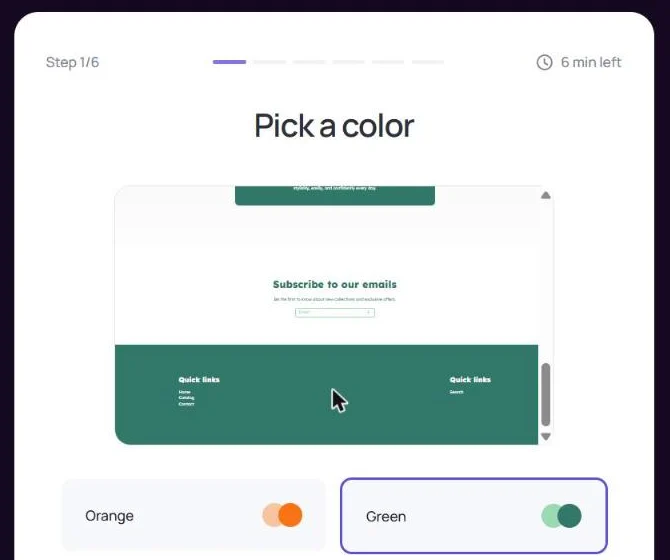
- The color (step 1 of 6). Four colors: Orange, Green, Blue, Red. We picked Green.
- The banner (step 2 of 6). Four photos with their headline. We picked "Create the Perfect Retreat".
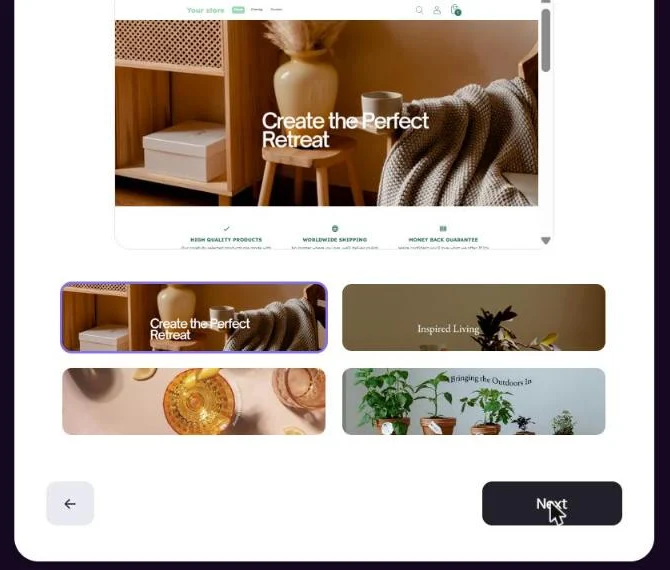
- "Your Store is Ready!" A message "Our AI is building your store!" shows for about ten seconds, then the store is announced ready.
- The Shopify account (step 3 of 6). You create a Shopify account through Storebuild's button, then you select the Basic plan.
- Linking your store (step 4 of 6). You copy your Shopify admin URL and paste it into Storebuild.
- The products (step 5 of 6). You install the Zendrop app, the supplier. It is the one that loads the store and its 10 products.
- Going live (step 6 of 6). You remove the store password. Storebuild then announces bonuses: an 8-hour course and ad credits.
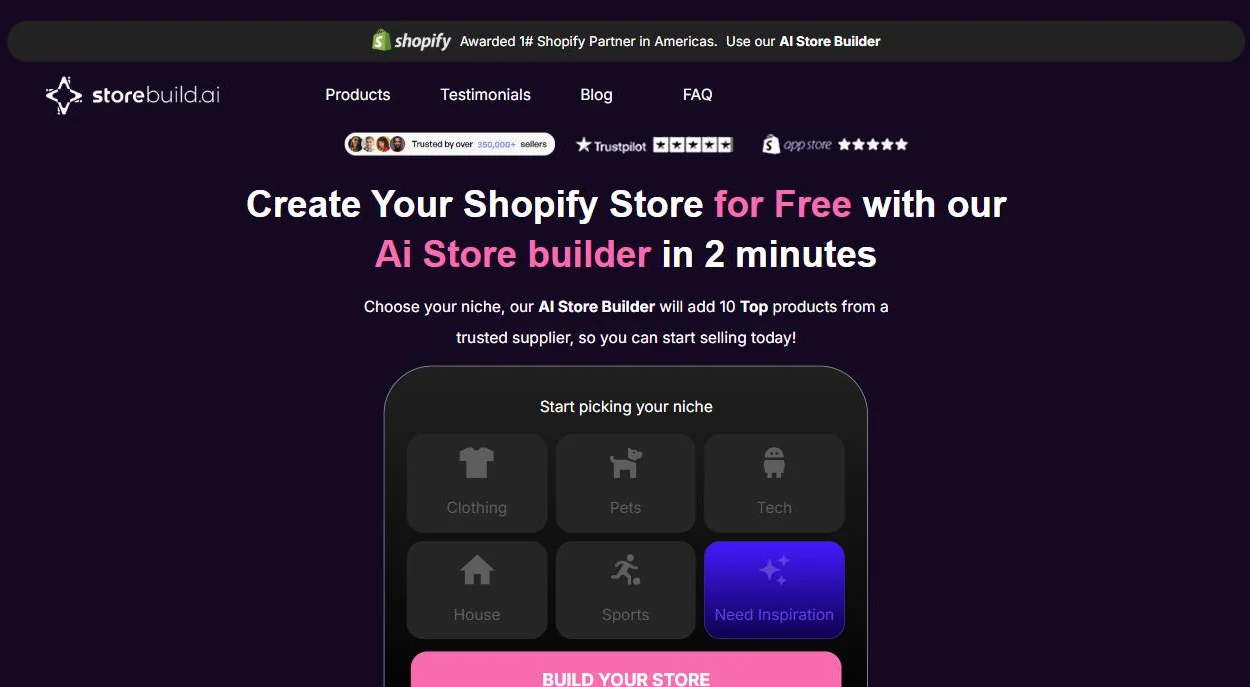
Steps 3 to 6 are the ones Storebuild shows on its own screens. What they ask for is detailed below, in the pricing section.
"Your Store is Ready!": what the screen shows
Storebuild announces the store ready ten seconds after the banner choice. The preview shown at that point is a template with its sample copy.
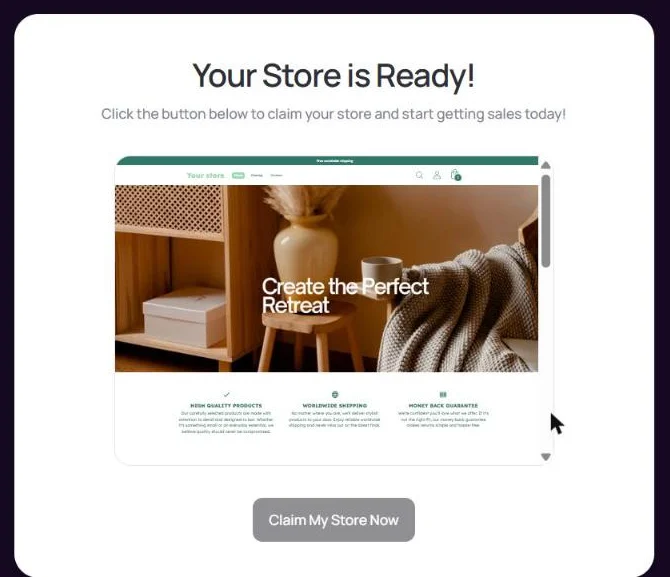
- The store name: "Your store". The flow never asks for a name.
- The products: "Product #1" to "Product #4". Under the heading "Best Sellers", with sample prices: $12.87, $76.32, $45.5, $39.98.
- The same testimonial three times. "Amazing Products!", with the text "Amazing products at amazing products, just like they say!", signed "Aveda". The sentence carries a typo from the template: "at amazing products" instead of "at amazing prices".
- Three all-purpose selling points. "High quality products", "Worldwide shipping", "Money back guarantee", with copy about "stylish products" for a home store.
- What changed with our choices. The color of the bars and the banner photo. Nothing else.
The price: free for Storebuild, then Shopify and Zendrop
Storebuild charges nothing for the store. But you only receive it after taking a Shopify plan and installing the Zendrop app, which has its own subscription.
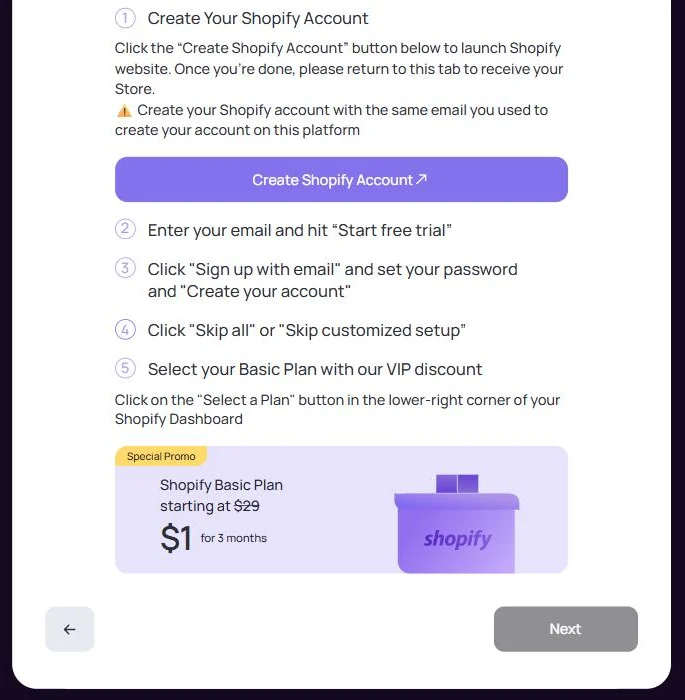
- The Shopify plan. Step 3 tells you to "Select your Basic Plan": $1 for 3 months, then the regular plan price.
- An affiliate link. The button to Shopify goes through a partner link in Storebuild's name. That explains the free part: the store is given away because it brings a customer to Shopify.
- The Zendrop app. Step 5 says: "Let's get your supplier and your store loaded with 10 winning products with sales page by installing the Zendrop app".
- The credit card. The same step warns: "If Shopify requires you to add your credit card information, you will have to add it. But remember that you have a 3-day free trial for Zendrop." Then: "Click Approve to confirm your trial subscription".
- No refunds. Storebuild's terms list paid services (custom paid themes, additional products and marketing content) and state that all sales are final.
So that is three accounts to open (Storebuild, Shopify, Zendrop), one plan and one subscription trial to confirm before you see your store. Trustpilot reviews also mention $97 charged by Storebuild. We come back to them below.
What this template looks like live: 16 stores
Storebuild's preview reuses the Zendrop theme, block for block. We searched Google for the sentence of its sample testimonial, and opened 16 live stores on October 2, 2026, like any visitor would.
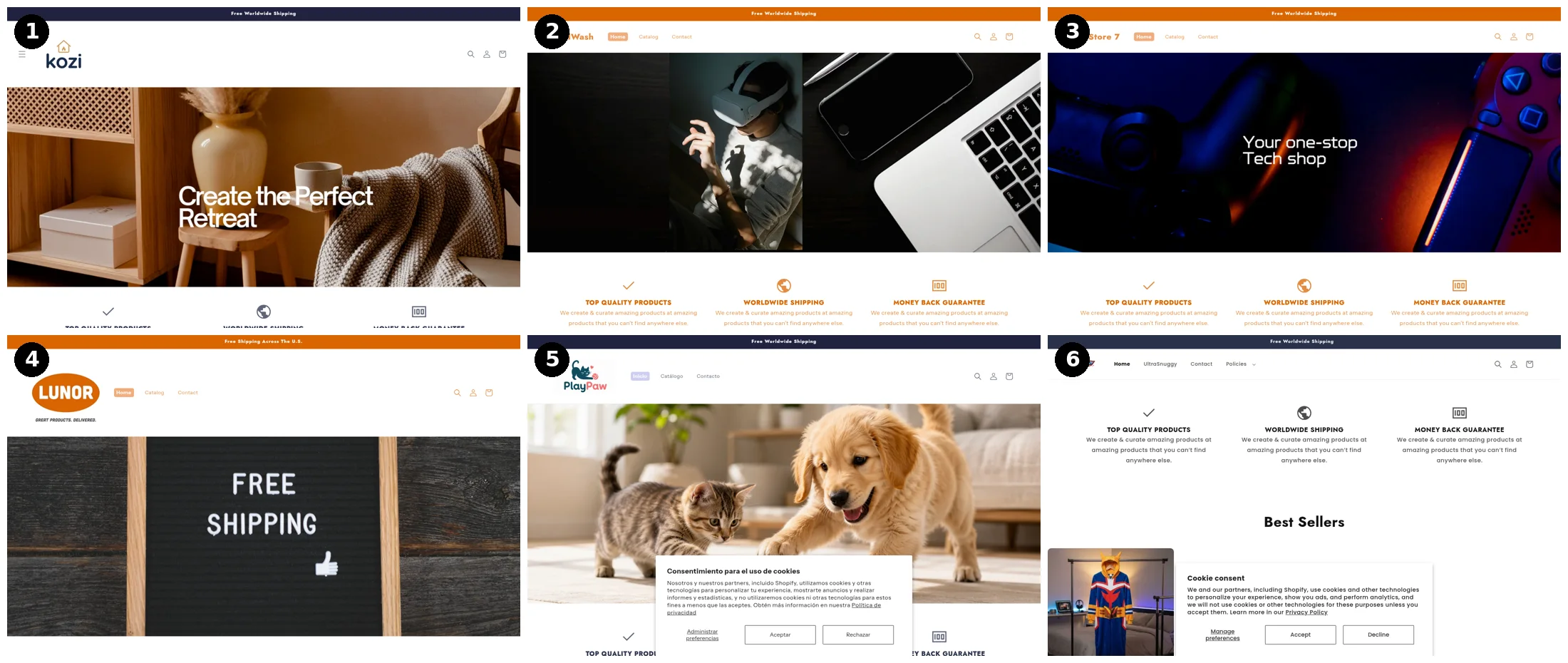
- A single theme. 14 stores out of 16 run on the theme named "Zendrop".
- Our banner, already live. Store 1 shows "Create the Perfect Retreat" on the same photo as our picker screen. Stores 2 and 3 carry banners named "tech-banner" in their files.
- The sample testimonial, word for word. 8 stores still show "Amazing products at amazing products, just like they say!", typo included.
- The same sentence three times. On 6 stores, the three selling points "Top quality products", "Worldwide shipping" and "Money back guarantee" have exactly the same copy, the first one's.
- The name never set. 3 stores are still called "My Store" or "My Store 7", all three with their own domain name.
- The same products from one store to the next. A hologram fan shows up on the home page of two stores. A 13-piece yoga set shows up on three.
- A store with no products. Store 4 shows the heading "Best Sellers" above an empty block: its catalog has 0 products.
We cannot tell which door each merchant came through, Storebuild or Zendrop directly. The template is the same, and it is the one Storebuild presents as your store.
Where is the AI? In what we saw, nowhere. The flow never asks you for any text. The store is announced ready in ten seconds, with products named "Product #1". And the banner we picked is already used by another store.
The quality of the stores: basic, and not built to sell
We opened the home page and a product page on five of these stores. The template lays out sales blocks, but fills them with sample elements.
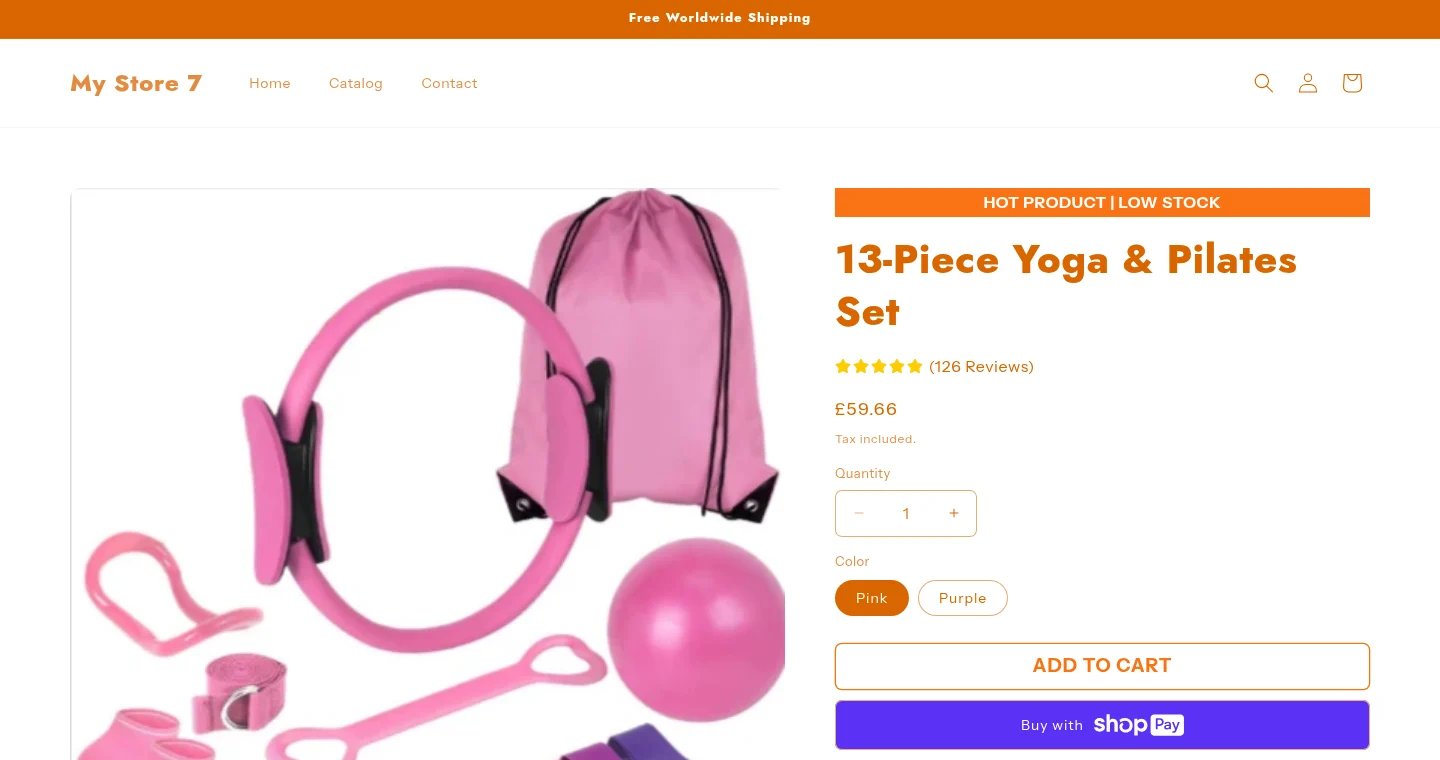
- "(126 Reviews)" on three different products. A yoga set, a hologram fan and a levitating lamp, in three stores, all show "126 Reviews" and "4.5 out of 5 stars". The number comes from the template, not from customers.
- "Hot product | Low stock" everywhere. The urgency bar is on every product page, whatever the stock.
- Sample testimonials on the product page. "Great customer service experience!", signed Alex W., under two unrelated products.
- A very short home page. 150 to 200 words: three selling points, four products, three testimonials, a newsletter signup. No brand introduction, no reason to buy here rather than elsewhere.
- Prices straight from the supplier. A decorative lamp at $154.65, a fan at €115.69. Nobody set a retail price.
- What is there. A quick-buy button, a delivery estimate, an add-to-cart bar that follows the scroll.
A store sells when its reviews are real, its prices leave a margin and its page speaks to someone. Here, those three things are still to be done.
Editing the store afterwards: by hand
The store is a regular Shopify theme, a filled-in template. You edit it by hand in Shopify's theme editor, section by section. No AI picks the store back up once it is delivered.
- The name, logo, copy, testimonials: yours to change. The stores still named "My Store" with the sample testimonial show that many never do.
- The products: the ones in the Zendrop catalog, to sort, rename and price.
- The store settings: shipping, payments, policies, languages, all done in the Shopify admin.
- A separate app for pages. Storebuild also sells a Shopify app, "AI StoreBuilder", that builds product pages: 1 free page, then $29.90 a month (checked September 11, 2026).
A beginner who has never opened Shopify ends up with a theme to finish and an admin to learn. That is the real work, and the tool does not do it.
What the reviews say
Trustpilot shows 145 reviews and a 4.5 out of 5 rating as of October 2, 2026. We read the 12 reviews at 3 stars or below.
- A free offer that adds nothing to Shopify. April 23, 2026: "their free offer is just what you can do with shopify by your own self".
- $97 charged. April 12, 2026: "couldnt make a decent page for 1 product tried 3xs, it charged me $97".
- The apps to install. On September 25, 2025, a review mentions money taken "through other softwares that they ask you to install". April 29, 2025: "maybe just for you to install zendrop".
- A store with no products. November 20, 2024: "no products have been added to the store".
- Support. Several reviews say they got no answer, apart from messages on Instagram.
Positive reviews are the majority. They are short and say the same thing: simple and quick to get started.
Storebuild's own site shows "1.5 Million Stores Created" and more than 10,000 reviews. Trustpilot counts 145.
What Storebuild does well
- No friction at the start. Three choices, no brief, a preview in ten seconds.
- A way into Shopify. The instructions are written click by click, for someone who has never seen the admin.
- The $1 Shopify offer. Three months at $1 to try it.
- A supplier plugged in. With Zendrop installed, you have a product catalog to import from day one.
Storebuild or Scale Ova, situation by situation
Here is what each tool does for you depending on your situation, as of October 2, 2026.
| Your situation | With Storebuild | With Scale Ova |
|---|---|---|
| You have an idea or a specific product | You take the closest niche out of five | You describe your project, or paste your product link |
| You want a store that looks like you | A theme shared by 14 stores out of 16, four banners per niche | The theme, pages and copy are generated for your project |
| You are new to Shopify | You finish the store and set up the admin yourself | You ask the AI: products, menus, shipping, markets, languages, policies |
| Your store is not in English | An English flow and template that never ask for the language | The store is generated in the language of your market |
| You want to change something later | Shopify's theme editor, by hand | You ask in conversation, or click the element to change |
| You want to see before you pay | A preview with "Product #1", the store after the Shopify plan and Zendrop | You generate, browse and edit the store without paying |
| You want to go fast | Three choices, ten seconds | A few minutes, after a conversation about your brand and audience |
Storebuild is faster, by a few minutes. It is the only row where it comes out ahead.
Scale Ova starts with your project: your market, your promise, your offers. It then generates the whole Shopify store from that, theme, pages, product pages, collections, copy and images. The AI stays connected to the store afterwards: products, collections, menus, discounts, shipping, markets, languages. Publishing to Shopify requires a subscription, generating and editing are free. See generated stores, no signup.
Other Storebuild alternatives
- BuildYourStore.ai works on the same principle, down to the wording of its screens: a niche, banners, a Shopify plan, a supplier's app (AutoDS instead of Zendrop). Our BuildYourStore test.
- DropMagic starts from a product link and delivers a product page and a home page. The catch: publishing requires Pro at $79 a month. Our DropMagic review.
- Atlas AI also starts from a product link and fills one template out of 13. The catch: edits are done by hand, with no AI. Our Atlas AI review.
- Shopify AI Store Builder generates store designs for free from a few words. The catch: these are designs, not a store with products, copy and strategy.
Going further
Want to see your store rather than the niche's? Describe your project to Scale Ova and look at the result. The overview of AI store builders compares tools of the same kind. On stores delivered ready to sell, the turnkey dropshipping website guide.
FAQ
How does Storebuild.ai work?
Is Storebuild.ai really free?
Is Storebuild.ai legit?
Is Storebuild a scam?
Does Storebuild use templates?
Will my Storebuild store look like other stores?
Can you edit the store with the AI after delivery?
Is Storebuild enough to get started?
Storebuild.ai or BuildYourStore?
Can you move from Storebuild to Scale Ova?
Sources
- Real test on October 2, 2026: brand-new free account on storebuild.ai, House niche, dated captures
- Survey on October 2, 2026: 16 live stores built on the Zendrop theme, opened without an account, dated captures
- Storebuild on Trustpilot, rating and quoted reviews, checked October 2, 2026
- Storebuild.ai terms, paid services and no-refund policy, checked September 11, 2026