Bringing in a visitor is expensive. It costs you time if you make content, or money if you run ads. Once they've decided to buy, they've done the hardest part, because they trust you. It's the best moment to offer what goes with their purchase. A good share of your profitability is decided right there.
Increasing average order value isn't about pushing. You offer, at the right moment, what completes the purchase or makes it better value. Done well, your customer leaves happier and you keep more margin.
The math that shows why it matters so much
Take a simple example. You sell a product at $30 that costs you $12 delivered. Your margin is $18 per order. Now imagine your customer adds a $12 accessory that costs you $4. It goes in the same parcel, with no extra shipping.
| Order | Your cost | Your margin | The most you can pay for a customer | Minimum ROAS | |
|---|---|---|---|---|---|
| Product alone | $30 | $12 | $18 | $18 | 1.67 |
| Product and accessory | $42 | $16 | $26 | $26 | 1.62 |
With the accessory, you earn $8 more per order. Above all, you can pay up to $26 to acquire a customer instead of $18. That gives your ads 44% more room. Many stores that "aren't profitable on ads" actually have an average order value problem.
Run the math with your numbers in the Shopify profit margin calculator. Then check your minimum ROAS in the break-even ROAS calculator.
Lever 1: the free shipping threshold
It's the simplest and most effective lever. Offering free shipping to everyone eats your margin on small orders. Offering it to no one drives people away. According to the Baymard Institute, extra costs are the top reason for cart abandonment, cited by 40% of shoppers who abandon. So you offer free shipping above a set amount.
Where to set the threshold. Put it just above your current average order, enough to add a small product. If your average order is $30 and you have accessories around $10, a threshold at $40 makes sense. Too low, it changes nothing. Too high, nobody tries to reach it.
Check it stays profitable. Go back to the example above with shipping that costs you $5. The $42 order with free shipping still leaves you $21 of margin. That's more than the $18 from the product alone.
Show what's missing. A progress bar in the cart turns the threshold into a small game, with a message like "Only $10 away from free shipping". You can add a second tier, for example a gift above a higher amount.
In Shopify. Free shipping is set in your shipping rates with a minimum order condition. You can also use a free shipping discount. The progress bar depends on your theme or an app. It shows the threshold but doesn't apply it. So always set up both, and check with a test order. The step by step is in set up shipping and payments on Shopify. If you'd rather use a discount, how to create a discount code on Shopify shows the free shipping one.
Lever 2: bundles
A bundle is several products sold together, slightly cheaper than separately. Your customer feels they're getting a good deal. On your side, you sell more items per order.
- Same-product bundle: pack of 2 or 3, or "second one 50% off". It works very well for things people use up, give as gifts or buy in several colors.
- Kit or routine: products used together (cleanser, serum and cream; teapot and teas; controller and stand). The customer buys a complete result.
- Gift set: an assortment ready to give, in nice packaging.
Show the bundle right on the product page, next to the single item. Write the saving out clearly. The "1, 2 or 3" choice with the middle option highlighted works well. It feels reasonable, and it's often the one people pick.
In Shopify, the free Shopify Bundles app creates fixed bundles and multipacks (packs of 2 or 3 of the same product). Quantity discounts ("10% off from 2, 15% off from 3") need a third-party app. For the math and choosing the type of offer, build an offer that converts compares the options.
Lever 3: complementary products on the product page
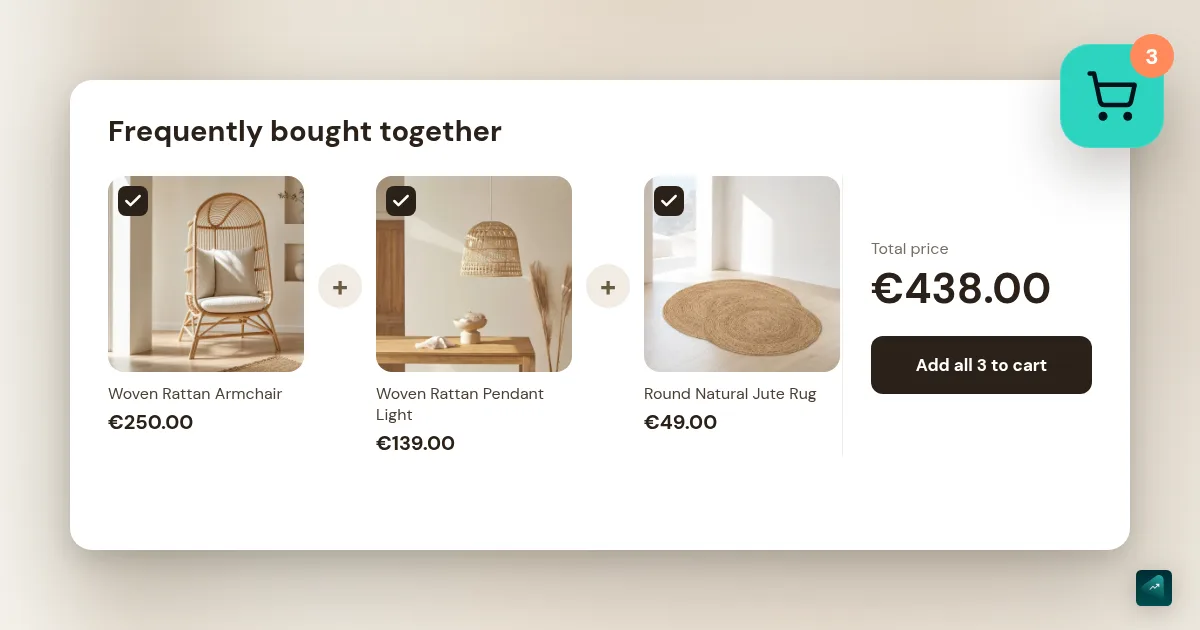
Under the buy button, show two or three products that genuinely improve the use of the main product. The block can be called "Frequently bought together", "Complete your routine" or "Goes perfectly with".
Offer complements, not similar products. Under a lamp, offer the bulb and the dimmer rather than another lamp. A similar product makes people hesitate between the two. A complement gets added to the cart.
In Shopify, the free Search & Discovery app lets you choose the complementary products for each product yourself. If your theme can show "complementary" recommendations, it picks them up automatically.
Lever 4: the add-on in the cart
When your customer opens their cart, a box offers them a small product to add in one click. It can be an accessory, a care product, a refill or gift wrapping. The right product is cheap compared to the cart and linked to what's already in it. It gets added without leaving the cart.
This is also where the free shipping bar and the add-on reinforce each other. The cart can show "Only $8 away from free shipping. Add the travel pouch, $9."
Lever 5: the post-purchase offer
Right after payment, your customer lands on the confirmation page. They've just trusted you, and their card is still on file. An offer at that moment is accepted without going through checkout again, for example "Add a refill to your order at 20% off, in one click". Post-purchase upsell apps on the Shopify App Store make that possible.
This lever has one advantage. It can't lower your conversion rate, since the main purchase is already done. Keep a single offer, linked to the order and with a real benefit.
The mistakes that lower sales
- Offering everything, everywhere. With three pop-ups, five recommendations and an upsell at every step, your customer feels pushed. They end up abandoning.
- Offering something pricier than the main product. The add-on should feel small next to what they're already buying.
- Unrelated products. An add-on that's useless with the main product will never be taken. It also makes the store feel salesy.
- A threshold nobody reaches. If nobody reaches the free shipping threshold, it's too high. Lower it, or add small products to top up the cart.
- Showing the threshold without applying it. The bar announces free shipping, then checkout charges for it. You lose that customer, and they leave annoyed.
Where to start
- Find your current average order value in your Shopify analytics.
- Set up the free shipping threshold just above it, with the bar in the cart.
- Create a bundle or kit around your main product, shown on the product page.
- Add two or three complements on the product page and a small add-on in the cart.
- Check your average order value in a month and adjust the threshold.
If your store was generated with Scale Ova, your theme already includes a tiered progress bar and a cart add-on box. Ask Ova to turn them on with your threshold and your complementary product. Set the shipping rate in Shopify too, because that's what actually applies free shipping.
No store yet? You can generate it with Scale Ova from your product. You can look at it and change it for free, and you only pay when you publish it on Shopify.
FAQ
What is average order value?
How do I increase average order value on Shopify?
What should the free shipping threshold be?
What's the difference between upsell and cross-sell?
Sources
- Reasons for cart abandonment, Baymard Institute, accessed October 29, 2026
- Shopify Bundles, Shopify App Store, accessed October 29, 2026
- Shopify Search & Discovery, Shopify App Store, accessed September 18, 2026
- Shopify discount types, Shopify Help Center, accessed September 18, 2026