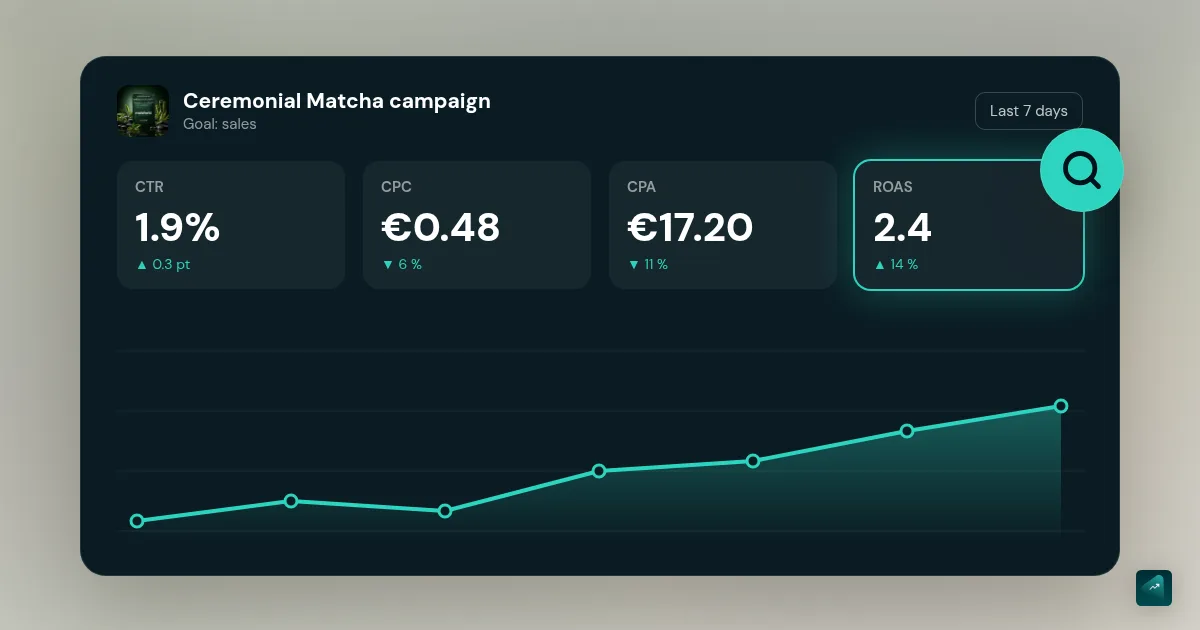
After a few days of ads, Ads Manager shows dozens of columns. It's tempting to look at ROAS and cut everything when it looks bad. That's often a mistake. ROAS tells you it isn't working, but not why. The other numbers do.
The numbers, plainly
| Number | What it is | What it tells you |
|---|---|---|
| Impressions | How many times your ad was shown | Can the platform deliver? |
| CPM | Cost per thousand impressions | How much it costs to reach your audience |
| Click-through rate (CTR) | Share of people who click after seeing | Does your ad make people want to? |
| CPC | Cost per click | How much each visitor costs you |
| Landing page views | Clicks that actually reach your store | Does your page load properly? |
| Adds to cart | Visitors who add a product | Do your page and price convince? |
| Checkouts initiated | Those who start paying | Is the cart clear? |
| Purchases | Orders | Does checkout work? |
| Cost per purchase (CPA) | Spend divided by purchases | Is it profitable? |
| ROAS | Revenue divided by spend | Is it profitable, seen another way? |
The last two are compared to your thresholds: your maximum acquisition cost (your margin per order) and your minimum ROAS. The break-even ROAS calculator gives you both.
Read in funnel order
Picture a funnel. Each step loses people. Your job is to find the step that loses too many.
- Delivery. Are your ads running? If impressions are near zero, the problem is technical. The ad may be rejected, the budget too low or the audience too narrow. In Merchant Center, the product itself is sometimes rejected, and the Google Shopping tutorial shows where to find the reason.
- Attention. Do people stop and click? A low click-through rate means your ad doesn't speak to those who see it.
- Arrival. Do clicks become visits? A big gap between clicks and page views often comes from a slow mobile page or a broken link.
- Interest. Do visitors add to cart? If not, the page, price or offer doesn't convince.
- Payment. Do those who add pay? If not, something jams between cart and confirmation.
- Profitability. Is cost per purchase below your maximum?
The diagnosis, symptom by symptom
| What you see | Where the problem is | What to do |
|---|---|---|
| Almost no impressions | Delivery | Check approval, budget, audience, product rejections |
| Impressions, almost no clicks | The creative | Change angle and hook: creatives that work |
| Clicks, few visits | The page | Test the link and mobile speed |
| Visits, no add to cart | Product page, price, offer | Rework the message and the offer, check the page continues the ad's promise |
| Carts, few payments | Costs, shipping, trust | Show shipping earlier, simplify: shipping and payments |
| Checkouts started, few purchases | Checkout | Test an end-to-end order, check payment methods |
| Purchases, but cost per purchase too high | The economics | Better creative, better conversion, or higher average order value |
| Purchases below your maximum cost | Nothing | Keep, build on it, then scale carefully |
A number on its own means nothing. A high CPM isn't a problem if visitors buy. A very high click-through rate isn't good news if visitors leave immediately. It's often the sign of an ad that attracts curiosity, not desire.
When to decide
Too early, you decide on noise. In the first days, the platform is learning and results vary a lot. Meta explains that an ad set needs about 50 optimization events over seven days to exit its learning phase. On TikTok, volatility usually starts to decline after about 25 results or 7 days. On a small budget, you won't get there. Your first Meta Ads campaign and the TikTok Ads tutorial explain how to judge each ad anyway.
Too late, you've lost money for nothing. To be safe, cut an ad that has spent two to three times your maximum acquisition cost without a single sale. At that point, the signal is clear.
In between, decide with this rule:
- Continue: cost per purchase is below your maximum over several days.
- Fix: a specific step is blocking, and you know what to change.
- Cut: spend has exceeded your maximum cost several times with no sale, or the whole funnel is weak.
And change one thing at a time. If you change the creative, the page and the price at once, you'll never know what worked.
Platform numbers versus Shopify's
Meta, TikTok and Google each credit sales with their own rules. That can be a click seven days ago or a video watched yesterday. So the same order can be claimed by two platforms. If you add up their numbers, you often find more sales than you really made. It's one more reason to start with a single platform. The guide to choosing your ad channel helps you find which one.
Your reference is your real orders in Shopify. Regularly look at your total revenue divided by your total ad spend, across all platforms. It's the most honest measure of what ads bring you. UTM parameters help Shopify tell you where sales come from. They're explained in install your pixels.
No store yet? You can generate it with Scale Ova from your product. You can look at it and change it for free, and you only pay when you publish it on Shopify.
FAQ
Why does my ad get clicks but no sales?
What's a good ROAS?
When should I cut an ad?
Why does Meta show more sales than Shopify?
Sources
- Learning Phase, TikTok Ads Manager help, accessed September 23, 2026
- About the learning phase, Meta Business Help Center, accessed September 18, 2026