You can have the best-configured campaign in the world. If your ad doesn't make people stop, nobody watches it. Since Meta and TikTok automated targeting, the creative has become your main lever. It's what tells the platform who to show your product to. And it's also what decides whether the person buys.
The formats, safe zones and rules quoted here were checked against Meta's and TikTok's help centers on September 24, 2026. The running example comes from the Meta ads tutorial. It's a laptop stand selling for $31, and you can spend up to $18 in ads per sale.
Start from an angle: one ad, one hypothesis
An angle is the reason someone should stop on your ad. The same product can be sold from several angles, and often only one of them sells. Here are six angles for the laptop stand.
| Angle | Example |
|---|---|
| The problem | "Sore neck at night?" |
| The demonstration | Unfolded and set in 10 s |
| The result | Screen at eye level |
| The comparison | Books versus the stand |
| The proof | A customer, three months in |
| The offer | Stand and mat bundle |
To find your angles, reuse the work from sell the problem, not the product. Write down your customer's frustrations and the solutions they've already tried. Add what they dream of getting. Every strong phrase can become an angle.
Each ad tests one idea. On r/FacebookAds, one advertiser says each ad should "represent a clear hypothesis." That way you compare concepts "rather than just seeing which video Meta decided to push more." The same rule applies if you outsource production. "If the freelancer can't say what variable each batch is testing, you're just buying more files, not learning," a founder writes on r/ecommerce.
Ad hooks: it all happens before the third second
On Instagram, Facebook or TikTok, your customer is scrolling. The hook is what they see and hear first: the first frame, the first sentence and the first on-screen text. Both platforms set the same pace.
- Meta recommends adding animation in the first 3 seconds of its conversion videos.
- TikTok recommends placing your hook in the first 6 seconds. It also recommends introducing what you offer in the first 3.
Here's what stops the scroll, with the laptop stand.
- A question that lands, like "Sore neck by 6 pm?"
- A recognizable scene. Someone is hunched over a laptop at the kitchen table.
- A visible result. The screen rises to eye level in one move.
- A direct statement, like "I stopped working with my head down."
- The product in motion from the first frame. You see the stand unfolding, not a logo or a title card.
On the other hand, a slow intro or a logo up front makes people scroll on. So does too much text, or an image that looks like every other ad. To know whether your hook works, one number is enough, the hook rate. It's covered below with a worked example.
The structure of a video that sells
A 15- to 30-second demo or testimonial almost always follows the same outline.
- The hook (0 to 3 seconds). You show the question, the scene or the result.
- The problem (3 to 6 seconds). You show why it's a pain.
- The demonstration (6 to 20 seconds). The product is in action, shot from several angles.
- The proof. You show the material, the adjustment or real use.
- The call to action. You give the offer and where to buy, on an end card that never changes.
Very short videos work too. For its conversion tests, Meta recommends videos 5 to 10 seconds long with a single benefit. It also recommends a call to action with a consistent end card. An animated product photo is enough. It's the simplest way to add video to still-image ads.
Put short on-screen text that repeats the key line, because many people watch with the sound off. Still take care of the sound. Meta calls it "strongly recommended" for Reels, and TikTok puts sound and music at the top of its best practices.
Keep the same message from start to finish, and the same one as on your product page. A customer who clicks on a promise must find it when they land.
Instagram, Facebook and TikTok ad specs in 2026
| Placement | Ratio | Size |
|---|---|---|
| Reels, Stories (Meta) | 9:16 | 1440 x 2560 |
| Instagram feed video | 9:16 | 1080 x 1920 |
| Instagram feed image | 4:5 | 1440 x 1800 |
| Facebook feed | 4:5 | 1440 x 1800 |
| TikTok In-Feed | 9:16 | 720 x 1280+ |
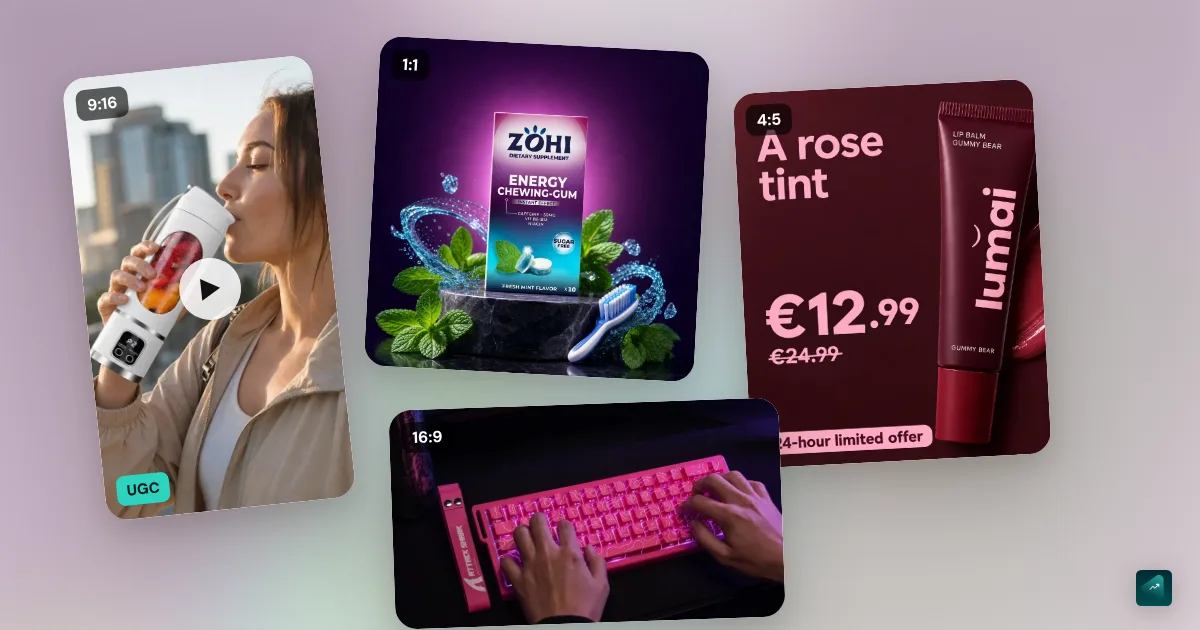
If you only make one format, choose 9:16 at 1080 x 1920. It's the format for Reels, Stories and TikTok. For the feed, Meta recommends 1:1 or 4:5, which cover more of the mobile screen. Make your own 4:5 crop rather than letting Meta crop it.
TikTok accepts 9:16, 1:1 and 16:9, with a minimum of 540 x 960 pixels. A video can run up to 10 minutes and 500 MB. Its best practices call for at least 720p.
For text, Meta's guide recommends 125 characters of primary text in the Instagram feed. In the Facebook feed, it recommends 50 to 150. For the headline, it recommends 27 to 40 characters.
Safe zones: where to put text on Meta and TikTok
On a Reel or a TikTok, the app lays several elements over your video: the account name, caption, buttons (like, comment, share) and call to action. Any text or price underneath is hidden.
- Meta, Reels and Stories. The ads guide recommends leaving at least 14% at the top, 35% at the bottom and 6% on each side free of text, logos or other key elements.
- TikTok, In-Feed. TikTok provides downloadable templates. On the standard 720 x 1280 template, the clear area starts 160 pixels from the top (12.5%). It stops 440 pixels from the bottom (34%) and leaves 80 pixels on each side (11%). At the bottom right, it also avoids the button column. TikTok notes that the zone depends on the dimensions and the caption length. A long caption reaches higher, so keep yours short.
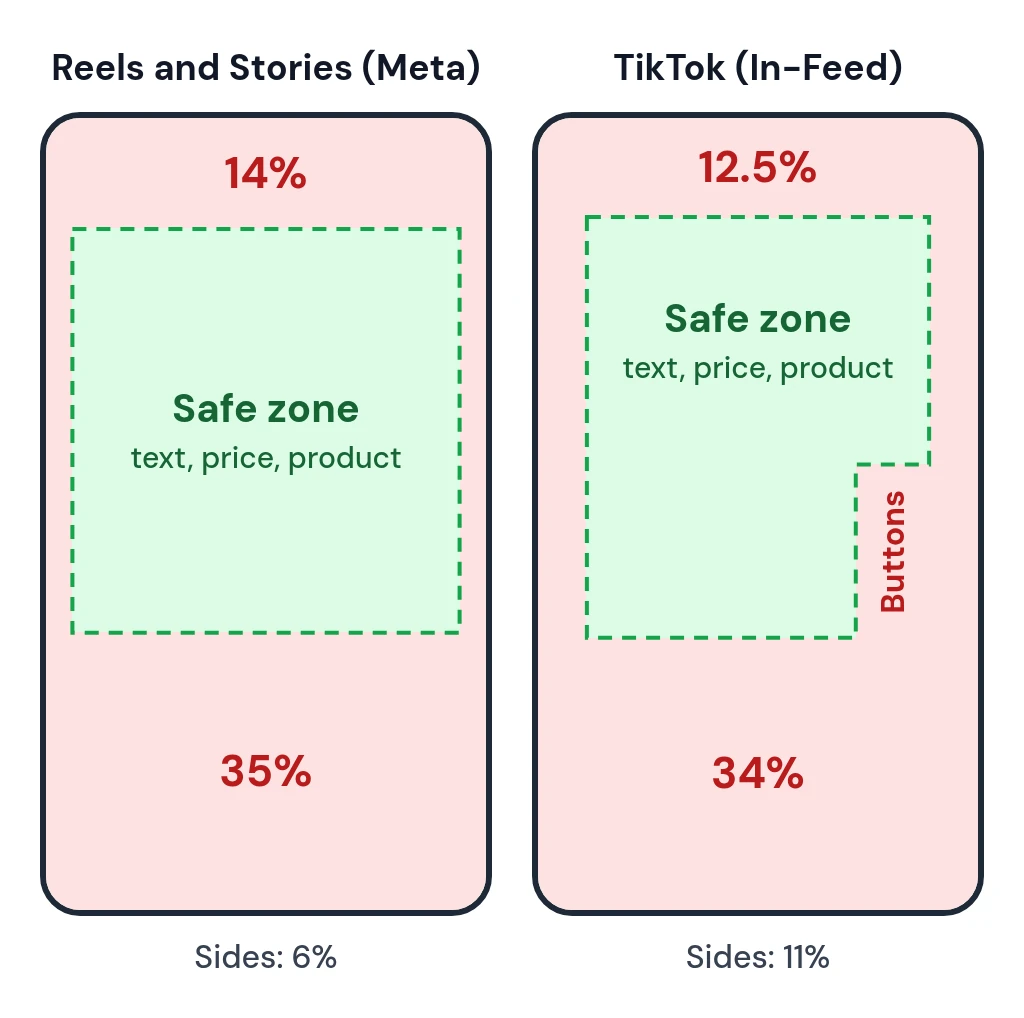
Here are the same margins in pixels, on a 1080 x 1920 video.
| Margin | Meta | TikTok | Both |
|---|---|---|---|
| Top | 269 px | 240 px | 269 px |
| Bottom | 672 px | 660 px | 672 px |
| Sides | 65 px | 120 px | 120 px |
| Right column | none | 180 px | 180 px |
TikTok's button column takes the rightmost 180 pixels. It runs from 840 to 1,260 pixels down from the top, just above the bottom band. For one video on both platforms, use the "Both" column. Your text, price and product then stay between 269 pixels from the top and 672 pixels from the bottom, 120 pixels from the edges. In the lower half, they also stay left of that column.
Automatic options that change your creative: turn them down
Leave the platforms free on audience and budget. On the creative, though, stay in control. An option that changes your video changes what you're testing, and you no longer know what sold.
- Meta, Advantage+ creative. Among its optimizations, Meta lists auto-cropping non-9:16 image ads to 9:16. It also lists adding music to image ads. Meta recommends opting in. Our take is to turn them off when you create each ad. The steps are in the Meta ads tutorial, step 3.
- Meta, Reels templates. Media that isn't 9:16 gets an automatic template to fill the vertical screen. To avoid it, upload 9:16 media or choose No template for the placement. Only the basic enhancements remain, such as color temperature and resolution. Meta says advertisers can't opt in or out of them.
- TikTok, Automate Creative. Keep it off, along with AI-generated content. The TikTok ads tutorial shows this in step 4. Automate Creative can change your music and resize your video. It can also add sound effects.
Shoot on your phone
Ads that look like ads are often ignored. A video that looks like something a real user would post does better, and your phone is enough to shoot it. TikTok recommends it itself, with people on screen and a DIY style.
- Natural light, facing a window.
- Vertical framing, with the product clearly visible inside the safe zone.
- Short shots, two or three seconds each.
- The product in use, in a real situation. Show a real desk and real hands unfolding the stand.
- Clean sound if you talk. A cheap lapel mic changes everything.
The footage you shoot of your test order is often better than the supplier's. It's unique, and it shows the real product.
For music, never use a licensed track. Your playlist isn't royalty-free. Meta excludes licensed music from Reels ads. It recommends original audio or the royalty-free Meta Sound Collection instead. On TikTok, businesses can't use the general music library for commercial use. They go through the Commercial Music Library, which is free for businesses. It holds 1 million pre-cleared songs.
UGC ads: what they are, and how to pick a UGC creator
UGC (user-generated content) means videos shot by customers or creators. They take the style of an honest review, as a talking head, a demo or an unboxing. They work because they feel like a recommendation rather than an ad. A UGC creator is paid to shoot these videos for your brand. They don't necessarily post them on their own account.
You can get them in three ways.
- Your customers, in exchange for a free product or a discount.
- UGC creators, through dedicated platforms or directly.
- Creators who already post. You promote their video with Spark Ads on TikTok or partnership ads on Meta (see below).
One merchant on r/shopify gets near-identical pitches from creators. Before paying, they screen them with a few questions you can reuse.
- Usage rights. In ads, on which platforms and for how long, all in writing.
- Raw files, so you can edit your own versions.
- The type of video, among demo, talking head or unboxing. For a laptop stand, go with the demo.
- Experience in your niche.
- A paid test clip before ordering several videos.
There's no official rate. An advertiser on r/FacebookAds spends $30,000 to $50,000 a month across accounts. They say they pay creators $150 to $400 per video depending on the niche. That's a ballpark, not a benchmark.
One rule isn't negotiable. The creator must have actually used your product. In the European Union, falsely representing oneself as a consumer is among the commercial practices banned in all circumstances. So is submitting or commissioning fake consumer reviews or endorsements (Directive 2005/29/EC, Annex I, points 22 and 23c).
Spark Ads: what they are and how to get the code
Spark Ads turn an already-published TikTok video into an ad, on your account or a creator's. The ad keeps the account name, likes and comments. For a creator's video, it takes two steps.
- The creator opens the video in the TikTok app and taps the three dots. They pick Ad settings, then Generate, and send you the code.
- In Ads Manager, when adding the ad's creatives, click Add post and paste the code. You can add up to 20 at once.
Watch out for two traps. The caption can no longer be edited once the video is authorized. And a private video becomes public as soon as it runs in a campaign. The details are in the TikTok ads tutorial.
Meta partnership ads
On Meta, the equivalent is called partnership ads. They used to be called branded content ads, and advertisers often call this whitelisting. The ad's header shows the creator's account and yours. Meta then combines signals from both accounts for delivery. You need the creator's permission. Since September 2026, partnership ads can also run in WhatsApp Status.
AI UGC ads: what merchants say
AI avatar tools promise hundreds of UGC videos without a creator. Merchants' feedback is mixed.
- One brand says it "runs about $5 milly a year on Meta ads" to its Shopify store. It hits three problems. AI gets the details of a complex product wrong, and the tool takes time to master. Above all, AI can do a person looking at the camera holding a bottle, not a real demo. The bluntest reply in the thread says it "also erodes customer trust." Another merchant mainly uses it for still product photos, not fake influencer videos.
- An advertiser tested it across several brands for six months. They use it as "a hook testing layer." They generate 10 to 20 hooks cheaply, then reshoot the winning hook with a real creator, "or even just the founder on a phone."
- A test posted on r/FacebookAds compares the same script as real UGC and as an AI version. In week one, the AI's cost per purchase is about 6% lower. It's about 12% higher in week two, then jumps by almost 40% in week three. It's a single test, with no sample size given.
Our take is to keep AI for writing scripts and testing hooks. For the demo, use real footage of the real product.
Two rules come on top. An AI avatar presenting itself as a customer who used your product is a fake consumer review. That's banned in the EU. And since August 2, 2026, the EU AI Act (Article 50) requires disclosing "deep fakes." These are AI-generated videos that resemble existing people, places or events and could pass for authentic. Some advertisers already do it at no cost. "All our AI avatar ads say AI generated directly on the video and they still crush," one writes on r/shopify.
If your store was generated with Scale Ova, you can also create product visuals in the Studio. They then work as a base for your still-image ads.
Test your creatives: how many per ad set
How many. TikTok recommends 3 to 5 creatives per ad group, with big differences between them. Meta gives no number for a first test. Our rule is the one from the tutorial, which is 3 to 5 ads. Budget 2 to 3 times your maximum cost per ad over seven days. On a tight budget, go down to 2 or 3. "If you're running a $30/day ad set and split it across 4 creatives, each creative might only see $7/day," one advertiser works out on r/FacebookAds.
One video per ad. Meta lets you put several videos in one ad, but make one ad per video anyway. A commenter on r/FacebookAds gives the reasons. Each video then gets its own post ID. You can turn one off without touching the others. And you can move the winner to another campaign with its comments and history. With several videos in a single ad, removing one means editing the creative. For Meta, that's a significant edit, and it restarts learning.
Where to add new ones. Create them as new ads in the same ad set, not in a new campaign. That way they share the budget and the learning data. TikTok gives the same advice for its ad groups. Add them all at once, at most once a week, because each addition restarts learning.
Don't panic if one ad takes all the budget. "One ad getting all the spend is the CBO working, not a problem," an advertiser replies on r/ecommerce. Judge each ad on its cost per purchase, not its share of spend.
Meta's testing tool. The creative test creates 2 to 7 copies of an ad inside an existing campaign. That lets you compare variations. It only works with the Highest volume bid strategy. It's useful once you have a winning ad and want to test a single variable, such as the hook.
The name. Name each ad with its angle, hook and version, like "problem_question_v2". In a week, you'll know exactly what worked.
Static ads or video ads? Run both. According to Meta research, campaigns with both static images and video achieved conversion lift at a 17% higher rate than campaigns with static images only. Merchants disagree. "Statics get me literally 0 sales," says one. "Now static wins for us," says another. The shortest answer in the thread is simply "You need both."
Read your results: the hook rate
Back to the tutorial's campaign. Week one picked the problem as the winning angle, with problem_video_v1. In week two, three new hooks for the same angle were added in a single batch. Here's the Ads tab after seven days.
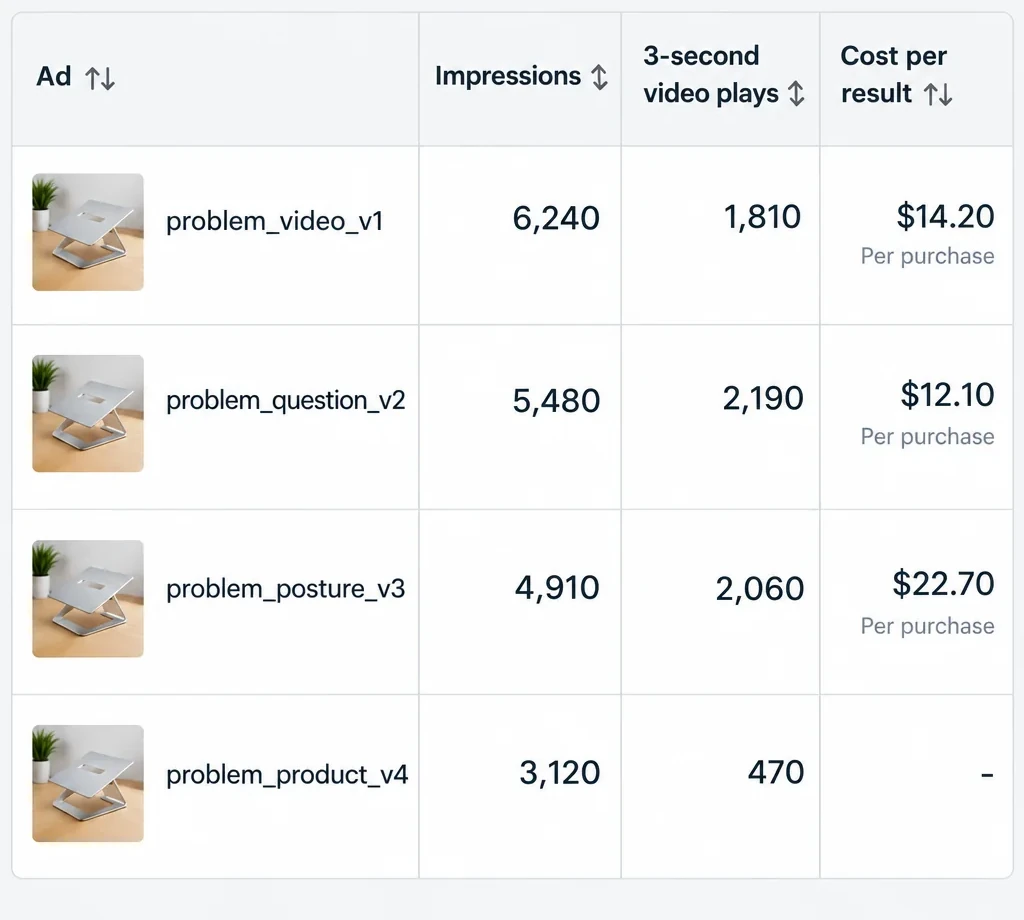
The hook rate is 3-second video plays ÷ impressions. Meta has no column by that name. It's the formula advertisers use. Meta counts a 3-second play when the video plays for at least 3 seconds. If the video is shorter, it has to play for 97% of its length. Replays don't count.
Here's each ad's hook rate, next to its cost per purchase.
| Ad | Hook rate | Cost |
|---|---|---|
| problem_video_v1 | 29% | $14.20 |
| problem_question_v2 | 40% | $12.10 |
| problem_posture_v3 | 42% | $22.70 |
| problem_product_v4 | 15% | none |
With an $18 maximum cost, here's how to read it.
- problem_product_v4 opens on the product sitting on a desk. On this video, 85% of people scroll past before the third second. And $24.60 goes out without a purchase. Cut it. The hook failed, not the angle.
- problem_posture_v3 stops the most people, but sells above your $18. The start hooks, but the rest doesn't convince. Keep the hook and rework the middle or the offer.
- problem_question_v2 does both, with a 40% hook rate and $12.10 per purchase. That's your new base to build on.
- problem_video_v1 still sells below $18. Keep it while it holds.
In total, the week cost $175.20, which is $25 a day. It brought in 10 purchases. That's $17.52 per purchase. You're just below your $18, and the campaign is no longer losing money.
Still, look at the volumes, which run from 2 to 4 purchases per ad. One more purchase would drop problem_posture_v3's cost from $22.70 to $15.13. The hook rate instead rests on thousands of impressions, so it settles much faster. Use it to judge the start of the video. The cost per purchase judges the ad, and you confirm it over a second week. When an ad holds under your maximum cost for several weeks, you can raise its budget in steps. These numbers are only an example. There's no official "good" hook rate, so compare your ads with each other. For the other columns, read your ad campaign numbers goes through them.
Creative fatigue: spot it and refresh your creatives
A winning creative eventually wears out. The audience has seen it too often, and the cost per purchase rises. On r/FacebookAds, an advertiser kept the same 3 or 4 creatives for six weeks. Their click-through rate fell from 2.1% to 0.9%.
What Meta shows. In the Delivery column, Creative limited appears when the cost per result is higher than your past ads but less than double. Creative fatigue appears when it's double or more. Meta considers all recent exposures of the image or video, including from other campaigns from your Page. But according to its help center, this feature is only available for ad sets with one creative. With 3 to 5 ads per ad set, don't count on it and monitor things yourself.
What you watch. On your winning ad, check whether the frequency goes up. Also check whether its click-through rate goes down and its cost per purchase climbs back toward your maximum. "Watch the winning ad's frequency," one advertiser advises on r/ecommerce. That's your signal to add creatives.
What you do. Meta recommends a new ad with an image or video that is "materially different." It also advises keeping the original active instead of pausing it. It suggests Advantage+ creative too, which you can turn down. TikTok recommends refreshing creatives when results decline. Add them to the existing ad group rather than creating a new one.
The pace. Add creatives in a single batch, at most once a week. On Reddit, big budgets add creatives daily. "I have the best results at 1 per week," a small-budget advertiser says all the same.
Classic mistakes
- Opening on the logo or the product sitting still. In the example, 85% of people scroll past.
- Putting text or a price in the bottom 35%. The caption and the button hide it.
- Putting five videos in one ad. You can no longer cut one without restarting learning.
- Changing five things between two versions. You don't know which one mattered.
- Letting the platform crop your video or add music to it.
- Using licensed music.
- Having an AI avatar or a creator who never used the product play a customer.
- Promising more than the product delivers. The ad must match what your customer receives.
No store yet? You can generate it with Scale Ova from your product. You look at it and change it for free, and you only pay when you publish it on Shopify.
FAQ
What size should Instagram ads be in 2026?
What are the TikTok ad specs?
What is the TikTok safe zone?
What are UGC ads, and what is a UGC creator?
What are Spark Ads, and how do you get the authorization code?
How do you write a hook for an ad?
How many creatives per ad set?
What is creative fatigue on Meta ads?
Static ads vs video ads: which works better?
Can you make UGC ads with AI?
Sources
- Meta Ads Guide: Instagram Reels, Instagram feed video, Instagram feed image and video and image specs, Meta, accessed September 24, 2026
- About creative optimizations for Reels ads, Meta Business Help Center, accessed September 24, 2026
- Creative best practices for conversion testing and Set up a creative test in Meta Ads Manager, Meta Business Help Center, accessed September 24, 2026
- 3-second video plays, Meta Business Help Center, accessed September 24, 2026
- About creative fatigue recommendations in Meta Ads Manager, Meta Business Help Center, accessed September 24, 2026
- About partnership ads, Meta Business Help Center, accessed September 24, 2026
- TikTok Auction In-Feed Ads, specs and safe zone templates, TikTok Ads Manager help, last updated June 2026, accessed September 24, 2026
- Creative best practices for performance ads, TikTok Ads Manager help, last updated June 2025, accessed September 24, 2026
- About the Commercial Music Library, TikTok Ads Manager help, last updated July 2025, accessed September 24, 2026
- About Spark Ads, TikTok Ads Manager help, last updated June 2026, accessed September 24, 2026
- Directive 2005/29/EC on unfair commercial practices, consolidated version, Annex I, EUR-Lex, accessed September 24, 2026
- Regulation (EU) 2024/1689 on artificial intelligence, Article 3(60) and Article 50, EUR-Lex, and Code of Practice on AI-generated content, European Commission, accessed September 24, 2026
- r/FacebookAds threads accessed September 24, 2026: Separate Ad for each creative or all creatives in one ad?, Multiple ads in one ad set vs. one creative per ad set on a low budget?, How many creatives is too many?, Do static ads perform?, What are you all using for static ad creatives these days, I A/B tested real-model UGC against an AI-generated version of the same script
- r/ecommerce threads accessed September 24, 2026: When should I think about adding more creatives?, DTC Founders: Do you hire freelancers just for rapid-testing static ads, or keep it in-house?
- r/shopify threads accessed September 24, 2026: Anyone else getting spammed by "UGC creators"?, My hesitance with AI UGC Ads, Thoughts on AI UGC (Yapper ads) for Shopify stores?