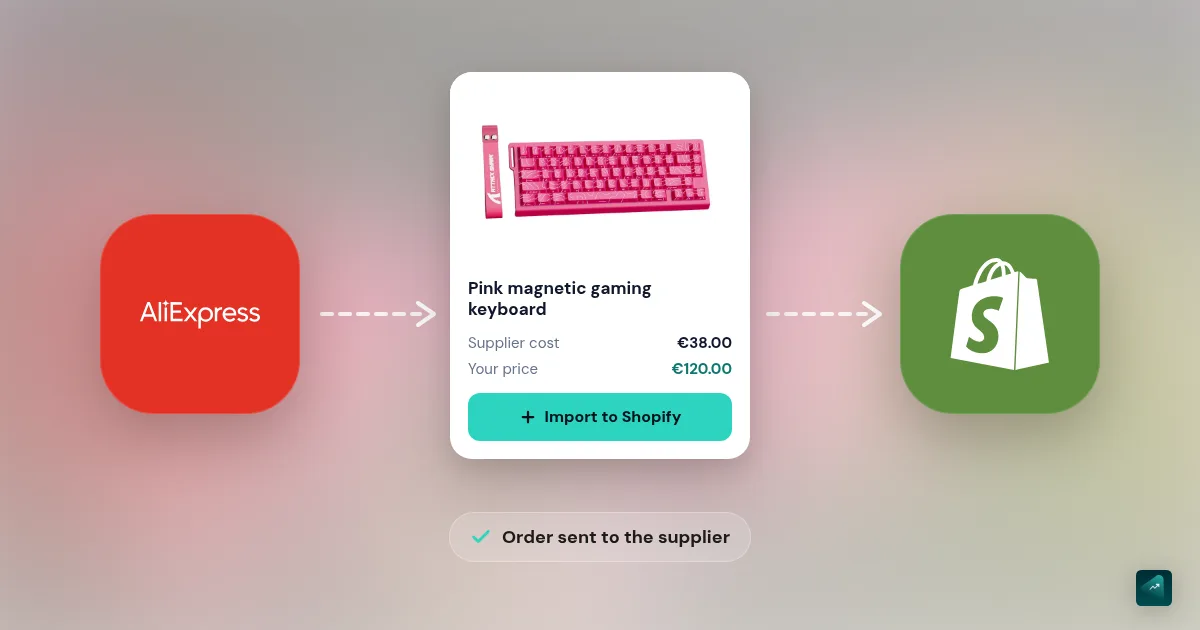
Without a tool, selling an AliExpress product on Shopify takes a lot of copy and paste. You copy each customer's address into AliExpress by hand and pick the right variant. Then you pay order by order. After that, you come back to paste the tracking number into Shopify.
DSers does this work for you. It fills in the address and can place up to 100 orders in one click. Then it sends tracking back to Shopify. On the Shopify App Store, the app shows a 5.0 rating across 6,408 reviews as of October 29, 2026. It has been listed there since October 26, 2018. DSers describes itself as the official AliExpress, Alibaba and 1688 dropshipping partner. Menu names below are in bold, exactly as they appear in the app.
This tutorial follows one example from start to finish. It's a store selling an insulated water bottle in three colors, shipped to the US. The amounts in the example are made up. The menu paths come from the DSers Help Center.
What you need before you start
- A Shopify store, even if it's not published yet. Its shipping zones and rates need to be set up, and you'll see below why DSers depends on them. If you don't have one, you can generate it with Scale Ova from your product. Then you'll set up shipping and payments.
- An AliExpress buyer account with a saved payment method. That's the account you'll pay suppliers with.
- Google Chrome, if you want the import extension.
- The product you want to sell, spotted on AliExpress. If you're still choosing, how to find a supplier helps you sort through them. You may still be torn between dropshipping and another way to sell online without inventory, like print-on-demand. If so, start there.
Step 1: install DSers and link AliExpress
- In your Shopify admin, open Apps and search for "DSers". Pick DSers: Dropship+AliExpress+AI and click Install. Then accept the permissions, since DSers needs your products and orders to sync them.
- DSers offers to create your account with your Shopify store's email. You can also log in to an existing DSers account. Pick the free plan (Basic), which the DSers Help Center calls enough to get started.
- Check the connection in Settings > Application Management > Sales channel. Your store should show Connected there.
- Link AliExpress in Settings > Application Management > AliExpress. Click Add Accounts and log in in the window that opens, then click Authorize. Use the account that will pay for orders.
- If you work in Chrome, install the DSers extension from the Chrome Web Store. Then log it in to your DSers account.
One DSers account manages up to 3 stores on the free plan.
Step 2: set the ship-to country before you import
An AliExpress supplier can show a different price depending on where the order ships. If DSers imports the price for another country while you ship to the US, your whole margin math is off from the start.
- Before your first import, set DSers's default country ("Price for ship to country") to United States. DSers then fetches the US price and shipping for every product you import.
- Afterwards, avoid changing it. Switching the country on products already linked can break the link to the supplier, called the mapping and explained below. Your orders then stop going through.
Step 3: import your product
There are two ways to do it, and each takes under 30 seconds according to the DSers Help Center.
- By link. Copy the product page URL on AliExpress. Paste it into the Import List bar, then confirm.
- With the extension. On AliExpress, click Add to DSers on the product page. From a search results page, you can check up to 10 products and import them in one go.
The product arrives with the supplier's title and photos. Its variants and supplier price come along too. It isn't in your store yet, it waits in Import List for you to prep it. The free plan allows 500 imports a day and 3,000 products in total.
Step 4: prep the product before you push it
This is the step most people rush. Yet it's the one that separates a credible store from an AliExpress copy. Click the product card in Import List to open the Edit Product Detail editor. It has four tabs.
- Products, for the title. The example's supplier titles it "2026 New Stainless Steel Water Bottle Vacuum Insulated Sports Thermos Cup". Replace that title with a name your customer understands, like "Insulated Water Bottle 24 oz".
- Variants, for colors and prices. Rename the variants in plain words ("Green#01" becomes "Sage") and uncheck the ones you don't want to sell. Then type your selling price in the Price column. Right next to it, the table shows the product cost and the shipping cost for the chosen country.
- Description. Delete the supplier's. It's machine-translated, and you'll find it word for word on hundreds of stores. You'll rewrite it with the method from the product page that converts.
- Images. Uncheck photos with Chinese text, a watermark or another shop's logo. Keep 3 to 5 sharp ones. The free plan doesn't let you upload your own photos in DSers. You'll add them in Shopify after pushing.
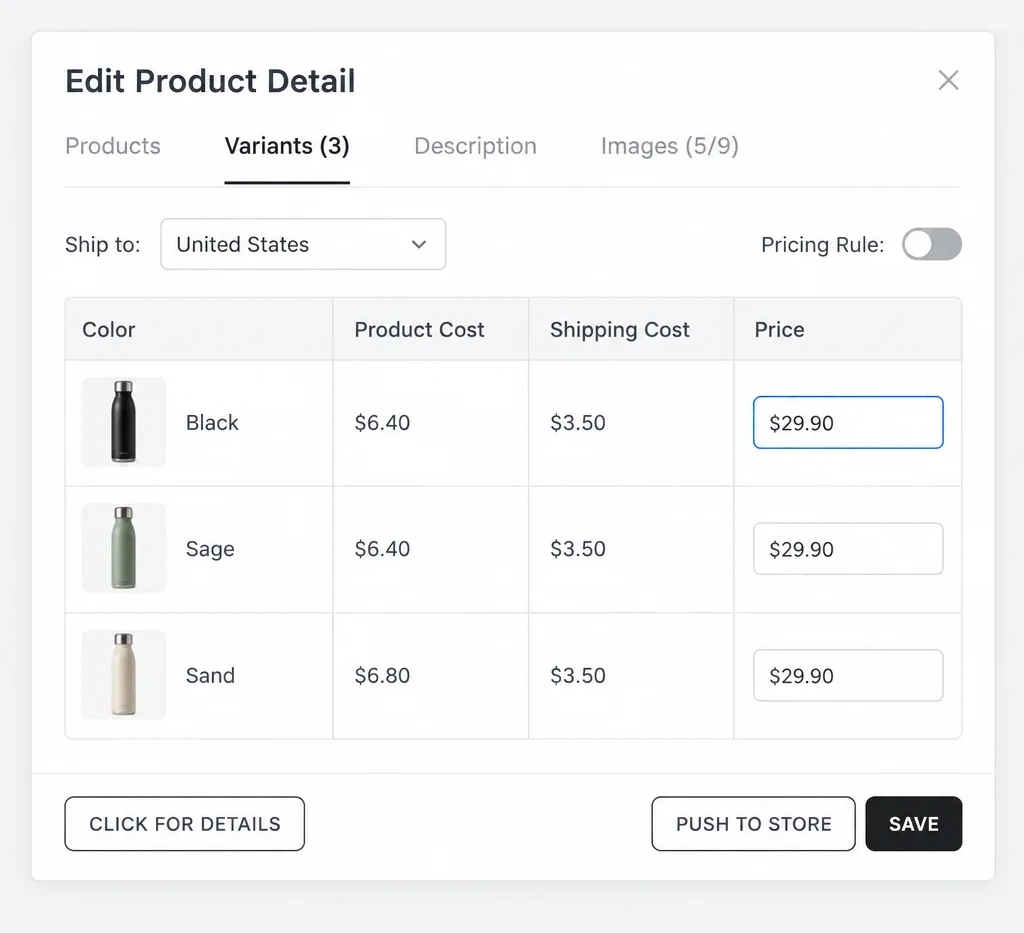
When it's ready, click Push to Store. DSers lets you publish the product right away or create it as a draft. Pick the draft, which you'll finish in Shopify with your photos and your description.
Step 5: work out your real cost, duties included
The price on AliExpress isn't what you pay. Two lines get added to it.
- Shipping. On r/dropshipping, one merchant found out while setting up their store. The product cost $19 and DHL shipping cost $42, with no other carrier offered. They planned to sell it for $44, so every sale would have lost money.
- Import duties. Since August 29, 2025, the US no longer exempts low-value parcels from duties, whatever country they come from. That exemption was called the "de minimis" rule. U.S. Customs and Border Protection made the suspension indefinite in rules announced June 24, 2026. Every shipment valued at $2,500 or less now owes the applicable duties. Genuine gifts of $100 or less are the only exception.
When you order, DSers shows an estimate (Product Cost, Est. Shipping, Tax & Fee). The DSers Help Center says these amounts are for reference only. The final amount is the one on the AliExpress order page. Your test order is what gives you the real number. Plug it into the profit margin calculator.
So that Shopify knows that cost, turn on the Send product and shipping cost to Store setting. DSers then puts the product and shipping cost in each product's Cost per item field. That way your Shopify margin reports come out right.
Step 6: set shipping once and for all
Each AliExpress product offers several shipping methods, with different delivery times and prices. That choice decides the delivery time you can promise. Rather than picking it order by order, set it once in Settings > Shipping Settings. It lives under Add Global shipping method based on Condition, which offers two modes.
- Basic: you list the shipping methods for the United States in your order of preference. If the supplier doesn't offer the first one, DSers takes the next.
- Advanced: you set your limits, and DSers picks the cheapest or the fastest method that fits them. Those limits cover required online tracking, maximum delivery time and maximum cost.
At the very least, require online tracking. Without a tracking number, your customer will end up emailing you to ask where their parcel is.
The delivery time shown is a promise from nobody. The r/dropshipping merchant quoted above had negotiated 5 to 10 days with their supplier. DSers showed 6 to 21 days instead. Always compare with your own test order, because that's the one that counts.
Step 7: tell the supplier what goes in the parcel
Your customer should receive your product, not an AliExpress invoice with the real price on it. In Settings > Order Settings, the Leave a message to Suppliers option adds a message to every order. You can also write one per product, and that one takes priority.
On r/dropship, a merchant about to open their store shared the message they settled on:
"Please use plain packaging and do not include any paper receipts or other papers such as packing slips. Please do not have any branding."
On r/dropshipping, another merchant adds a caveat. Unless you have an agent, there's "no way to really insure it's being followed." The only check is to order yourself.
Step 8: place and pay for orders
Here's what happens when a customer buys from your store.
- The order shows up under the Awaiting order tab in Open Orders. The customer's address is already filled in. DSers also fixes common address errors, free plan included.
- Check the shipping method and select the order, or all pending ones. Then click Place order to AliExpress.
- Choose how to place it. Order via API is the default and the fastest. Order via Chrome Extension is slower, but it applies the AliExpress coupons you've collected. On r/dropshipping, a DSers user confirms that the automation won't use AliExpress store coupons. In their words, "you have to manually change those orders sometimes."
- Click ORDER. DSers creates the orders on AliExpress without paying them and moves them to the Awaiting payment tab.
- Click Make Payment. DSers sends you to the AliExpress unpaid orders page, where you click Pay Now.
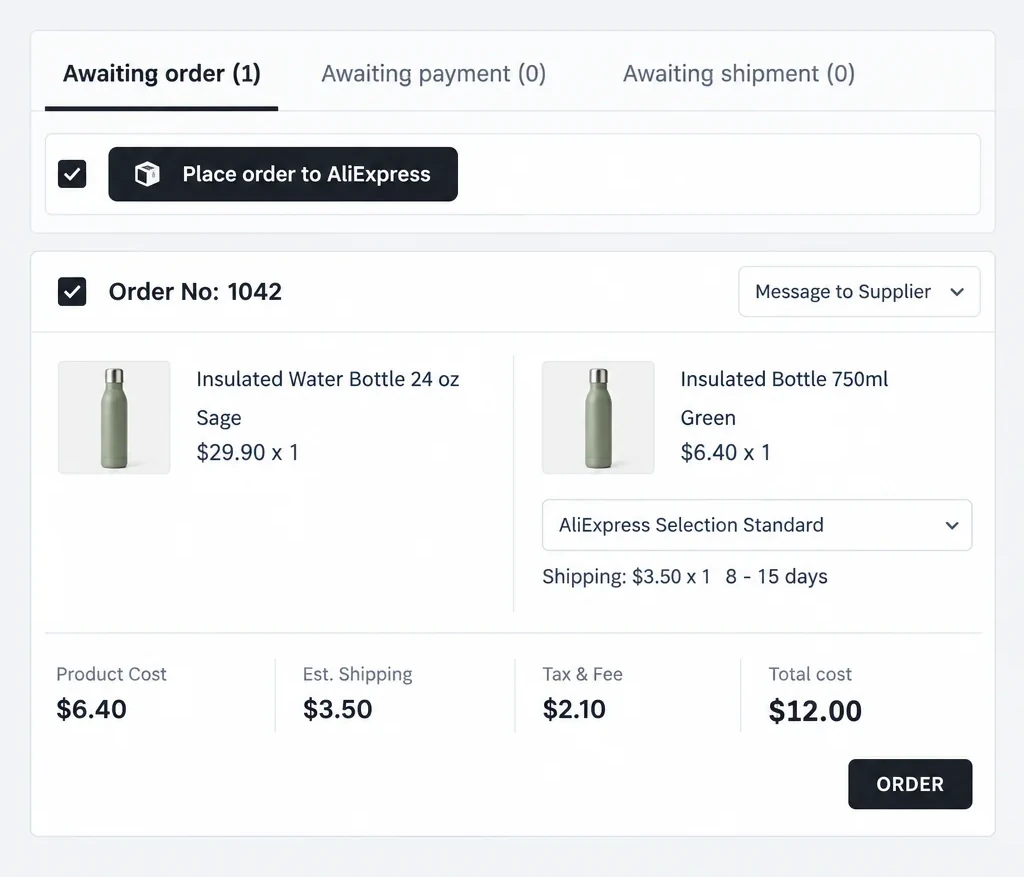
DSers doesn't pay for you and doesn't draw on your Shopify balance. A user on r/dropshipping calls it "like a semi-auto process". DSers creates the order, and you pay for it yourself. Your customer paid you, and you pay the supplier with that money. Place your orders every day, because each day of waiting adds to your customer's delivery time.
Step 9: tracking comes back on its own
When the supplier ships, DSers fetches the tracking number and sends it to Shopify. It checks AliExpress 5 times a day to find it. Shopify then marks the order as fulfilled. It also sends your customer the shipping confirmation email with their tracking link.
- In a hurry? In Open Orders, click Sync AliExpress Order, then Sync via API. It doesn't make the supplier ship faster. As long as nothing has shipped, there's nothing to fetch.
- Want to delay or turn off the shipping email? That's in Settings > Fulfillment Settings.
- The supplier changes the number after the fact (placeholder number, corrected mistake)? DSers watches for those changes for 7 days on the free plan. It keeps watching for 14 days on Advanced and 21 days on Pro.
Keep an eye on orders that still have no tracking after a few days. It's often the sign of a slow supplier, to chase or replace.
Mapping: when you need to go back to it
Mapping is the link between each variant in your store and the supplier's variant. When you push a product with Push to Store, DSers creates that link on its own. You need to come back to it in three cases.
- You added a variant in Shopify. That variant has no link. From the Shopify product page, click More actions > Edit in DSers, then the Mapping icon. Then match it to the supplier's option. Renaming an existing variant keeps the link, on the other hand.
- The supplier changed their variants, like a color renamed or a size removed. Turn on the SKU Changes alert in Settings > General Settings > Notification. The affected product then shows a red badge in My Products. Click its Mapping icon and redo the link.
- Another tool rebuilt your listing. On r/dropship, a merchant spent hours on shipping and mapping errors before finding the cause. Their listings pushed by DSers worked. The ones rebuilt with a product page builder lost their link, with the same supplier. If a tool recreates your listing or its variants, redo the mapping right after through Edit in DSers.
Basic mapping also takes a backup supplier per variant. If the first one is out of stock, DSers orders from the second. Both have to come from the same platform, AliExpress with AliExpress.
Stock and prices: what the free plan doesn't do
On the free plan, DSers checks your suppliers every 24 to 36 hours. It can alert you to a stockout or a price increase, but it doesn't touch your store. A beginner found out on r/dropship and put it this way: "the automatic inventory update setting is a paid feature. Product that is out of stock on DSers isn't going out of stock on the Shopify store."
- Alerts are free. In Settings > General Settings > Notification, turn on Inventory changes. Alerts show for 30 days on the product card in My Products and under the bell.
- Automatic updates start on the Advanced plan. You set them in Settings > Product Settings > Automatic Inventory Update. They run once a day at 10 a.m. China time, which is 10 p.m. Eastern the day before in summer. Four questions await you there (product out of stock, variant out of stock, mapping lost, stock changes). All four are set to Do nothing by default. So paying for the plan isn't enough, you also have to change those settings.
Without a subscription, check your products' stock and price at the supplier yourself. Do it at least once a week.
Products showing "Sold out" on Shopify
It comes up a lot on the Shopify Community forum. The product imported by DSers has stock, but the store shows "Sold out" or refuses to ship to the customer's address.
The cause is on the Shopify side. To send tracking back, DSers assigns ordered products to its own location, DSers Fulfillment Service. Its order window says so. Shopify puts a location created after your shipping profile in the Not fulfilling from section, with no zones or rates. So a product stocked only there can't ship anywhere.
To fix it, open your shipping profile in Settings > Shipping and delivery. Add the DSers location to the group that holds your zones and rates. A Shopify Community thread covers this exact problem. The answer that got several merchants unstuck fits in one sentence: "you need to set up the shipment zones and costs in your Shopify store."
Free or paid plan?
Here are the first three plans, from the DSers pricing page as of October 29, 2026.
| Basic | Advanced | Pro | |
|---|---|---|---|
| Price | Free | $19.90/mo | $49.90/mo |
| Stores | 3 | 10 | 25 |
| Products | 3,000 | 20,000 | 75,000 |
| Bulk orders | Yes | Yes | Yes |
| Tracking to Shopify | Yes | Yes | Yes |
| Auto stock sync | No | Yes | Yes |
| Auto price sync | No | Yes | Yes |
| Your own photos | No | Yes | Yes |
Paid plans come with a 14-day free trial. The trial starts the day you switch to the paid plan, not the day you sign up. Paid yearly, they cost 20% less, which comes to $190.80 a year for Advanced. An Enterprise plan at $499.90 a month targets very high volumes.
The DSers Help Center has its own plan table, and it doesn't say the same thing on the same day. For example, it reserves address fixing and automatic tracking for paid plans. The DSers overview for beginners also mentions 50 orders a month on the free plan. The pricing page and the App Store listing agree with each other, and the table above follows them. Your test order will tell you what your plan really does.
To start, the free plan is enough. A DSers user on r/dropship puts it plainly: "The free plan is probably more than enough so go for it." Move to Advanced when a supplier stockout or price increase costs you more than $19.90 a month. A single refunded order can be enough.
What merchants say
- To get started, the tool does the job. One merchant sums it up on r/dropship: "DSers is fine. It connects your store to AliExpress […]. You are not sitting there typing in addresses."
- The limits come from suppliers. Another merchant says everything was fine with a handful of products. Delivery times and stock became unpredictable as they added more. One reply in the thread sums it up: "the inconsistency with DSers isn't really a platform problem. you're dealing with 5 or 10 different suppliers each running their own carrier arrangements."
- Stockouts break the automation. On r/dropshipping, a user who moved to a competitor mentions tracking issues. They also describe orders that broke whenever a supplier went out of stock. That's what the backup supplier and stock alerts above are for.
The mistakes that cost money
- Importing without setting the ship-to country. The cost shown is then another country's.
- Publishing the supplier's description as is. It's identical on hundreds of stores.
- Leaving shipping and duties out of your price.
- Never ordering yourself. You then know neither the real delivery time nor the packaging nor the quality.
- Paying for Advanced and leaving stock settings on Do nothing.
- Rebuilding a listing with another tool without redoing the mapping.
- Letting orders sit. Every day of waiting adds to your customer's delivery time.
FAQ
Is DSers free?
Is DSers only for AliExpress?
Is DSers an official AliExpress app?
Is DSers trustworthy?
Is DSers the same as AutoDS?
Does DSers pay for orders for me?
Why do my DSers products show "Sold out" in my store?
Can my customer tell they're buying from AliExpress?
Sources
- DSers pricing, accessed October 29, 2026
- DSers on the Shopify App Store (plans, rating, reviews, launch date, publisher address), accessed October 29, 2026
- DSers Help Center, accessed September 24, 2026: What is DSers? A Quick Overview for Beginners, Connect DSers to Shopify Store, How to Set Your Default "Price for Ship to Country", Importing, Edit & Push, Shipping Settings, Bulk Order Processing, Fulfill Your First Order, Auto-Sync Tracking Number Changes, Mapping Errors, Basic Mapping: How to set Backup Suppliers, Inventory Auto-Sync, DSers Plans and Billing
- Managing fulfillment locations in shipping profiles, Shopify Help Center, accessed September 24, 2026
- CBP modernizes low-value shipment processing, U.S. Customs and Border Protection, June 24, 2026, accessed September 24, 2026
- AutoDS on the Shopify App Store, accessed September 24, 2026 (rating and reviews rechecked October 29, 2026)
- r/dropship threads accessed September 24, 2026: How to properly fulfill via DSers?, Do you use DSers?, Any negatives/cons with Dsers?, Hours spent linking to DSers, Dropshipping as a side hustle, UK based., At what point did you stop using DSers and start working directly with Alibaba suppliers?
- r/dropshipping threads accessed September 24, 2026: My margins are messed up because of DSers, what can I do?, DSers vs AutoDS which one is better?, How is dsers working?, For those of you who use dsers and aliexpress
- Shopify Community thread accessed September 24, 2026: Imported from DSer Says sold out?