This tutorial assumes your pixel is installed and checked. If not, start with installing your Meta and TikTok pixels on Shopify.
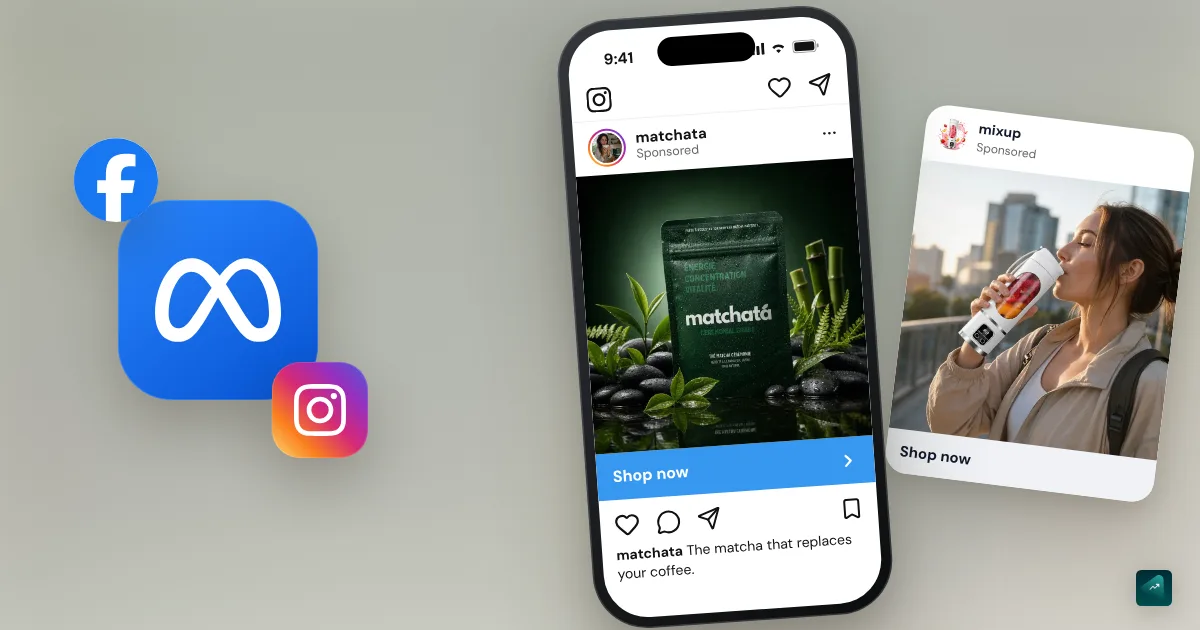
Meta covers Facebook, Instagram and their placements (feed, Stories, Reels). It's often a store's first paid channel, but not always the right one. It shows your product to people who weren't looking for it. It's also where many beginners lose their first budget. Most of the time, they pick the wrong objective and spread a shoestring across ten ad sets. Then they edit everything daily and draw conclusions after 48 hours.
Here's how to launch a clean campaign that gives you real answers. The Meta screens and rules quoted here were checked against Meta's help pages on September 23, 2026.
Before launching: three numbers and a page
Your maximum acquisition cost. This is what you can pay in ads for one sale without losing money. It equals your margin per order before ads. Say your product sells for $31 and costs you $12 delivered. Once payment fees are taken out, about $18 is left. So you can pay up to $18 per sale. If you charge VAT, take it out of the price first. Beyond that amount, every sale loses you money.
Your minimum ROAS. It's the same number seen the other way around. It tells you how much revenue each dollar of ad spend must bring in. In the example, $31 ÷ $18 ≈ 1.72. Each dollar of ads must bring in at least $1.72 in sales. The break-even ROAS calculator works it out with all your costs.
Your average order value. The higher it is, the more you can pay to win a customer. If your maximum cost is too low for ads, raise your order value first with the average order value levers.
Your landing page. The ad sends people to the product page and never to the homepage. That page must carry on the ad's promise exactly.
Step 1: the account
If you installed Meta's Facebook & Instagram app on Shopify, most of the wiring is done. Your business portfolio, your ad account and your pixel are already linked. The business portfolio is the Meta space that groups your Facebook page, Instagram account and ad account. You still need to:
- Add a payment method to your ad account.
- Set your real constraints once in your ad account controls, if you have any. Think of countries you don't ship to, or a minimum age if your product can't be sold to minors. Meta says these controls don't turn Advantage+ off. It's also where you'll turn off Audience Network in step 3.
- Open Ads Manager.
Domain verification is no longer required to measure your purchases. Meta still recommends it, so do it if Ads Manager suggests it.
Step 2: create the campaign with the Sales objective
In Ads Manager, click + Create. Pick the Sales objective, then click Continue. It's the only objective that asks Meta to find buyers. The Traffic or Engagement objectives find people who click or like, not people who buy. That's why a "cheap" Traffic campaign often brings visitors who never buy.
Then, at the ad set level, choose:
- Conversion location: your website.
- The pixel (Meta also calls it a "dataset"): the one linked to your store.
- The event: Purchase.
Step 3: leave targeting open, turn down the Advantage+ extras
With the Sales objective, Meta opens its Advantage+ setup. Budget, audience and placements are set so its system looks for buyers on its own. Leave that part to Meta. On a small budget with little data, slicing up targeting yourself doesn't help it.
Everything else, turn down. As you build the campaign, Meta switches on dozens of "+" options for your ads by default. It offers you more on every screen and pitches them as performance gains. Advertisers who test them one by one turn almost all of them off. "Tested extensively and they never seem to provide an uplift," one of them writes on r/FacebookAds. Another turned "every single one of them" off and got "the best results for my account."
What you leave open
| Section | Setting | Why |
|---|---|---|
| Budget | Campaign budget, as a daily budget | Meta shifts spend toward the ads that sell |
| Audience | Advantage+ audience: your country, no interests, Use as a suggestion ticked | Finding buyers is what Meta does best. Your real constraints (countries you ship to, minimum age) go in your account controls |
| Placements | Advantage+ placements, minus Audience Network (see below) | Meta picks between feeds, Stories and Reels based on where your ad works |
The structure that goes with it:
- One campaign, Sales objective.
- A single ad set on your country, with ages and genders open unless your product is truly for a specific group.
- Three to five ads in that ad set, each testing a different idea.
Don't split your budget into ten small ad sets by age, interest or placement. Meta's help puts it plainly: "By combining similar ad sets, you also combine learnings."
What you turn down
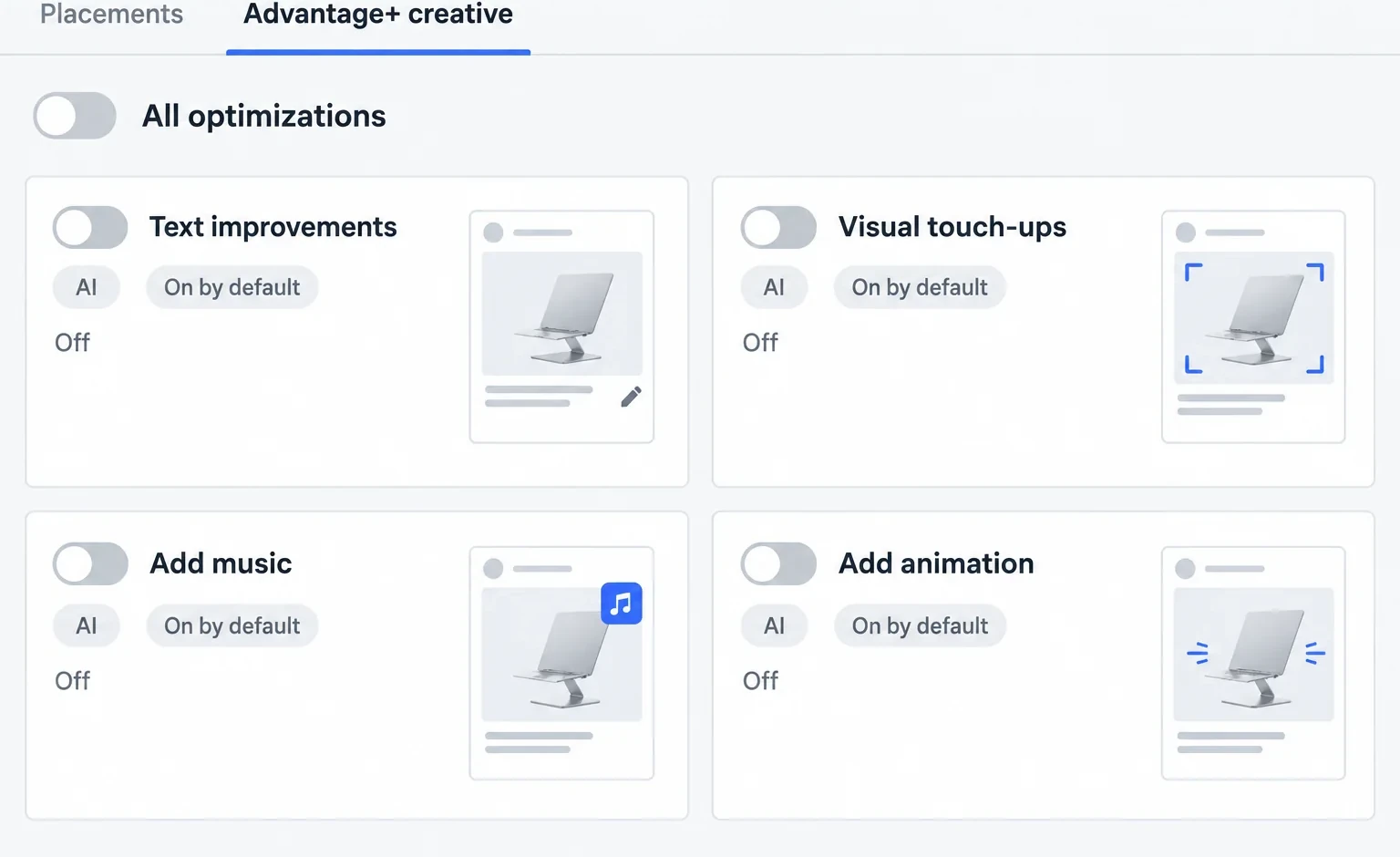
1. Advantage+ creative enhancements. You'll find them when you create each ad, in Set up creative. The Enhancements step shows several already on: text improvements, visual touch-ups, overlays, music, animation, and more. Meta warns that with them, "The media and text you upload may be adjusted." You wrote your copy and picked your image for a reason, so turn them all off. One advertiser describes a static image that Meta turned into an AI video without notice. The budget moved to that version, and it didn't sell.
Two more places need a check:
- Advanced preview. Some enhancements can only be turned off there. In the ad preview, click Expand, then the Advantage+ creative tab.
- The Review defaults button, next to advanced preview. It lists by category everything Meta turned on by default: translations, interactive experiences, related media, format display options, personalized destinations. Go through it before publishing.
2. Audience Network. These are apps and sites that partner with Meta, outside Facebook and Instagram. Meta cites a study where conversion rates were "8x higher among people who saw ads across Facebook, Instagram and Audience Network than people who only saw the ads on Facebook." So the comparison is with Facebook alone. It says nothing about what Audience Network adds on top of Instagram. Advertisers are blunt about it. They describe click-through rates of 40% that come from accidental taps in mobile games. One sums it up: "never once had 1 sale outside of feed, stories, reels."
To turn it off for your whole account, follow this path: Advertising settings → Placement controls → turn on My business can only advertise on specific placements → untick Audience Network native, banner and interstitial and Audience Network rewarded videos. Your campaigns keep Advantage+ placements for everything else. Meta is rolling this option out gradually. If you don't have it yet, switch the ad set to manual placements and untick Audience Network.
3. Multi-advertiser ads. At the ad level, the Multi-advertiser ads box is checked under Ad setup. Your ad can then show up in the same unit as ads from other businesses. It can also be resized or cropped to fit. Uncheck the box. Meta warns that multi-advertiser ads "may be turned on automatically for existing ads unless ads were explicitly opted out."
4. Testing new creative features. Go to Advertising settings → Creating ads → Creative features. If you see Test new creative features, uncheck it. Otherwise, Meta can apply enhancements that are still in testing to your campaigns.
5. Recommendations and the score. Ads Manager rates your campaigns out of 100, and that rating is called the opportunity score. It then nudges you to apply its recommendations to raise it. Meta admits the score "does not reflect your actual or future performance." It measures how many recommendations you followed, not how much you sell. So ignore them. A 60 with an ad selling below your maximum cost beats a 100.
Do all of this before launching. Afterward, any change to your ad creative can restart learning (step 6). Once the ad is published, open the Ads tab → Edit to check it. The Advantage+ creative section shows how many enhancements are on. You want zero.
Sometimes a toggle won't turn off. Since late summer 2026, several advertisers report that the Advantage+ creative toggle stays stuck on. They get around it by publishing the ad, then editing it while it's still in review. The enhancements turn off at that point (r/FacebookAds thread).
Step 4: three to five genuinely different ideas
What makes a Meta campaign work is the creative first. Testing the same video five times with a different button color teaches you nothing. Test different angles instead:
| Angle | Example for a laptop stand |
|---|---|
| The problem | "Sore neck by evening? Your screen is too low." |
| The demonstration | The stand unfolded and adjusted in ten seconds |
| The result | A clean desk, an upright posture, at the end of the day |
| The comparison | A stack of books versus the stand |
| The offer | Stand and desk mat bundle, free shipping |
Each ad has a headline, a "Shop now" button and short copy that restates the problem and the result. Name it with its angle and version, for example "problem_video_v1." In a week, you'll know exactly what worked. To produce these creatives, the article on creatives that work covers formats, hooks and shooting on your phone.
Get them all ready before launching. Adding an ad to an ad set is a significant edit that restarts learning. So new creatives go in as one batch, at most once a week, never as they come.
Add your UTM parameters in the field provided at the ad level. Check the mobile preview too.
Step 5: what budget for your first Meta ads campaign?
There's no magic budget, but there is a logic. You work your budget out from your margin. It also has to let Meta get purchases. Otherwise Meta learns nothing, and neither do you.
Here's our starting rule, which is not a Meta number. Plan 2 to 3 times your maximum acquisition cost per ad you test, over seven days. That's what it takes to decide. An ad that has spent 2 to 3 times what you can pay for a sale without making one has given you its answer.
| Calculation | Example |
|---|---|
| Maximum acquisition cost | $18 |
| Ads tested | 4 |
| Budget over seven days (4 × 2 to 3 × $18) | $144 to $216 |
| Daily budget | about $20 to $30 |
You'll often read that you should start with $5 to $10 a day. Run the numbers with an $18 maximum cost. At $10 a day for seven days, you can expect fewer than four sales over the week. Spread across four ads, they leave you nothing to compare.
Set this budget at the campaign level, as a daily budget. Think of it as the price of what you're about to learn. Meta also requires a minimum budget that depends on factors such as country, currency and the optimization you choose. Ads Manager warns you if you're below it.
If you can't afford that budget, paid ads are probably coming too early. Go back to first sales without paying instead.
Step 6: launch, then touch nothing during the learning phase
Meta reviews your ads before running them. "Most ads are reviewed within 24 hours," according to its help. Ads can also be reviewed again while they run. Some categories like health, weight loss or supplements have stricter ad rules. If you sell in those areas, avoid promising results and skip before/after photos.
Then comes the learning phase. While it lasts, the Delivery column in Ads Manager shows Learning and results stay unstable. According to Meta, an ad set exits it "usually after about 50 results in the week after the ad set's last significant edit." Its help lists these as significant edits:
- any change to targeting or ad creative;
- a change of optimization event or bid strategy;
- adding a new ad;
- pausing for 7 days or longer.
For budget, it all depends on the size of the change. Going from $100 to $101 won't restart anything. Going from $100 to $1,000 may restart learning. The hardest rule to keep follows from that. Don't touch anything for seven days.
"Learning limited": normal for a first test
Take the example again with $30 a day and a cost per purchase around $20. That's about ten purchases a week, far from 50. So the Delivery column will show Learning limited. Meta makes clear this status "isn't a penalty." It's a sign your budget isn't being spent as effectively as it could be with your current setup.
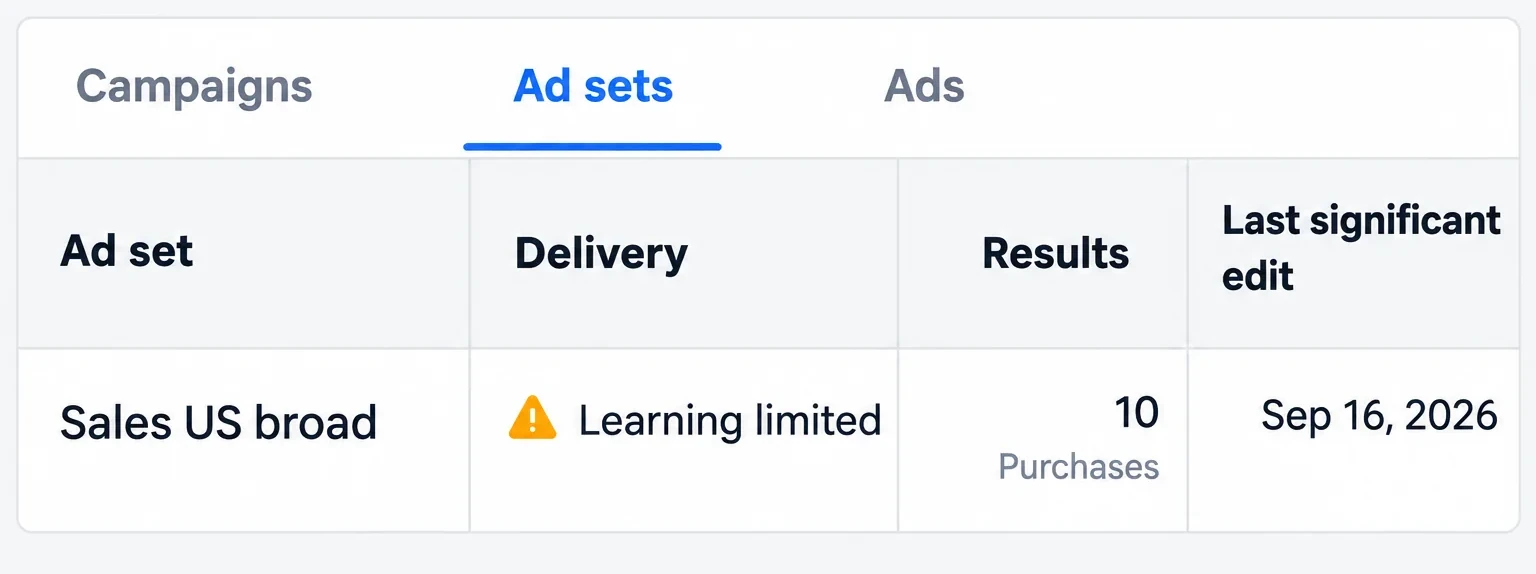
Meta suggests several ways out: combining ad sets, expanding your audience, raising your budget or optimizing for a more frequent event such as add to cart. For a first campaign, our take is to skip all of them. You already have a single ad set and a broad audience. Raising the budget just to hit 50 purchases a week means paying to please a column. Optimizing for add to cart is no better. Meta would then look for people who add to cart, not buyers. Keep Purchase as your event. Then judge each ad on its cost per purchase against your maximum cost.
Step 7: read your results (a worked example)
After three days, you don't judge sales yet. You check everything works:
- Ads are running and approved.
- People click. If an ad gets almost no clicks, its hook isn't working.
- Visitors add to cart. If nobody does, the product page or the price is the blocker.
- Purchases show up in Ads Manager and match your Shopify orders.
After seven days, you decide ad by ad in the Ads tab.
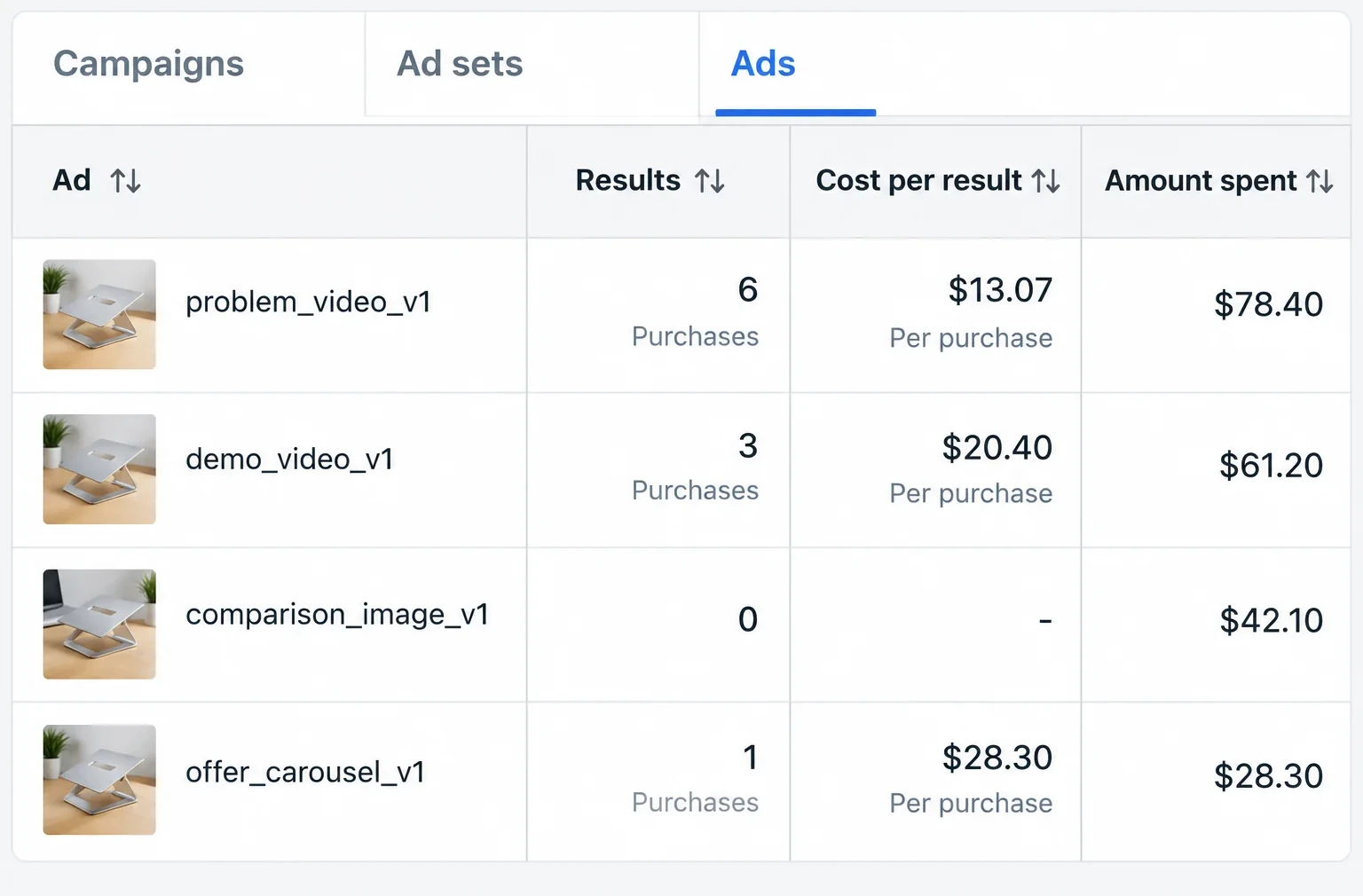
With an $18 maximum cost, here's how to read that table:
| Ad | What the numbers say | What you do |
|---|---|---|
| problem_video_v1 | 6 purchases at $13.07, below $18 | Keep it, that's your winning angle. Prepare two variations of it |
| demo_video_v1 | 3 purchases at $20.40, above $18 | It sells, but at a loss. Cut it, or keep it one more week if you have nothing to replace it |
| comparison_image_v1 | $42.10 spent, more than twice $18, without a sale | Cut it |
| offer_carousel_v1 | 1 purchase at $28.30 | Meta gave it little budget, and its one purchase cost more than your $18. Cut it in favor of the winning variations |
Taken as a whole, the campaign is at $21 per purchase, above your $18. So it's losing money. But ad by ad, it gave you an angle that makes money. That's exactly what a first campaign should give you. The following week, cut what loses. Add the variations in a single batch so learning restarts only once. Then read the results again seven days later. Once an ad keeps selling below your maximum cost, scale your ads explains how to raise the budget without breaking it.
Two separate cases:
- Clicks and carts, but no purchases. The problem is after the ad, in checkout or shipping.
- Nothing works. Rework the angles, or go back to the offer and the product page before adding budget.
Meta's purchases aren't your orders
Meta credits a purchase to your ad when it happens within a set time after someone saw or interacted with it. Its help describes three attribution settings:
| Setting | What it counts |
|---|---|
| Click-through | Purchases within 1 or 7 days after a link click on your ad |
| View-through | Purchases within 1 day after an impression of your ad |
| Engage-through | Purchases within 1 day after an interaction other than a link click: a share, a save, a video watched for 5 seconds |
On March 3, 2026, Meta announced that click-through would count link clicks only. The rollout has been gradual since that month. Before, a share or a save followed by a purchase also counted as a click. That case now moves to engage-through. Meta says it wants to bring its numbers closer to tools like Google Analytics, with no change to billing. If your click-through purchases dropped since then while your sales didn't, that's the reason. Either way, keep your Shopify orders as the reference. The full diagnosis, symptom by symptom, is in reading your campaign numbers.
Costly mistakes
- The Traffic objective to "test cheaply".
- Leaving the defaults on: creative enhancements, Audience Network, multi-advertiser ads.
- Applying recommendations to raise the score.
- Launching a catalog ad because Meta recommends it. On a small store, advertisers mostly describe traffic that doesn't buy.
- Ten ad sets on a small budget.
- Adding an ad every other day. Each one restarts learning.
- Raising the budget to get out of Learning limited instead of judging cost per purchase.
- Judging after 48 hours.
- Trusting Meta's numbers without comparing them to Shopify. Your real orders are in your admin.
- Sending people to the homepage instead of the product page.
If your product shows better on video than in photos, the TikTok Ads tutorial follows the same method. It also lists the TikTok extras to turn down. If your customers already search for your product on Google, the Google Shopping and Performance Max tutorial takes over.
No store yet? You can generate it with Scale Ova from your product. Looking around and editing it is free. You only pay when you publish it to Shopify.
FAQ
How do I launch a Facebook Ads campaign for my store?
Advantage+ or a manual campaign for beginners?
How do I turn off Advantage+ creative enhancements?
Should I turn off Audience Network?
What budget for a first Meta campaign?
How much does a Facebook Ads campaign cost?
Is $5 a day enough for Facebook Ads?
What's the difference between a campaign, an ad set and an ad?
How long does the Meta ads learning phase last?
How long should a campaign run before judging it?
Why does my campaign get clicks but no sales?
Sources
- Create a campaign in the Advantage+ campaign experience, Meta Business Help Center, accessed September 23, 2026
- What turns Advantage+ on and Advantage+ off, Meta Business Help Center, accessed September 23, 2026
- About the learning phase, Meta Business Help Center, accessed September 23, 2026
- Significant edits and learning phase, Meta Business Help Center, accessed September 23, 2026
- About learning limited, Meta Business Help Center, accessed September 23, 2026
- Best practices for minimum budgets, Meta Business Help Center, accessed September 23, 2026
- About ads in review, Meta Business Help Center, accessed September 23, 2026
- About attribution models and attribution settings, Meta Business Help Center, accessed September 23, 2026
- Simplifying Ad Measurement for a Social-First World, Meta for Business, March 3, 2026, accessed September 23, 2026
- Turn off Advantage+ creative enhancements in Meta Ads Manager, Meta Business Help Center, accessed September 23, 2026
- About Advantage+ creative, Meta Business Help Center, accessed September 23, 2026
- Review default-on creative features in Meta Ads Manager, Meta Business Help Center, accessed September 23, 2026
- Set audience and placement controls for your ad account, Meta Business Help Center, accessed September 23, 2026
- About Meta Audience Network, Meta Business Help Center, accessed September 23, 2026
- About multi-advertiser ads, Meta Business Help Center, accessed September 23, 2026
- Opt in to or out of testing new creative features in Meta Ads Manager, Meta Business Help Center, accessed September 23, 2026
- About opportunity score in Meta Ads Manager, Meta Business Help Center, accessed September 23, 2026
- Are you guys using Meta's Creative Enhancements? Worth it?, r/FacebookAds thread (Reddit), accessed September 23, 2026
- Is advantage+ placements good anymore?, r/FacebookAds thread (Reddit), accessed September 23, 2026
- Turn off advantage plus audience and placements, r/FacebookAds thread (Reddit), accessed September 23, 2026
- "Advantage+ Creative" will NOT toggle off, help!!!, r/FacebookAds thread (Reddit), accessed September 23, 2026
- Do Advantage+ Catalogue ads work for any small businesses, r/FacebookAds thread (Reddit), accessed September 23, 2026
- Create a business portfolio in Meta Business Suite, Meta Business Help Center, accessed September 23, 2026
- Facebook & Instagram by Meta, Shopify App Store, accessed September 23, 2026