This tutorial assumes your TikTok pixel is installed and verified. If not, start with install your Meta and TikTok pixels on Shopify.
TikTok sells some products within hours. For others, it loses money for weeks. The difference comes down first to the product, which has to show well in short video. It then comes down to your videos, which have to speak TikTok's language. The rest is keeping the default settings from spending your budget for you.
The TikTok screens and rules quoted here were checked in its help center on September 23, 2026. TikTok is rolling out a new campaign creation flow, one account at a time. Depending on yours, you'll see the "Manual campaign / Smart+ campaign" choice or a single unified flow. This tutorial gives the path for both.
When TikTok is the right choice
TikTok works when your product can be understood in a few seconds of video:
- It demonstrates: a kitchen gadget, a cleaning tool or a clever accessory.
- It transforms: skincare, storage or decor, with an honest before and after.
- It tells a story: a routine, an unboxing, a reaction or a surprising use.
TikTok is a weaker first choice if your product is hard to show. The same goes when your category's claim rules limit what you can say (health, weight loss), or when your budget can't carry a one-week test. In those cases, choosing your channel based on your product helps you find a better option.
Start with organic. Post videos of your product on a TikTok account for a few weeks. They cost nothing and show you which angles hold attention. The best ones will later become your ads. Photo carousels count too. A few slides showing your product in use are quicker to make than a video, and they show up in the same For You feed. To post them regularly without spending your evenings on it, our comparison of TikTok carousel tools puts nine tools side by side.
TikTok Shop is a different tool. If you sell through a TikTok Shop, its ads run through GMV Max. Since July 2025, that's the only campaign type supported for TikTok Shop ads. Its shipping deadlines and the SIRET business number it requires in France are covered in selling online without inventory. This tutorial is about your Shopify store, so about ads that send people to your website.
Step 1: the account and the pixel
- Install the free TikTok app from the Shopify App Store. Then connect your TikTok for Business account, your Business Center and your TikTok Ads Manager account.
- Choose the Enhanced or Maximum data sharing level. From Enhanced up, the purchase is also sent from the server (Events API) and not only from the browser.
- Place a test order. Check in Events Manager that the purchase comes through once with the right amount. TikTok renamed this event Purchase. The old name CompletePayment is still supported.
The step-by-step test and the UTMs to add are in install your Meta and TikTok pixels on Shopify.
Step 2: a Sales campaign, set up manually
In TikTok Ads Manager, click Create ad. Choose the Sales objective, with Website as the destination. Traffic or Video views objectives find people who click or watch. They don't look for buyers.
Then you'll be in one of two cases, depending on your account:
- You see the campaign type choice: pick Manual campaign. According to TikTok's help center, the Smart+ option may be on by default. Make sure you turn it off.
- You have the unified flow, where TikTok merged manual and Smart+: choose the Ad group budget strategy. That's the option TikTok gives for a manual campaign.
In the ad group, choose Purchase as the optimization event. Leave Set target CPA off. With no cap, TikTok seeks the most purchases your budget can support. You don't know your real cost yet, and a target CPA set too low would block delivery.
Why not start with Smart+? Smart+ automates the audience, placements, videos and budget. For a Smart+ campaign to a website, TikTok itself recommends at least six creatives. It also asks for seven days without edits and a daily budget of 10 to 30 times your usual cost per purchase. With an $18 maximum cost, that's $180 to $540 a day. That's far from a first test. Smart+ also builds variations of your videos, and you no longer know which angle sold. It has its place later, once you have winning angles and purchases to give it.
Step 3: what's the minimum budget for TikTok Ads?
TikTok sets two minimums for a daily budget:
| Level | Minimum |
|---|---|
| Campaign, only if you give it a budget | over $50 a day |
| Ad group | over $20 a day |
But TikTok advises leaving the campaign budget open at first. Its help center puts it this way: "For your campaign budget, leave it open initially." With no campaign budget, only the ad group minimum applies. A campaign with a single ad group starts at $20 a day, which comes to about $140 over a week.
Then work out your budget from your margin, as with Meta. Your maximum acquisition cost is what you can pay in ads for one sale without losing money. It's what's left of the price after product, shipping, payment fees and taxes. The break-even ROAS calculator works it out with your numbers. Give each video 2 to 3 times that cost over seven days. With an $18 maximum cost, it looks like this:
| Videos tested | 7-day budget (2 to 3 × $18) | Per day |
|---|---|---|
| 3 | $108 to $162 | $15 to $23 |
| 4 | $144 to $216 | $21 to $31 |
If your number falls below TikTok's minimum, the minimum wins. And if even that minimum strains you for a week, start with organic.
TikTok, for its part, recommends a bigger budget for a purchase-optimized campaign. It advises at least 10 times your cost per purchase, or $200 if you don't have one yet. That's the budget that helps an ad group finish its learning phase. For a first test, you accept not finishing it. You then judge each video on its cost per purchase after seven days.
Later, you'll want to raise that budget. During the learning phase, TikTok advises going up by 40% at most. After it, the limit drops to 30%, and no more than once every two days. The full method is in scale your ads without breaking them.
Step 4: leave the audience open, turn down the extras
TikTok adds default settings that widen delivery or change your videos. For a first test, you want the opposite. You're trying to learn which video sells to real people on TikTok.
What you leave open
| Setting | What you choose | Why |
|---|---|---|
| Audience | Automatic targeting, with only the audience controls: your country, your language, 18 minimum | With little data, a broad audience lets TikTok find the buyers. Hand-picked interests shrink it with no guarantee |
| Budget | Ad group budget, no campaign budget | The minimum stays at $20 a day, and you know exactly what you spend |
| Comments | On | On TikTok, comments are part of the video. Reply, and hide abuse |
What you turn down
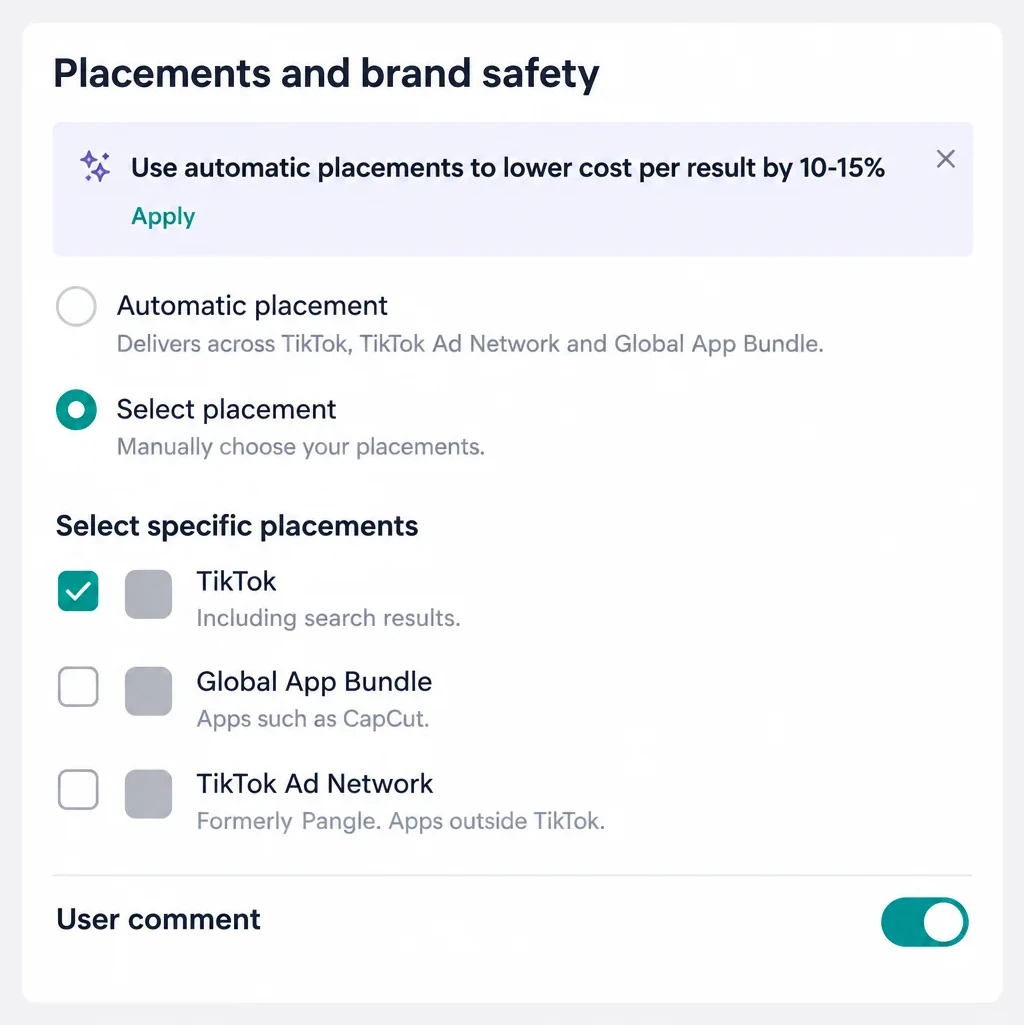
1. Off-TikTok placements: TikTok Ad Network and Global App Bundle. By default, placement is automatic. Your ads can then run on TikTok Ad Network (formerly Pangle). It's a network of nearly 400,000 apps from other publishers. They can also run on Global App Bundle, which covers apps such as CapCut. In the creation screen, a box promises a 10-15% lower cost per result with automatic placement.
A lower cost says nothing about quality. One advertiser describes what they got targeting Germany, the Netherlands, Switzerland, Austria and the UK. Their CPM fell to €0.20 to €0.40. In Shopify, they only saw zero-second sessions, with not a single add to cart. The answer that keeps coming up in the thread points to off-TikTok placements. You have to restrict delivery to TikTok only.
Here's the path. In the ad group, Placements section, choose Select placement. Keep TikTok checked, then uncheck Global App Bundle and TikTok Ad Network. Do it when you create the ad group, because TikTok states that placement can't be changed once the ad group is created. If the manual option doesn't show up on your account, advertisers report that TikTok support can unlock it.
2. Automate Creative. In the ad's creative section, an Automate Creative toggle hands your videos to TikTok's AI. It can enhance quality, swap the music or resize the video. It also adds sound effects in the first 15 seconds, and other enhancements are being tested with some advertisers. Leave this toggle off. According to TikTok's help center, this setting can't be changed once the campaign is published. You'd have to create a new one.
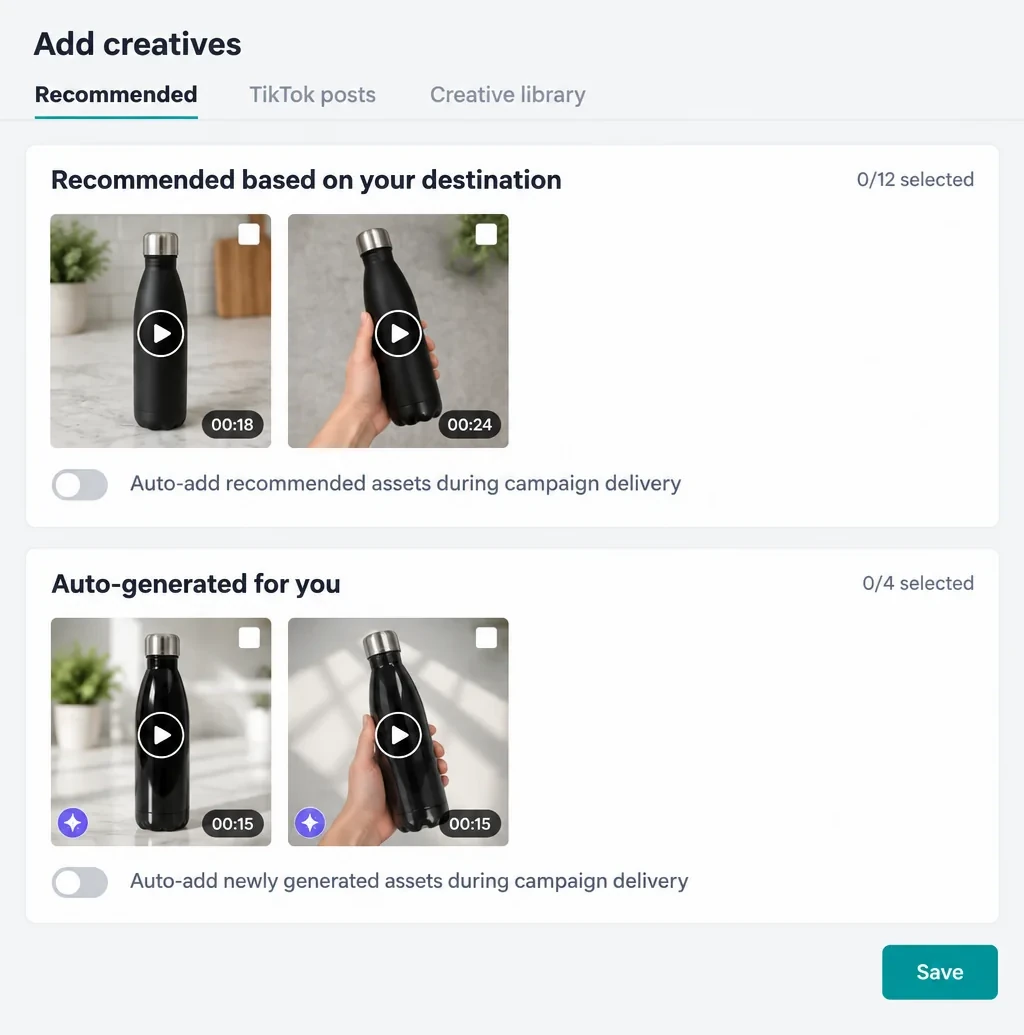
3. Recommended and AI-generated creatives. When you add your videos, the window may open on a Recommended tab. It offers assets pulled from your product page. An Auto-generated for you module adds AI-made videos built from your URL. Don't select anything. Also leave both auto-add toggles off, since they inject new creatives while the campaign runs. Take your videos from your TikTok posts or from your creative library.
TikTok also combines the videos and texts within one ad to build others. To keep an exact pair, its help center advises a single creative and a single text per ad. So run one ad per video.
On r/TikTokAds, advertisers running Smart+ describe 50 to 70 AI-generated variations built from their videos. One of them quoted an email from TikTok support in early 2026. Support acknowledged that there was then "no available setting at the account or ad group level" to fully opt out. That's one more reason to stay manual for this test.
4. Recommendations. On the right of the creation screen, a panel scores your ad group. It suggests applying its recommendations, such as automatic placement or a campaign budget. It also pushes a higher budget and six more creatives. In the budget section, another box promises a 5-10% lower cost per result with a campaign budget strategy. That's the campaign budget with its $50 minimum, where TikTok splits the money for you. Every recommendation pushes toward more spend or more automation. Read them, but don't apply any during the test.
Do all this before you publish. Placement, attribution settings and Automate Creative can't be changed afterward.
Step 5: videos that look like TikTok
This is where it all happens. On TikTok, a video that looks like an ad gets skipped in a second. Here's what works:
- Jump straight into the scene, with no intro or logo, and the product or the problem from the first frame.
- Shoot on a phone vertically, with a real person and real hands.
- Talk like on TikTok, in a natural and direct way, looking at the camera.
- Subtitles and readable on-screen text.
- Three or four angles: the problem, the demonstration, the before/after and the reaction.
Name each ad with its angle, format and version ("problem_video_v1"). That's the name you'll read in the results and in your UTMs.
Avoid copying a trend unrelated to your product. If it doesn't show what your product does, it entertains but doesn't sell. Hook and structure principles are detailed in ad creatives that work.
Spark Ads: promote an existing video
Spark Ads turn an already-published video into an ad, on your account or a creator's. The ad keeps the account name, likes and comments. The engagement gained during the promotion goes to the original video.
It's the best way to go from organic to paid. When one of your videos does well on its own, promote it. For a creator's video, there are two steps:
- The creator opens their video in the TikTok app and taps the three dots. They choose Ad settings then Generate, and send you the code.
- In Ads Manager, when adding the ad's creatives, open the TikTok posts tab. Click Add post and paste the code. You can add up to 20 at a time.
TikTok flags two traps. The caption can't be edited once the video is authorized. And a private video becomes public as soon as it's used in a campaign.
Step 6: launch, then don't touch anything for seven days
According to TikTok, volatility usually starts to decline after about 25 results or 7 days in the learning phase. At $20 to $30 a day, you probably won't reach 25 purchases in a week. That's normal for a first test, and it doesn't stop you from judging each video.
During those seven days, TikTok asks you to avoid pausing and unreasonable budgets. It also warns against edits that restart learning. After three days, only check that everything works. The ads should be delivering and getting clicks. Visits should reach Shopify and purchases should come through.
A check to run from day two. Compare TikTok's clicks with the visits from TikTok in Shopify's reports, thanks to your UTMs. A CPM of a few tens of cents is a bad sign. With zero-second visits and no adds to cart, it points to low-quality traffic. Then check that the ad group really runs on TikTok only.
Step 7: read your results
In the ads tab, add the missing columns. Then look at them in order, video by video:
- Retention: 2-second video views, 6-second video views and Average play time per video view. If few people get past the first seconds, it's the hook.
- Clicks: do viewers click? If not, the video entertains without making people want to buy.
- Adds to cart and purchases: do visitors buy? If not, look at the product page, the price or shipping.
- Cost per purchase, compared with your maximum cost. That's what decides.
| Video | After 7 days | Decision |
|---|---|---|
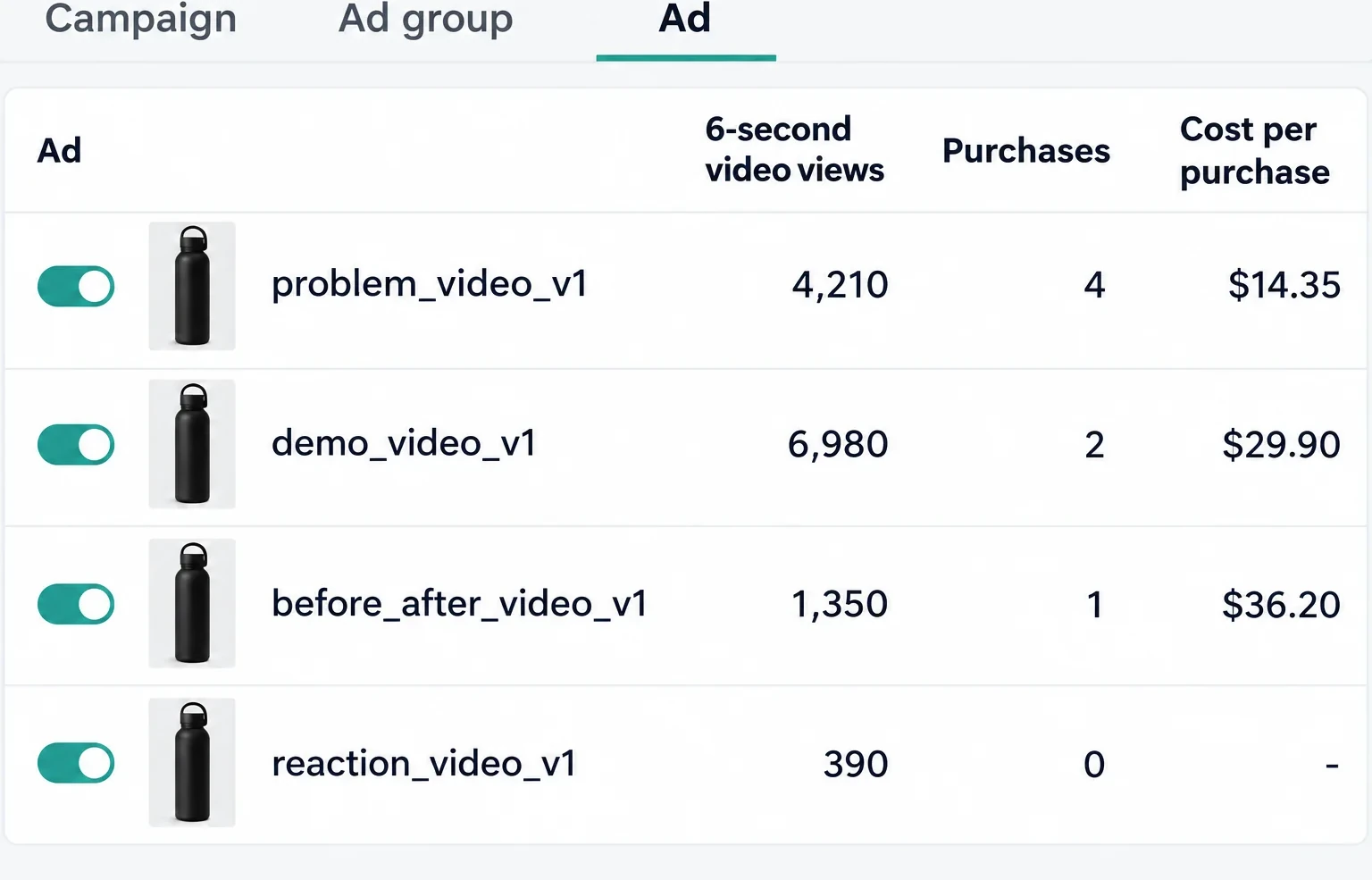
| problem_video_v1 | 4 purchases at $14.35, below $18 | Keep it, that's your winning angle. Prepare two variations, and if it's posted on your account, promote the post as a Spark Ad |
| demo_video_v1 | The most watched, 2 purchases at $29.90 | It holds attention but sells at a loss. Cut it, and keep its opening for a new version that ends on the price or the offer |
| before_after_video_v1 | 1 purchase at $36.20, twice your $18 | Cut it |
| reaction_video_v1 | 390 six-second views, $11.60 spent | TikTok nearly stopped delivering it: the hook doesn't hold. Cut it, or redo its first two seconds |
A heavily watched video isn't necessarily a video that sells. Judge on purchases, not views.
TikTok's purchases aren't your orders. TikTok counts a purchase after a click, but also after a simple view of the ad. Depending on your attribution settings, it also counts one after a view of at least 6 seconds. Always compare with the orders Shopify attributes to TikTok through your UTMs. The attribution window is set when you create the ad group, in the Optimization and bidding section. It can't be changed afterward. The full diagnosis is in read your campaign numbers.
Costly mistakes
- Leaving automatic placement on: part of the budget goes outside TikTok, on clicks you never find in Shopify.
- Launching Smart+ on a small budget: it builds variations and mixes your videos. On top of that, TikTok recommends 10 to 30 times your cost per purchase per day for it.
- Setting a campaign budget for no reason: the minimum goes from $20 to $50 a day.
- Recycling a Facebook ad without adapting it to TikTok's format and tone.
- Running only one video and concluding TikTok doesn't work.
- Judging on views rather than purchases.
- Applying recommendations during the test: every significant edit restarts learning.
- Sending traffic to a page that's slow on mobile: on TikTok, all traffic is mobile.
No store yet? You can generate it with Scale Ova from your product. You look at it and change it for free, and you only pay when you publish it on Shopify.
FAQ
What's the minimum budget for TikTok Ads?
How much does a TikTok Ads campaign cost?
Smart+ or manual campaign to start?
How do I turn off Pangle in TikTok Ads?
How do I stop TikTok from creating AI ads?
How long is the TikTok learning phase?
How do I get a Spark Ads code?
Why do my TikTok ads get clicks but no sales?
TikTok Ads or Facebook Ads to start?
Sources
- About budgets for ads in TikTok Ads Manager, TikTok Ads Manager help, accessed September 23, 2026
- Best practices for budget, TikTok Ads Manager help, accessed September 23, 2026
- About Budget and Bidding, TikTok Ads Manager help, accessed September 23, 2026
- About the Sales advertising objective on TikTok, TikTok Ads Manager help, accessed September 23, 2026
- How to set up an ad campaign in TikTok Ads Manager, TikTok Ads Manager help, accessed September 23, 2026
- How to create manual and automated campaigns in the upgraded Smart+ experience, TikTok Ads Manager help, accessed September 23, 2026
- Upgraded Experience Campaign Setup Guide, manual campaigns, TikTok for Business PDF guide, accessed September 23, 2026
- About Smart+ Web Campaigns and Best practices for Smart+ Web Campaigns, TikTok Ads Manager help, accessed September 23, 2026
- About eligible placements, TikTok Ads Manager help, accessed September 23, 2026
- About TikTok Ad Network (formerly TikTok Pangle), TikTok Ads Manager help, accessed September 23, 2026
- About Eligible Placement for your upgraded Smart+ experience, TikTok Ads Manager help, accessed September 23, 2026
- About Targeting for your upgraded Smart+ experience, TikTok Ads Manager help, accessed September 23, 2026
- About Automate Creative, TikTok Ads Manager help, accessed September 23, 2026
- About Recommended Creatives in TikTok Ads Manager, TikTok Ads Manager help, accessed September 23, 2026
- Learning Phase, TikTok Ads Manager help, accessed September 23, 2026
- About Spark Ads and How to create Spark Ads for Manual and Search Campaigns, TikTok Ads Manager help, accessed September 23, 2026
- Video play metrics, TikTok Ads Manager help, accessed September 23, 2026
- About Engaged View-Through Attribution and How to Create Attribution Windows for your Ad Group, TikTok Ads Manager help, accessed September 23, 2026
- About Data Sharing on TikTok App on Shopify and How to Adopt TikTok's Updated Standard Events, TikTok Ads Manager help, accessed September 23, 2026
- TikTok, Shopify App Store, accessed September 18, 2026
- r/TikTokAds threads accessed September 23, 2026: very low CPM and zero-second sessions, manual placement missing, AI-generated variations on Smart+, unified flow and 70 AI ads, support's answer on AI edits