You're searching "how to start an online store" because you have an idea, or just the itch, and no clue what order to do things in. Business setup, taxes, Shopify, suppliers, ads: everything shows up at once and everything feels urgent.
The market is there. In France alone, shoppers spent €196.4 billion online in 2025, up 7% from 2024, and ecommerce now accounts for 12% of retail product sales (Fevad, report published February 11, 2026). What makes a beginner fail is rarely the tech. It's the order: they build the store before knowing whether anyone wants the product, or before they're allowed to sell.
Here's the order, with the current rules and what it really costs. For the step-by-step inside Shopify, the complete guide to building your Shopify store takes over.
The 7 steps to start an online store
In order: what to sell and to whom, your model, your business setup, your legal obligations, your suppliers, your platform, your first customers. Each step depends on the one before.
- Decide what to sell and to whom
- Pick your sales model
- Register your business
- Make your store legally compliant
- Find your suppliers
- Choose your platform and build the store
- Find your first customers
1. Decide what to sell and to whom
Before opening anything, you need three answers:
- What to sell. A product you can describe in one sentence and show in one picture.
- To whom. "Clothes" targets nobody. "Hoodies for people who drink three coffees a day" tells you where to find customers and what to say to them.
- Why buy from you. Price, quality, style, or service: people need a reason to buy from you instead of Amazon.
Then check that people already look for this product: Google's suggestions when you type its name, reviews left on competitors' products, the groups where your audience talks about it. Then run the calculation almost everyone skips: your margin. Selling price, minus product cost, shipping, payment fees, and the ad spend it takes to sell one unit. If what's left doesn't pay for your time, change products before you build anything. The Shopify profit margin calculator runs that math line by line.
2. Pick your sales model
| Model | Cash up front | Inventory at home | Margin | Who it's for |
|---|---|---|---|---|
| Own inventory | Medium to high | Yes | The best | You have a product and the cash to buy it in bulk |
| No inventory (dropshipping) | Low | No | Lower, longer delivery | You want to test an idea without tying up cash |
| Print-on-demand | Very low | No | Low | You sell a design (t-shirts, mugs, posters) |
| Handmade | Raw materials | Small | Variable, your time counts | You make it yourself (jewelry, candles, soap) |
| Digital products | Almost nothing | No | Very good | You sell know-how (guides, templates, courses) |
If you're torn between dropshipping and your own inventory, selling online without inventory breaks down the three ways to do it and their traps.
There's also an option people forget: starting on a marketplace. Etsy, Amazon, or eBay bring you buyers from day one, in exchange for a commission and their rules. It's a good way to check that a product sells before you build a store. The catch: the customer belongs to the platform, so you can't reach them again. Most brands end up with their own store as the base and marketplaces on the side. To look beyond the store itself, how to start an online business compares four models by profile.
3. Register your business
Selling online on a regular basis is a commercial activity, and the rules depend on where you're based.
In the US, registration, licenses, and sales tax depend on your state, and sometimes your city. The SBA's guide to launching a business walks through the steps.
In France, every business is registered through the INPI's one-stop portal (formalites.entreprises.gouv.fr). The micro-entreprise status is the simplest way to start: you pay social contributions on what you collect, with light bookkeeping. For selling goods, it applies as long as revenue stays under €203,100 excluding VAT per year (2026 threshold), and you only leave it after two consecutive years above that. Under €85,000 in annual sales of goods, you don't charge VAT, and every invoice says "TVA non applicable, article 293 B du CGI". Above €93,500 during the year, VAT applies from the day you cross it. These thresholds did not change in 2026: the single €25,000 threshold planned by the 2025 budget law was dropped.
A company (an LLC in the US, a SASU or EURL in France) makes sense when you have partners, want to separate your personal assets from the business, or have high costs to deduct. At that point, an accountant usually pays for themselves.
4. Make your store legally compliant
This is the step technical tutorials skip, and the one that costs the most when you get it wrong. The rules below are French. The 14-day right of withdrawal and the 2-year legal guarantee apply across the European Union, so they matter as soon as you sell to EU customers.
- Legal notice: your name or company name, registration number, address, contact details, and the identity of your web host (Shopify, if your store runs on it).
- Terms of sale: prices including VAT, shipping costs and times, payment methods, warranties, right of withdrawal, dispute resolution. They are mandatory when selling to consumers in France, and missing terms can mean a €3,000 fine.
- A link to a consumer mediator. French sellers must join a consumer mediation service and display its contact details. Almost everyone forgets this one.
- The 14-day right of withdrawal. Your customer can change their mind without giving a reason for 14 days after delivery, and you refund them within 14 days of their decision. If you didn't tell them about this right, the period extends by 12 months. Exceptions: made-to-order or clearly personalized products, and goods that spoil quickly.
- The 2-year legal guarantee of conformity. A product that's faulty or doesn't match your description gets repaired, replaced, or refunded for 2 years. "2-year warranty" on a product page is this legal guarantee, not a perk.
- A privacy policy and a cookie banner. You tell visitors what you collect and ask for their consent before setting non-essential advertising or analytics cookies (CNIL rules in France).
Shopify provides templates for terms of service, refund and privacy policies. They're starting points: read them and fill them in with your real details, delivery times, and mediator.
Depending on your product, more rules apply: health claims for supplements and tea, ingredients and labeling for cosmetics, recycling fees for electronics and furniture. The industry guides cover them: cosmetics, tea.
5. Find your suppliers
Three routes, depending on your model:
- Local or regional wholesalers and manufacturers: short delivery times, easier quality control, higher prices.
- Manufacturers in Asia (Alibaba and similar): low prices, but minimum order quantities and quality checks to plan for.
- Dropshipping platforms: no inventory, but you depend on their delivery times and quality.
Always order a sample before listing a product. It's the only way to know what your customer will receive, and to get real photos. Finding a supplier for your online store compares the channels and lists the questions to ask before ordering.
6. Choose your platform and build the store
For a beginner who wants to sell fast without coding, Shopify is the simplest choice: hosting, payments, and security are included, and you get the widest choice of themes and apps.
- Shopify: 3-day free trial with no card, then $1 a month for 3 months, then $39 a month on the Basic plan, or $29 a month billed yearly (the details are in is Shopify free).
- WooCommerce: free on WordPress, but you pay for hosting, extensions, and often a developer. For people who already know WordPress.
- Wix: simple for a small catalog, with fewer dedicated selling tools.
- PrestaShop: built for large catalogs, and more technical.
The comparison of online store builders gives a verdict by profile.
Once the platform is chosen, a store that earns trust has at least:
- a homepage that says in one sentence what you sell and to whom;
- product pages with real photos, dimensions or ingredients, the price, and the delivery time (how to write a product page that converts);
- card payments plus at least one other method, such as PayPal or Apple Pay (setting up shipping and payments on Shopify);
- a contact page, a shipping and returns FAQ, and the legal pages from step 4;
- your own domain name: look at the renewal price, not just the first-year deal.
Before opening, place a real order on your phone. That's where you find the forgotten shipping fees and the pages that display badly.
7. Find your first customers
An online store gets zero visits by default. What works at the start:
- Your friends and networks, for the very first orders and the first reviews.
- Short-form content on TikTok or Instagram, if your product looks good on video.
- Meta ads with a small, capped budget, to test what makes people buy (your first Meta Ads campaign).
- SEO, which is slower: it won't pay for your first month, it counts a year from now.
Your first sales details how to land the first orders of a store that just opened.
Example: a store generated from a description
The store below is a demo generated by Scale Ova from a simple description: a ceremonial-grade matcha in a 30 g pouch, sold alone, in threes, or in sixes. It shows where you stand after steps 1, 2, and 6, and what's left to check in step 4.
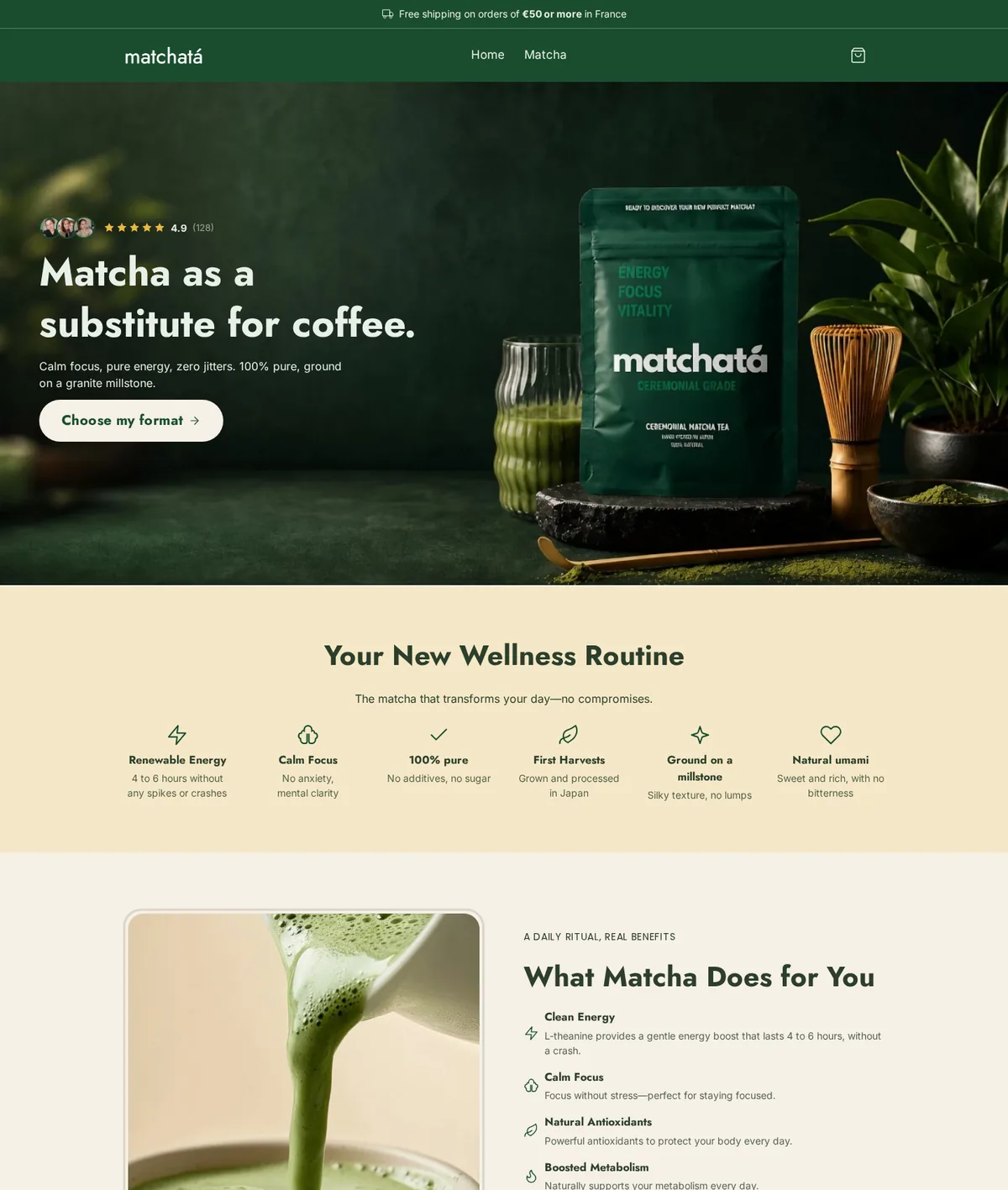
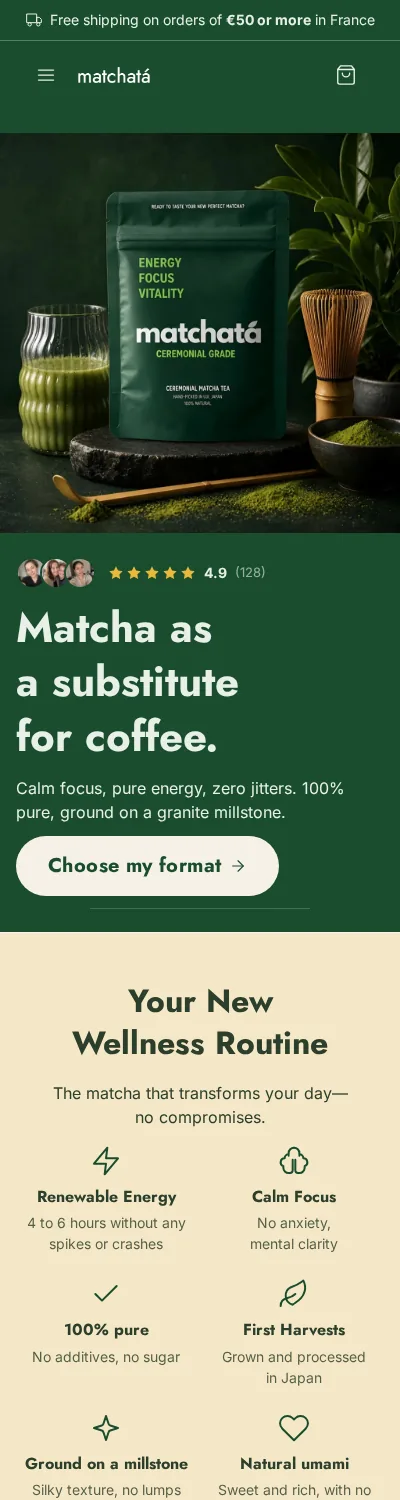
What it already has: a clear promise at the top of the page, three formats including a "buy 2, get 1 free", free shipping from €50, a displayed shipping time, and every page of a complete store. What's left before publishing, as with any store: put your real details in the legal notice and terms of sale, add your mediator, and reread every promise. On this demo, the product page claims "energy for 4 to 6 hours, antioxidants, metabolism". None of these claims is authorized for green tea in Europe. That's exactly the kind of sentence to remove before going live, whether the page was written by an AI, a supplier, or you. How to start a tea business breaks this store down marker by marker.
The time saved is real: according to the Scale Ova 2026 report, the median time between opening a project and the first generated store is 12 minutes, writing the description included. What AI doesn't do for you: choose the product, register your business, and decide what you promise your customers.
How much does an online store cost in 2026
A Shopify store costs $3 for the first three months, then $29 to $39 a month on Basic. Most of the budget goes to product and ads, not the site.
| Item | First 3 months | After that |
|---|---|---|
| Shopify Basic subscription | $3 ($1 a month) | $29 a month billed yearly, $39 monthly |
| Domain name | A few dollars to about $20 a year | The renewal price |
| Theme | $0 with a free theme | $0 |
| Payment fees | A percentage plus a fixed fee per order, shown on Shopify's pricing page | Same |
| Business registration | Depends on your state or country | Depends on your state or country |
| Samples and first inventory | Depends on your product and model | Depends on your sales |
| Test ad budget | The cap you set, for example $300 | Only if the margin holds |
With a no-inventory model, you can test an idea for a few hundred dollars, ads included. With your own inventory, your first supplier order sets the budget. Often forgotten: paid apps added one at a time, refunds on returns, and the time you put in.
The mistakes that sink a first online store
Building the store before validating the product. You spend weeks on the design, you publish, and nobody buys. Check demand and margin first, that's what step 1 is for.
Picking a niche that's too broad. The vaguer your audience, the more your ads cost and the more your message sounds like everyone else's.
Skipping the legal part. No terms of sale, no mediator, a returns policy that never mentions the 14 days: it holds until the first dispute.
Neglecting product pages. Your customer can't touch the product. A blurry photo and three lines of text is a lost sale.
Planning no budget to get noticed. Without visitors, nothing happens. Set a test budget from the start, even a small one, with a cap.
Going further
If you want to see what your store could look like before launching everything, describe your project to Scale Ova: a complete Shopify store is generated in minutes. You browse it and edit it for free, and a Scale Ova subscription is only required to publish it. Steps 3 and 4 are still on you, as with any store.
FAQ
How much does it cost to start an online store?
Do I need an LLC to start an online store?
Can I build an online store for free?
Can I start an online store without inventory?
Is starting an online store profitable?
What sells best online?
How long does it take to start an online store?
Do I need technical skills?
Sources
- Fevad, ecommerce in France in 2025 (February 11, 2026, in French)
- SBA, launch your business
- Service-public, VAT franchise threshold (in French)
- Service-public, mandatory information on a business website (in French)
- Service-public, right of withdrawal for distance purchases (in French)
- Service-public, legal guarantee of conformity (in French)
- Shopify, pricing